Quantum Flare WatchFace SAM-34
SMA Design Watch Faces- EveryoneAge rating
- PersonalizationCategory
- Oct 18, 2024Updated
- $0.49Price
Links to the official Google Play listing of com.smadesign.quantum_flare. Last checked on Nov 21, 2026.
About this app
A dynamic, cosmic-themed Wear OS watch face with vibrant animation & key metrics
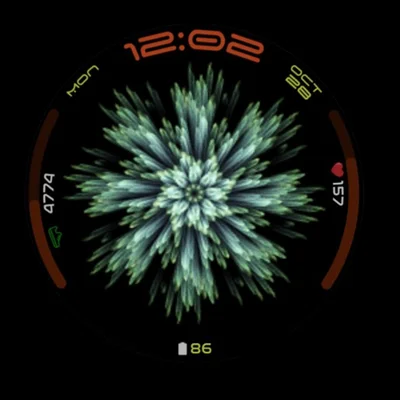
This animated watch face features a stunning, cosmic-themed design with a vibrant, dynamic center that resembles a blooming celestial flower or starburst. The animation is both mesmerizing and visually striking, creating a sense of movement and energy on your wrist.
In addition to its captivating aesthetic, the watch face is highly functional. It prominently displays the time at the top in a sleek, modern font, while key metrics such as heart rate and step count are conveniently placed on the sides. The battery percentage is shown at the bottom, and the day of the week and date are clearly displayed in a minimalist, futuristic style.
Perfect for those who want a balance of beauty and utility, this watch face adds a touch of cosmic flair to your everyday health tracking.
Why Choose Us:
Innovative Design: Our team of designers and engineers are committed to providing you with the latest in smartwatch technology and aesthetics.
Reliable Performance: Enjoy a watch face that not only looks great but performs flawlessly, keeping you updated with the most accurate information.
Upgrade your smartwatch experience today with our watch face app. Stay connected, stay informed, and stay stylish.
Download Now and take the first step towards a smarter, more elegant watch face experience.
★ FAQ
Q: Do your watch faces support Samsung Active 4 and Samsung Active 4 Classic?
A: Yes, our watch faces support WearOS smartwatches.
Q: How to install the watch face?
A: Follow these steps:
1. Open the Google Play Store app on your watch
2. Search for the watch face
3. Press the install button
Q: I bought the app on my phone, do I have to buy it again for my watch?
A: You should not have to buy it again. Sometimes the Play Store takes a bit longer to figure out that you already bought the app. Any additional order will automatically be refunded by Google, you will receive the money back.
Q: Why I can not see steps or activity data in a built-in complication?
A: Some of our watch faces come with Built-in steps and Google Fit steps. If you select built-in steps, ensure that you grant activity recognition permission. If you select Google Fit steps complication, please use the watch face companion app where you can grant permission on Google Fit to log your data.
Note also that Google Fit sometimes won’t show your real-time data due to its caching sync issues. We are also working to implement Samsung Health for Samsung phone devices
Data safety
What SMA Design Watch Faces declares on Google Play about the data this app collects and shares.
- No data shared with third partiesLearn more about how developers declare sharing
- No data collectedLearn more about how developers declare collection
Developer contact
- Emailsmawatchface@gmail.com
- Privacy policyprivacypolicies.com
- Address1/97, Ganesh Nagar, Yerawada Opp. Dr Suhas Patil Nr. Vijay Auto Service Center Pune, Maharashtra 411006 India
Information
- Offered by
- SMA Design Watch Faces
- Category
- Personalization
- Updated
- Oct 18, 2024
- Released
- Oct 18, 2024
- Requires
- Android 11 or later
- Age rating
- Everyone
- Price
- $0.49
- Package name
- com.smadesign.quantum_flare