Redline: Car Dashboard Face
Muneef M- EveryoneAge rating
- PersonalizationCategory
- Nov 2, 2026Updated
- $1.99Price
Links to the official Google Play listing of com.watchface.redline. Last checked on Nov 25, 2026.
About this app
Photo-real car speedometer watch face: battery fuel gauge, odometer steps, gears
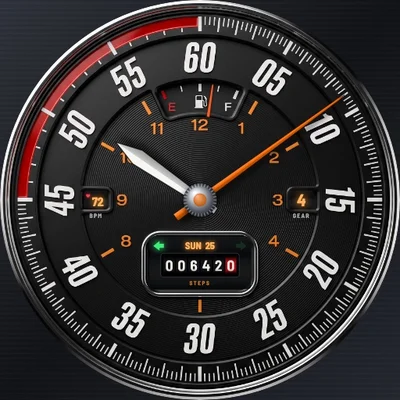
Redline turns your Wear OS watch into a classic sports-car instrument cluster. A photo-real speedometer dial with a polished chrome bezel, machined grooves and a red redline tells the time: the minute needle runs the speedo scale and the hour hand points to the inner hour ring.
⛽ FUEL GAUGE = BATTERY
The fuel needle shows your watch battery. Under 15% the pump lamp lights up amber.
🛞 ODOMETER = STEPS
Your steps roll on a six-wheel odometer.
⚙️ GEAR = STEP GOAL
The gear indicator shifts from 1 to 6 as you walk towards your daily step goal and turns green when you reach it.
❤️ HEART RATE
Your live heart rate in its own recessed window.
↔️ TURN SIGNALS
The turn-signal arrows blink on alternate seconds. Prefer a seconds hand? Switch to the sweep needle.
🌙 DASH LIGHTS
The Gunmetal dial lights up like a dashboard at night: on automatically from 7 pm to 7 am, or set Day or Night.
🎨 SIX FINISHES
Gunmetal, Racing yellow, Carbon, Ivory, Heritage green and Midnight ice.
👆 START-UP SWEEP
Tap the face and the minute needle swings round the dial and back, like a car's gauge check.
✨ ALWAYS-ON
A calm always-on mode with dim speedo numerals, the redline and needle outlines.
⌚ ROUND AND SQUARE
Made for both screen shapes.
✅ COMPATIBILITY
Made with the Watch Face Format for Wear OS 5 and later: Samsung Galaxy Watch, Google Pixel Watch, OnePlus Watch and other Wear OS watches. Not for Tizen or Apple Watch.
📱 HOW TO INSTALL
On your phone, choose your watch in the Install menu. Then long-press your watch screen, swipe to the end, tap "+" and pick Redline.
The car and gauge designs are original and not affiliated with any car maker.
Data safety
What Muneef M declares on Google Play about the data this app collects and shares.
- No data shared with third partiesLearn more about how developers declare sharing
- No data collectedLearn more about how developers declare collection
What’s new
Version 1.1.0 · Nov 2, 2026
Version 1.1.0: the dial now fills the whole screen. The drawn chrome bezel is off by default, which suits watches with a physical bezel; turn it back on in the watch face settings. New Numbers setting: show minutes (05–60) or hours (1–12) on the big outer numbers.
Developer contact
- Emailmail@muneef.me
- Privacy policymuneefm.github.io
- AddressMorayur Mannissery House Malappuram, Kerala 673642 India
Information
- Offered by
- Muneef M
- Category
- Personalization
- Version
- 1.1.0
- Updated
- Nov 2, 2026
- Released
- Oct 25, 2026
- Age rating
- Everyone
- Price
- $1.99
- Package name
- com.watchface.redline