Retro C Compiler Watch Face
Gadget Liv- EveryoneAge rating
- PersonalizationCategory
- Oct 23, 2026Updated
- FreePrice
Links to the official Google Play listing of com.gadgetliv.retroccompiler. Last checked on Nov 26, 2026.
About this app
Classic C IDE style digital watch face for Wear OS
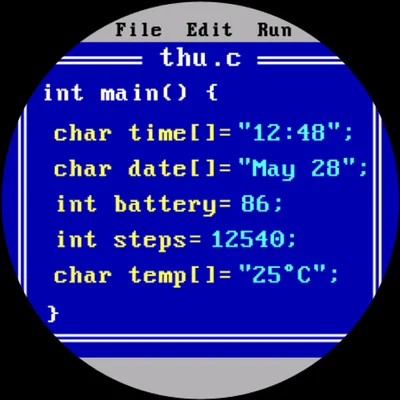
Retro C Compiler Watch Face brings the classic C++ IDE look to Wear OS. Time, date, steps, battery, and temperature are displayed like C variables, recreating the feel of old-school programming directly on your wrist.
Perfect for developers and retro tech enthusiasts who appreciate clean, terminal-inspired design.
✨Features
- Classic C language IDE aesthetic
- Customizable font and background colors
- Displays time, date, steps, temperature, and battery in code style
- Supports both 12-hour and 24-hour time formats
- Minimal always-on display mode for low power use
- Clean, sharp design inspired by vintage compilers and terminals
- Tap to Action: Open calendar, and battery
☀️ IMPORTANT: If the weather doesn't update:
1. Try switching between different watch faces.
2. Open the default “Weather” app on your watch and make sure location permission is enabled.
3. Set location access to “Always Allow” for both the watch face and the weather provider.
4. Ensure Location (GPS) is turned ON on both your watch and the paired smartphone.
5. Disable Power Saving mode so background data can sync properly.
⚠️ Compatibility
This is a Wear OS watch face app for smartwatches running Wear OS 5 or higher, built with the new Watch Face Format required on modern devices.
Compatible devices include:
➡️ Samsung Galaxy Watch 8, 7, 6, 5, and 4 (including Classic and Ultra models)
➡️ Google Pixel Watch 4, 3, 2, and 1
➡️ Other watches running Wear OS 5+
Contact Us
If you have questions or feedback, feel free to contact me at gadgetliv@gmail.com
Data safety
What Gadget Liv declares on Google Play about the data this app collects and shares.
- No data shared with third partiesLearn more about how developers declare sharing
- No data collectedLearn more about how developers declare collection
- Data is encrypted in transit
- You can request that data be deleted
What’s new
Oct 23, 2026
- Added more color options
- Added new background styles
Developer contact
- Websitegadgetliv.com
- Emailgadgetliv@gmail.com
- Privacy policygadgetliv.com
- AddressFlat No - 301, Shree Vighnhartha SOC, Sector 8A, Airoli Navi Mumbai, Maharashtra 400708 India
Information
- Offered by
- Gadget Liv
- Category
- Personalization
- Updated
- Oct 23, 2026
- Released
- Feb 14, 2026
- Age rating
- Everyone
- Price
- Free
- Package name
- com.gadgetliv.retroccompiler