Retro-CTR Terminal Watch Face
AstraTimeContains ads
- EveryoneAge rating
- PersonalizationCategory
- Oct 23, 2026Updated
- FreePrice
Links to the official Google Play listing of aaa.a.terminal_retro_digital_watchface. Last checked on Nov 13, 2026.
About this app
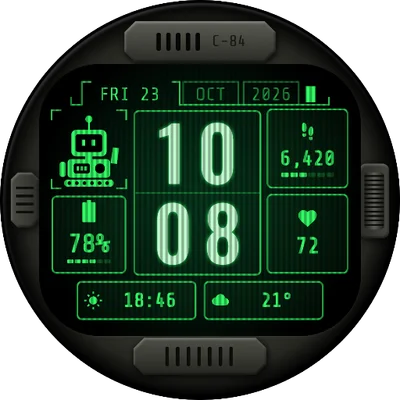
Retro CRT digital watch face for Wear OS: glowing green on black, sci-fi style
Retro-CTR turns your wrist into a glowing green CRT terminal, with big phosphor digits, a rugged C-84 bezel and an animated little robot for company. Adjust the scanlines, pick from five robot animations and five colour themes, and fill the five custom complications with the data you choose. Always-on modes keep the retro glow alive.
Powered by Watch Face Format
⚙️ Phone App Features
The phone app is simply a tool to facilitate installation and locating the watch face on your Wear OS watch. Only the mobile app contains ads.
⚙️ Watch Face Features
• 5 custom complications
• 5 colour themes
• Analog hands
• Mode: 2 options
• Robot animation: 5 options
• Scanlines: 3 options
• 3 always-on modes
• 12 always-on colours
• 5 ready-made presets
• 12/24h synced with your device settings
• Animated · Pick the animation in Customize (Robot animation)
• 3 tap shortcuts: Calendar
🎨 Customization
1 - Touch and hold display
2 - Tap on Customize option
🎨 Complications
Touch and hold display to open customization mode. You can customize the field with any data you want.
🔋 Battery
For better battery performance of the watch, we recommend disabling the "Always On Display" mode.
✅ Compatible devices include Google Pixel, Galaxy Watch 4, 5, 6, 7, 8, 9 and other Wear OS models
Installation and troubleshooting
Follow this link: https://www.recreative-watch.com/help/#installation-methodes
Watch faces don't automatically apply on your watch screen after the installation. That's why you must set it on your watch's screen.
💌 Write to support@recreative-watch.com for assistance.
Data safety
What AstraTime declares on Google Play about the data this app collects and shares.
- No data shared with third partiesLearn more about how developers declare sharing
- This app may collect these data typesLocation, Personal info and 3 others
- Data is encrypted in transit
- You can request that data be deleted
Developer contact
- Websiterecreative-watch.com
- Emailsupport@recreative-watch.com
- Privacy policyrecreative-watch.com
- AddressMihail Eminescu 2, nr 18 545100 Iernut Romania
Information
- Offered by
- AstraTime
- Category
- Personalization
- Updated
- Oct 23, 2026
- Released
- Oct 23, 2026
- Age rating
- Everyone
- Price
- Free
- Package name
- aaa.a.terminal_retro_digital_watchface