RoX3
Mohamed Nabil Elewa- EveryoneAge rating
- PersonalizationCategory
- Aug 5, 2026Updated
- $0.99Price
Links to the official Google Play listing of com.watchfacestudio.RoX3. Last checked on Nov 25, 2026.
About this app
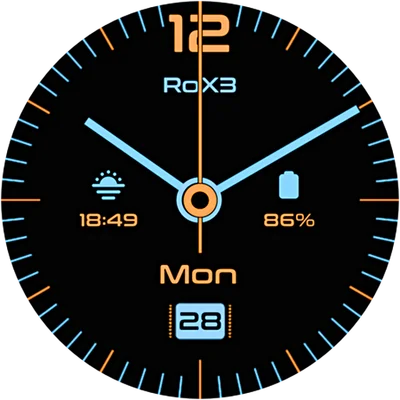
Minimal colorful sporty watch face.
The "RoX3" is a Minimal colorful sporty watch face for Wear OS devices.
This watch face was designed using Watch Face Studio tool.
Note: watch faces for the a round watches are not suitable for rectangular or square watches.
INSTALLATION:
1. Keep your watch connected to your phone.
2. Install in the watch. After installation, check your watch face list in your watch by pressing and hold display then swipe to the right end and click Add watch face. There you can see the newly installed watch face and just activate it.
3. After installation, you can also check the following:
I. For Samsung watches, check your Galaxy Wearable app in your phone (install it if not yet installed). Under Watch faces > Downloaded, there you can see the newly installed watch face and then just apply it to connected watch.
II. For other smartwatch brands, for other Wear OS devices, please check the watch app installed in your phone that comes with your smartwatch brand and find the newly installed watch face in the watch face gallery or list.
CUSTOMIZATION:
1. Press and hold display then hit "Customize".
2. Swipe left and right to choose what to customize.
3. Swipe up and down to choose options available.
4. Hit "OK".
FEATURES:
- Minimal colorful sporty watch face.
- Customizable.
- Jumping Function for selected icons.
- 2X customizable complications.
- Date infos.
- Name of the watch can be turned off.
- Always on display.
For support and request, Do not hesitate emailing me at mhmdnabil2050@gmail.com
Data safety
What Mohamed Nabil Elewa declares on Google Play about the data this app collects and shares.
- No data shared with third partiesLearn more about how developers declare sharing
- No data collectedLearn more about how developers declare collection
What’s new
Aug 5, 2026
- Fixing some minor Complications issues.
Developer contact
- Emailmhmdnabil2050@gmail.com
- Privacy policytermsfeed.com
- Address6 Fathalla Refaat Street, Nasr City 3 Cairo القاهرة 11371 Egypt
Information
- Offered by
- Mohamed Nabil Elewa
- Category
- Personalization
- Updated
- Aug 5, 2026
- Released
- Aug 9, 2025
- Age rating
- Everyone
- Price
- $0.99
- Package name
- com.watchfacestudio.RoX3