Sage LCD Watch Face
PANDA-FACE- EveryoneAge rating
- PersonalizationCategory
- Nov 6, 2026Updated
- $0.99Price
Links to the official Google Play listing of com.watchfacestudio.sagelcddigital. Last checked on Nov 19, 2026.
About this app
Retro LCD digits, daily steps, goal progress and a separate always-on display.
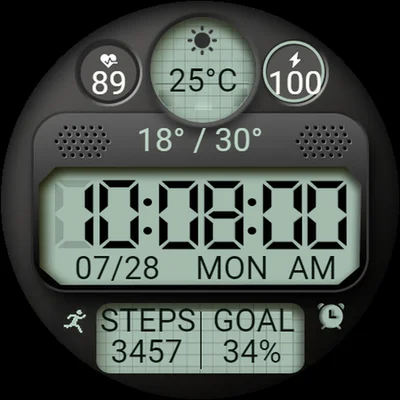
Sage LCD Digital brings the soft green screen and seven-segment digits of a retro LCD clock to your wrist. Hours, minutes and seconds fill the main window. The line below shows the date, English weekday and time format.
The upper dials show weather conditions and temperature in Celsius, the latest heart-rate reading and watch battery level. The line beneath them shows the day's low and high temperatures. In the lower window, STEPS shows your daily count and GOAL shows your progress toward the step target supplied by your device.
Always-on mode has a separate dark layout with hours, minutes, date and weekday. Enable Always On Display in your watch settings.
Tap the hours or minutes to open the alarm, the date for the calendar, and a health or battery reading for its device service. The small alarm icon is also a shortcut. On compatible Galaxy Watch devices, the seconds open Samsung Stopwatch and the current weather or daily forecast opens Samsung Weather. Wake the display before tapping.
Install this watch-only face on a compatible round Wear OS 5 or later watch and select Sage LCD Digital in the watch face selector. Steps, goal progress, heart rate and weather depend on available device services, permissions and synchronization. Missing weather uses placeholders. Heart rate reflects the latest available reading.
Support: 289858596@qq.com
Data safety
What PANDA-FACE declares on Google Play about the data this app collects and shares.
- No data shared with third partiesLearn more about how developers declare sharing
- No data collectedLearn more about how developers declare collection
What’s new
Version 1.0.0 · Nov 6, 2026
Initial release with six retro LCD time digits, daily weather, steps and goal progress, heart rate, battery level and an always-on display.
Developer contact
- Email289858596@qq.com
- Privacy policysites.google.com
- Address高新区天府大道中段177号世纪城天鹅湖15栋1701 成都市, 四川省 China 610041
Information
- Offered by
- PANDA-FACE
- Category
- Personalization
- Version
- 1.0.0
- Updated
- Nov 6, 2026
- Released
- Nov 6, 2026
- Age rating
- Everyone
- Price
- $0.99
- Package name
- com.watchfacestudio.sagelcddigital