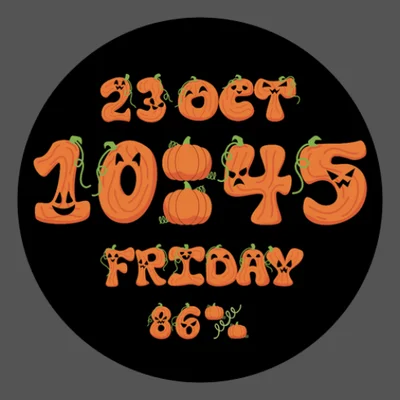
Scary Pumpkin Watch Face
Women Watch Faces- EveryoneAge rating
- PersonalizationCategory
- Sep 22, 2026Updated
- FreePrice
Links to the official Google Play listing of com.watchfacestudio.pumpkin.wf. Last checked on Nov 24, 2026.
About this app
Spooky Halloween design: Date, Time, Week Day, Battery, Light & Dark Theme, AOD
A fun and spooky Halloween-themed watch face with 7 color themes — black, a haunting night sky with bats and moon, deep purple, dark green, burgundy and deep blue. Perfect for those who love bold and festive designs on their Wear OS smartwatch.
This watch face requires Wear OS API 33+ (Wear OS 4 or newer). Compatible with Samsung Galaxy Watch 4/5/6/7/Ultra Series and newer, Pixel Watch series, and other watches with Wear OS 4 or newer.
Make sure you are purchasing using the same Google account registered on your watch. The installation should begin automatically on the watch after a few moments.
After installation is completed on your watch, do these steps to apply the watch face:
1. Tap and hold the current watch face on your watch
2. Scroll to find Scary Pumpkin Watch Face
3. Tap on it to apply
Features:
- Time, date, and day of the week
- Battery percentage
- Black theme and Halloween night sky theme
- Always-on display (AOD) mode showing time on a clean black background
To switch between themes, tap and hold the watch face, go to the Customize menu, and scroll to select the theam.
Special designed Always On Display ambient mode. Turn on Always On Display in your watch settings to show a low power display on idle. Please be aware, this feature will use more battery.
Data safety
What Women Watch Faces declares on Google Play about the data this app collects and shares.
- No data shared with third partiesLearn more about how developers declare sharing
- No data collectedLearn more about how developers declare collection
What’s new
Sep 22, 2026
Scary Pumpkin - 3 (3.0)
Developer contact
- Emailnastyapav3690@gmail.com
- Privacy policysites.google.com
- Addressstr. Padurii 6 Bl A6, Ap 1001 077175 Stefanestii de Jos Romania
Information
- Offered by
- Women Watch Faces
- Category
- Personalization
- Updated
- Sep 22, 2026
- Released
- Sep 22, 2026
- Age rating
- Everyone
- Price
- Free
- Package name
- com.watchfacestudio.pumpkin.wf