SD143.1
Speedydesign- EveryoneAge rating
- PersonalizationCategory
- Aug 11, 2026Updated
- $0.99Price
Links to the official Google Play listing of com.watchfacestudio.sd143_1. Last checked on Nov 14, 2026.
About this app
Type chronograph WearOS
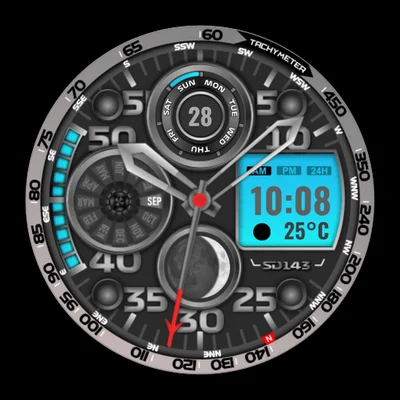
Intuitive analog chronograph-style sporty dial with moon phases, weather, temperature, days of the week, and months. Includes 4 shortcuts. Ability to change the display colors, battery life, and days of the week.
INSTALLATION NOTES:
Please check this link for installation and troubleshooting guide: https://speedydesign.it/installazione
This watch face supports all Wear OS devices.
Description:
• Analog & Digital time (12/24 hours based on phone settings)
• Day of the week
• Month of the year
• Battery level
• Moon phase
• Weather
• Temperature
• Shortcut
• AOD
Customizable:
x 6 Display colors
x 6 Battery colors
x 6 Day of the week colors
x 6 Second head colors
Dial customization:
1 - Touch and hold the display
2 - Tap on the Customize option
Dial Complications:
you can customize the dial with all the data you want.
For example, you can select weather, heart rate, barometer etc.
Notes on heart rate:
The watch face does not automatically measure and does not automatically display the heart rate result when installed.
To see current heart rate data on the dials, you will need to take a manual measurement.
To do this, tap the heart rate display area.
Wait a few seconds. The dial will take a measurement and display the current result.
Make sure you enabled the use of sensors when you installed the watch face, otherwise swap it with another watch face and then go back to this one to enable the sensors.
After the first manual measurement, the dial can automatically measure your heart rate every 10 minutes. Manual measurement will also be possible.
(Some features may not be available on some watches).
STAY TUNED:
newsletter@speedydesign.it
SPEEDYDESIGN:
https://www.speedydesign.it
FACEBOOK:
https://www.facebook.com/Speedy-Design-117708058358665
INSTAGRAM:
https://www.instagram.com/speedydesign.ita/
Thank you !
Data safety
What Speedydesign declares on Google Play about the data this app collects and shares.
- No data shared with third partiesLearn more about how developers declare sharing
- No data collectedLearn more about how developers declare collection
What’s new
Version 1.1.1 · Aug 11, 2026
- Initial release
Developer contact
- Websitespeedydesign.it
- Emailspeedydesign.ita@gmail.com
- Privacy policyspeedydesign.it
- AddressVia dell'Alpino, 33 33047 Remanzacco Italy
Information
- Offered by
- Speedydesign
- Category
- Personalization
- Version
- 1.1.1
- Updated
- Aug 11, 2026
- Released
- Sep 26, 2025
- Age rating
- Everyone
- Price
- $0.99
- Package name
- com.watchfacestudio.sd143_1