SMZ DE003
SMZ™- EveryoneAge rating
- PersonalizationCategory
- Nov 1, 2025Updated
- FreePrice
Links to the official Google Play listing of com.watchfacestudio.smzde003. Last checked on Nov 13, 2026.
About this app
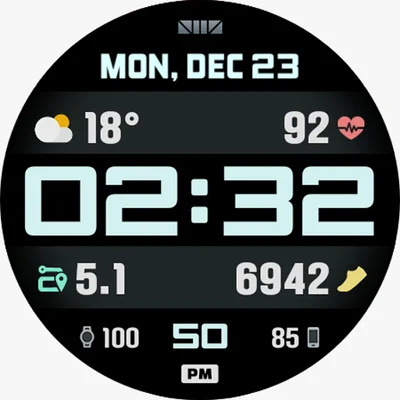
SMZ Digital Watchface for Wear OS
Please Watch the video to decorate your watch like the photos.
Please Watch the VIDEO for usage.
[How to use 24-hour format]
If you want to change the time format, you can set it in the path below on the phone connected to the watch.
*The connected phone - Settings - General management - Date and time - Use 24-hour format.
If checked, the watch will also be in 24-hour format, and if unchecked, the watch will be in 12-hour format.
[CUSTOMIZE]
For customization of watchface, touch and hold the screen and touch on [Coustomize] button.
[The DARKNESS of the AOD screen]
In the Customize section, 'AOD Dim' adjusts the darkness of all the AOD screen.
[Phone Battery Level]
Phone Battery Complications app from amoledwatchfaces™
Dev's link - https://play.google.com/store/apps/dev?id=5591589606735981545
To use this function, the 'Phone Battery Complication' app must be installed on your phone and watch.
Download path :
https://play.google.com/store/apps/details?id=com.weartools.phonebattcomp
*How to set. - https://cafe.naver.com/smzwatch/22
[SMZ Instagram]
http://www.instagram.com/smz.watch.tech
[SMZ Facebook]
https://www.facebook.com/smz.watchface
[SMZ Homepage]
https://www.smzwatch.com
[E-mail is always welcome]
smz.watch.tech@gmail.com
Data safety
What SMZ™ declares on Google Play about the data this app collects and shares.
- No data shared with third partiesLearn more about how developers declare sharing
- No data collectedLearn more about how developers declare collection
Developer contact
- Websiteinstagram.com
- Emailsmz.watch.tech@gmail.com
- Privacy policyblog.naver.com
- Address거제대로 275 거제미소지움더퍼스트, 102동 1101호 연제구, 부산광역시 47512 South Korea
Information
- Offered by
- SMZ™
- Category
- Personalization
- Updated
- Nov 1, 2025
- Released
- Oct 29, 2021
- Age rating
- Everyone
- Price
- Free
- Package name
- com.watchfacestudio.smzde003