Split: Bold Digital Face
Bonsware- EveryoneAge rating
- PersonalizationCategory
- Nov 10, 2026Updated
- $1.69Price
Links to the official Google Play listing of be.bonsware.split. Last checked on Nov 19, 2026.
About this app
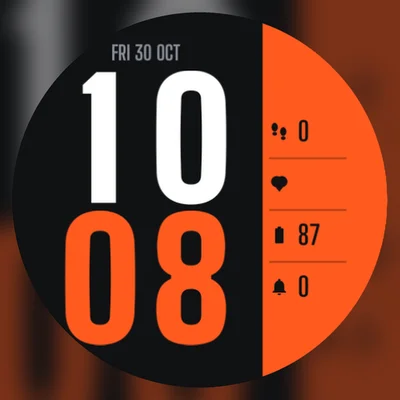
Giant stacked digits, steps, heart rate and 2 complications. 5 colors.
Big, bold and easy to read. Split shows the time in giant stacked digits, hours on top and minutes below, next to a bright color panel showing your steps, your heart rate and two complications of your choice.
DESIGN
• Giant condensed digits: white hours, minutes in the panel color
• A bold color panel on the right side of the dial
• Day and date on top, in your watch’s language
• 5 colors: orange, yellow, lime, cyan and pink
STEPS, HEART RATE + 2 COMPLICATIONS
• Steps and heart rate always shown, with their own icons (tap the heart to open your heart rate app)
• Two slots you can set to any compatible data: battery, notifications, weather, next event, sunrise, app shortcuts…
• By default: battery and unread notifications
FEATURES
• Follows your watch’s 12 h / 24 h setting
• Sober, battery-friendly always-on mode: thin digits on pure black
• No data collected, no ads
How to customize: long-press the watch face, tap Customize, then pick a color or tap one of the two complication slots.
Works on Wear OS 5 and later watches.
Data safety
What Bonsware declares on Google Play about the data this app collects and shares.
- No data shared with third partiesLearn more about how developers declare sharing
- No data collectedLearn more about how developers declare collection
Developer contact
- Emailinfo@bonsware.be
- Privacy policybonsware.be
- AddressAdresse non disponible dans le Banque Carrefour 0000 Inconnu Belgium
Information
- Offered by
- Bonsware
- Category
- Personalization
- Version
- 1.0
- Updated
- Nov 10, 2026
- Released
- Nov 10, 2026
- Age rating
- Everyone
- Price
- $1.69
- Package name
- be.bonsware.split