Stack Digital Watch Face
BasilBase- EveryoneAge rating
- PersonalizationCategory
- Oct 14, 2026Updated
- $1.49Price
Links to the official Google Play listing of com.basilbase.stack. Last checked on Nov 13, 2026.
About this app
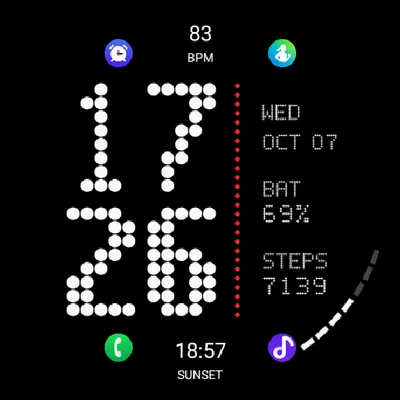
Big dot-matrix digits, date, battery and steps, two complications, 4 shortcuts
Hours stacked above minutes in big round dots fill the left half of a black dial. A dotted line in your theme color divides them from a column of small dot-matrix text: weekday and date, battery, and steps. A seven-part arc at the lower right fills with your battery.
FIVE COLOR THEMES
White / Red is the default. Ice / Cyan, Mint / Green, Cream / Amber and Lavender / Violet recolor the digits and the dotted divider. Nothing moves between themes.
TWO COMPLICATIONS AND FOUR APP SHORTCUTS
One complication sits above the clock and one below it. Each shows short text, a number with its label, or an icon from any app on your watch that offers one - heart rate or sunset, for example. A value that usually comes with a progress ring is shown as text here; there is no ring.
Four app shortcut slots sit in the corners around them. Pick an app in Customize and its own icon appears; tap it to open the app. The shortcut slots take icons only.
All six are empty when you install the face and draw nothing at all, so the dial stays clean until you fill them, and any of them can be set back to empty.
ON THE DIAL
- Hours and minutes in big dots, 24-hour or 12-hour. Choose the format in Customize, separately from your phone; in 12-hour mode a small AM or PM sits below the clock
- Weekday, month and day, always in English capitals (WED OCT 07), to keep the dot-matrix look
- Battery percentage, with the seven-part arc
- Today's steps
WHEN THE SCREEN DIMS
The always-on view keeps the time as outlined grey dots on pure black, with the date and AM/PM. Battery, steps and the arc go dark. Complication text stays in soft grey; icons are hidden.
BEFORE YOU BUY
Needs Wear OS 5 or later. The Customize names are in English: Color theme, Time format, Top complication, Bottom complication and the four app shortcuts. There is no companion phone app, no account, no ads and no subscription.
GETTING IT ON YOUR WRIST
Buy it on your phone, then open the Play Store on your watch, where it is waiting in your library. Press and hold your current face, swipe to Stack and tap it. Press and hold again and tap Customize to choose the theme, the time format, the complications and the shortcuts.
If you have a question, or something is not working right, please write to us at contact@basilbase.com.
Data safety
What BasilBase declares on Google Play about the data this app collects and shares.
- No data shared with third partiesLearn more about how developers declare sharing
- No data collectedLearn more about how developers declare collection
What’s new
Version 1.0 · Oct 14, 2026
First release.
Big dot-matrix digits with the date, battery and steps. Five color themes, 24-hour or 12-hour time with AM/PM, two complications, four app shortcuts and a quiet always-on view.
Developer contact
- Websitebasilbase.com
- Emailcontact@basilbase.com
- Privacy policybasilbase.com
- AddressUMUTKENT MAH. ADA 4 SK. NO: 17 IC KAPI NO: 9 MERKEZ 14300 Bolu Türkiye
Information
- Offered by
- BasilBase
- Category
- Personalization
- Version
- 1.0
- Updated
- Oct 14, 2026
- Released
- Oct 14, 2026
- Age rating
- Everyone
- Price
- $1.49
- Package name
- com.basilbase.stack