Stellar Transit Watch Face
Time Design LLC- EveryoneAge rating
- PersonalizationCategory
- Nov 11, 2026Updated
- $1.99Price
Links to the official Google Play listing of com.alexeymorozua.stellartransit. Last checked on Nov 19, 2026.
About this app
Stellar Transit: space digital for Galaxy Watch, Pixel Watch & Wear OS
📱 COMPATIBLE: Samsung Galaxy Watch 8, Ultra, 7, 6, 5 | Google Pixel Watch 4, 3, 2 | All Wear OS 6+ smartwatches
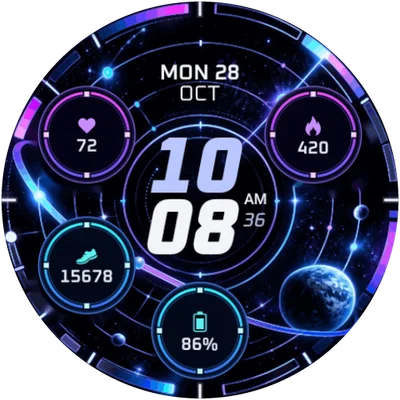
⌚ Stellar Transit is a space-themed digital watch face: a deep starfield crossed by glowing orbit lines, a segmented neon rim and a planet drifting in the lower right corner. In the centre, large bold slanted digits show the hours above the minutes inside a double ring and follow your watch's 12/24-hour setting, with an AM/PM label in 12-hour mode and live seconds beside the minutes. At the top you see the date – the weekday and day on the first line and the month below it (e.g. MON 28 / OCT). Four round neon widgets orbit the time: heart rate, an estimate of calories burned, steps and battery level. The neon rings around the widgets are decorative design elements.
🎨 COLOR THEMES:
Six color themes, each recoloring the nebula glow, the orbits, the rim, the widget rings and icons, the planet and the hour digits: Nebula (the default, blue-violet), Solar Wind (orange-gold), Solar Flare (red-orange), Aurora (green), Comet (cyan) and Supernova (pink).
✨ KEY FEATURES:
🕒 Digital Time – Large bold slanted digits, hours above minutes, with automatic 12/24-hour format and an AM/PM label in 12-hour mode
⏱️ Seconds – Live seconds shown next to the minutes
📅 Date – Weekday, day of the month and month
❤️ Heart Rate – Your latest heart rate reading from the watch, in BPM
🔥 Calories – An estimate of calories burned, calculated from your step count
👣 Steps – Your daily step count
🔋 Battery – Battery percentage with a battery icon whose fill level follows the charge
🎨 6 Color Themes – Nebula, Solar Wind, Solar Flare, Aurora, Comet, Supernova
⚫ Always-On Display – Power-saving black screen with the time in white (with AM/PM in 12-hour mode), the date, and the battery icon and percentage
🚀 A journey through the stars with your time and daily essentials at a glance.
Tap and hold the watch face → Customize to switch color themes.
⚠️ Note: The watch face may take up to 15 minutes to appear. Search in Play Store on your watch if needed.
Data safety
What Time Design LLC declares on Google Play about the data this app collects and shares.
- No data shared with third partiesLearn more about how developers declare sharing
- No data collectedLearn more about how developers declare collection
Developer contact
- Websitetime-design.web.app
- Emailwatchfacemanager.dev@gmail.com
- Privacy policytime-design.web.app
- Address68 of.233 pr. Chervonoi Kalyny Kyiv Ukraine 02064
Information
- Offered by
- Time Design LLC
- Category
- Personalization
- Version
- 1.0
- Updated
- Nov 11, 2026
- Released
- Nov 11, 2026
- Age rating
- Everyone
- Price
- $1.99
- Package name
- com.alexeymorozua.stellartransit