Stride: Activity Watch Face
Magic apps & games- EveryoneAge rating
- PersonalizationCategory
- Oct 10, 2026Updated
- $2.29Price
Links to the official Google Play listing of com.observatoire.stride. Last checked on Nov 21, 2026.
About this app
Clear time, steps, heart rate and weather in a clean Wear OS watch face.
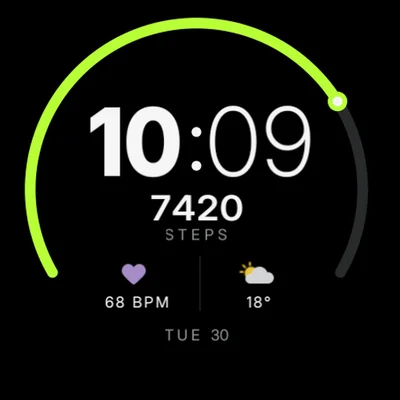
Time and activity, at a glance. Stride is a digital Wear OS watch face that pairs bold hours, fine minutes and a colorful progress ring in a clean composition on a black background.
FOLLOW YOUR DAY
• Clear time in your watch’s 12- or 24-hour format.
• Step count from a compatible source.
• A ring and progress marker when the step data includes a valid goal.
• Heart rate when available from your watch’s system.
• Temperature and a weather icon when your watch supplies that data.
• Day and date, with English or French labels according to your watch’s language.
A TOUCH OF COLOR
Choose Lime, Glacier, Orange or Lavender for the progress ring. The ring appears when a compatible goal is available. Always-on mode keeps only the time and colon visible against a black background.
INFORMATION FROM YOUR WATCH
Data depends on your watch’s sensors, compatible services, settings and permissions. Missing data appears as a dash. Without a compatible goal, the step count remains visible when available and the ring is hidden.
Stride displays data supplied by your watch. It does not start a workout session and is not a medical diagnostic tool.
COMPATIBILITY AND SETUP
For compatible watches running Wear OS 5 or later. Install Stride on your watch from Google Play, then select it from your watch faces. Open its settings to choose the ring color.
Support: abdo.elgomri@gmail.com
Explore our watch faces: https://abdogomri.github.io/watch-faces/
Data safety
What Magic apps & games declares on Google Play about the data this app collects and shares.
- No data shared with third partiesLearn more about how developers declare sharing
- No data collectedLearn more about how developers declare collection
What’s new
Version 1.1.1 · Oct 10, 2026
Fixed clipping of the step progress ring and its marker. Preserved goal data supplied by supported providers. Step counts received without a goal remain visible without an artificial progress ring.
Developer contact
- Websiteabdogomri.github.io
- Emailabdo.elgomri@gmail.com
- Privacy policyabdogomri.github.io
- Address52 Rue de Syracuse appartement 115 Appt 115 34000 Montpellier France
Information
- Offered by
- Magic apps & games
- Category
- Personalization
- Version
- 1.1.1
- Updated
- Oct 10, 2026
- Released
- Oct 1, 2026
- Age rating
- Everyone
- Price
- $2.29
- Package name
- com.observatoire.stride