Strider Tactical Watch Face
Time Canvas- EveryoneAge rating
- PersonalizationCategory
- Oct 19, 2026Updated
- $1.19Price
Links to the official Google Play listing of com.timecanvas.strider. Last checked on Nov 13, 2026.
About this app
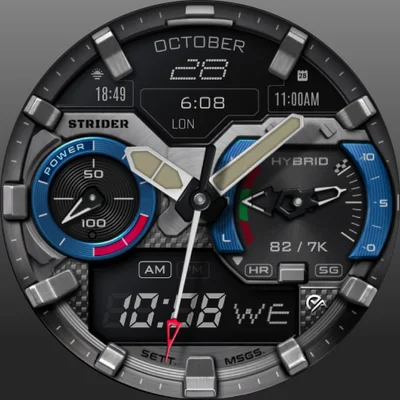
A bold tactical hybrid watch face with many custom styles and complications.
🛡️ Gear Up with the Strider Tactical Watch Face!
Built for those who want a rugged, mission-ready look on their wrist, the Strider Hybrid Watch Face by Time Canvas brings a bold tactical aesthetic to your smartwatch. Designed with a metallic bezel, carbon-fiber textures, a Power gauge and a Hybrid dial, it combines the analog and digital worlds in one powerful layout.
✨ HIGHLIGHTS & KEY FEATURES:
Tactical Hybrid Design: A detailed analog and digital layout with a Power sub-dial, a Hybrid sub-dial, a digital time display with day of the week, and a date and world-time panel.
6 Customizable Dial Styles: Choose your favorite dial look to match your mood and outfit.
Custom Hand Styles: Pick the hand design that suits your style best.
Separately Customizable Colors: Change the colors of the hands, indexes, sub-dials and accents individually. Mix and match bold shades like orange, teal, red, green, blue or even multicolor for a truly unique setup.
⚙️ COMPLICATIONS & SHORTCUTS: Keep your day organized and launch your favorite tools with a single tap:
3 Customizable Complications: Add essential widgets such as weather, sunrise/sunset, world time, step count, heart rate or battery level.
5 Custom Tap Shortcuts: Set your most-used apps on the designated tap zones for fast launching.
5 Fixed Tap Shortcuts: Get instant access to built-in essentials such as Settings and Messages. (May not work on some devices)
🔋 ALWAYS ON DISPLAY (AOD): Stay stylish around the clock with energy-optimized AOD modes:
3 AOD Options: From a detailed dial view to a minimal hands-only look, each mode is crafted for high legibility, low power consumption and maximum battery efficiency.
Designed exclusively by TIME CANVAS.
🔧 HOW TO CUSTOMIZE Touch and hold the watch screen. Tap Customize (or the settings/edit icon). Swipe left/right to browse categories; swipe up/down to select styles.
📱 Compatibility: This watch face is designed for Wear OS devices running on Wear OS 5 (API level 34+) and above, including Samsung Galaxy Watch 4, 5, 6, 7, 8 and Ultra, Pixel Watch, and other Wear OS-compatible models from various brands. Deep black AMOLED-optimized design for maximum contrast and battery efficiency.
🪢 CONNECT WITH US
📩Support & Feedback
Your experience matters. Reach out with questions or suggestions:
✉️ Email: support@timecanvaswatches.com, timecanvasapps@gmail.com
📝 Share your thoughts—leave a review on the Play Store.
🔎 Discover more designs from our collection.
🧡 Join the Journey
Stay updated with offers, new releases and upcoming previews:
Telegram: t.me/timecanvaswatchfaces
Facebook: facebook.com/timecanvaswatchfaces
Data safety
What Time Canvas declares on Google Play about the data this app collects and shares.
- No data shared with third partiesLearn more about how developers declare sharing
- No data collectedLearn more about how developers declare collection
Developer contact
- Websitetimecanvaswatches.com
- Emailcontact@timecanvaswatches.com
- Privacy policytimecanvaswatches.com
- AddressPlot No.16, Khasra No. 1858, Para, Alamnagar Lucknow, Uttar Pradesh 226017 India
Information
- Offered by
- Time Canvas
- Category
- Personalization
- Updated
- Oct 19, 2026
- Released
- Oct 19, 2026
- Age rating
- Everyone
- Price
- $1.19
- Package name
- com.timecanvas.strider