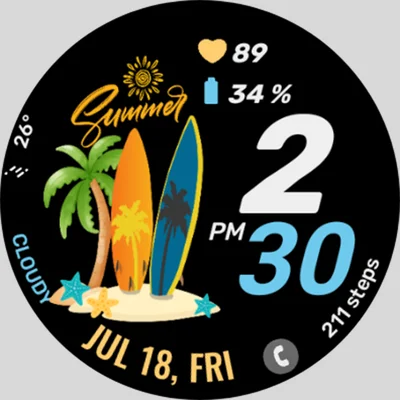
Summer Vibes
ChronoHarvest- EveryoneAge rating
- PersonalizationCategory
- Jul 21, 2025Updated
- $0.99Price
Links to the official Google Play listing of com.watchfacestudio.summervibes. Last checked on Nov 24, 2026.
About this app
Summer-Themed Watch Face for Wear OS
📍INSTALLATION GUIDE
⭐️Our watch face apps are thoroughly tested in a real device and are "reviewed and approved" by the Google Play Store Team before publishing them.
TAKE NOTE❗️❗️❗️
1️⃣ Watch faces automatically install on WEAR OS watch.
2️⃣ MAKE SURE THE WATCH IS SYNCED TO YOUR PHONE USING THE SAME GOOGLE ACCOUNT FOR SEAMLESS INSTALLATION.
3️⃣ After download, WAIT for a few minutes for the watch face to be transferred on watch. (There will be a notification on your watch if the watch face was successfully transferred.)
4️⃣ If incase there is no notification, Go to PLAYSTORE ON YOUR WATCH and type on the SEARCH BOX "Summer Vibes"
⭐️ Watch faces don't automatically display/change after successful installation. Go back to home display. Tap and hold display, swipe until the end and tap + to add the watch face. Rotate Bezel or scroll to find the watch face.
📍ALLOW / ENABLE all permissions from settings -> applications -> permissions.
⚠️⚠️⚠️ Refund is ONLY allowed within 24 hours.
⭐️FEATURES:
- Digital Clock
- Day & Date
- Preset App Shortcuts
- Customizable App Shortcut & Complication
- Vibrant Summer Styles
📍Supports Wear OS watches, but some features may not be available on some watches.
Contact us at: ajgearbusiness@gmail.com
Youtube Installation Tutorial: https://www.youtube.com/watch?v=vMM4Q2-rqoM
Data safety
What ChronoHarvest declares on Google Play about the data this app collects and shares.
- No data shared with third partiesLearn more about how developers declare sharing
- No data collectedLearn more about how developers declare collection
Developer contact
- Emailajgearbusiness@gmail.com
- Privacy policysites.google.com
- AddressB 5 L 15 BEVERLY HOMES HUGO PEREZ, TRECE MARTIRES CITY 4109 Philippines
Information
- Offered by
- ChronoHarvest
- Category
- Personalization
- Updated
- Jul 21, 2025
- Released
- Jul 18, 2025
- Age rating
- Everyone
- Price
- $0.99
- Package name
- com.watchfacestudio.summervibes