Titan Edge Watch Face
RADU GHEORGHE TURCU- EveryoneAge rating
- PersonalizationCategory
- Dec 30, 2024Updated
- $0.99Price
Links to the official Google Play listing of com.turcuradu.titanedgewatchface. Last checked on Nov 26, 2026.
About this app
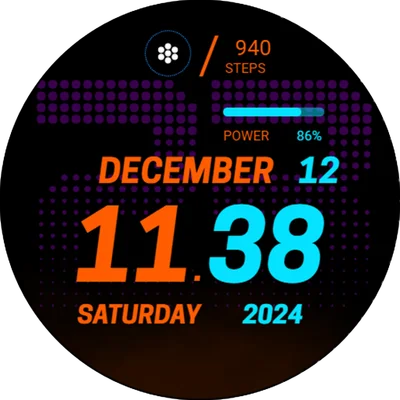
Digital Multi Color Watch Face for all wear os devices.
🌟 Titan Edge Watch Face 🌟
Enhance your smartwatch experience with the Titan Edge Watch Face! This dynamic and colorful watch face offers a sleek design combined with advanced functionality, making it perfect for anyone who loves style and utility.
🕒 Key Features:
✔️ Big Digital Clock: Easily read the time at a glance, with vibrant and customizable colors.
✔️ Full Date Display: Never miss an important day with the full date view.
✔️ Step Counter: Stay active and track your daily steps directly from your watch face.
✔️ Battery Information: Keep an eye on your watch’s power level with a clear battery status indicator.
✔️ Complicated Widget: An additional widget for advanced stats or app shortcuts.
✔️ Color Customization: Personalize your watch face with multiple color options to match your style.
🛠️ Perfectly optimized for AMOLED displays to save power while keeping everything crystal clear!
💡 Why Choose Titan Edge?
This watch face combines cutting-edge design with practical features, ensuring your smartwatch not only looks good but keeps you informed throughout the day
--------------------------------------------------------------------------------------------------------
Watch face installation notes on smart watch:
Phone app serves only as a placeholder to make it easier to install & find the watch face on your Wear OS watch. You have to select your watch device from the install dropdown menu.
If you download the helper directly with the phone , you need to open application and touch on the display or the download button. -> will start to install on the watch.
A wear os watch need to be connected.
If not working in that way , you can copy that link into your phone chrome browser and click on arrow down from right , and you choose the watch face to install.
..............................................
After installation you need to set that watch face to your screen , from wear OS app , go down at downloaded watch faces and you will find it.
If you have problems , please contact me on raduturcu03@gmail.com
Try to see others designs in my google profile.
Data safety
What RADU GHEORGHE TURCU declares on Google Play about the data this app collects and shares.
- No data shared with third partiesLearn more about how developers declare sharing
- No data collectedLearn more about how developers declare collection
Developer contact
- Emailraduturcu03@gmail.com
- Privacy policye-droid.net
- AddressStr. Eduard Albert Bielz, Nr. 89d, Bl. b1, Sc. f, et.1, Ap. 60 550031 Sibiu Romania
Information
- Offered by
- RADU GHEORGHE TURCU
- Category
- Personalization
- Updated
- Dec 30, 2024
- Released
- Dec 29, 2024
- Age rating
- Everyone
- Price
- $0.99
- Package name
- com.turcuradu.titanedgewatchface