TKS 33 Axis Watch Face
Tiny Kitchen Studios- EveryoneAge rating
- PersonalizationCategory
- Sep 6, 2026Updated
- $1.49Price
Links to the official Google Play listing of com.tks.axis. Last checked on Nov 26, 2026.
About this app
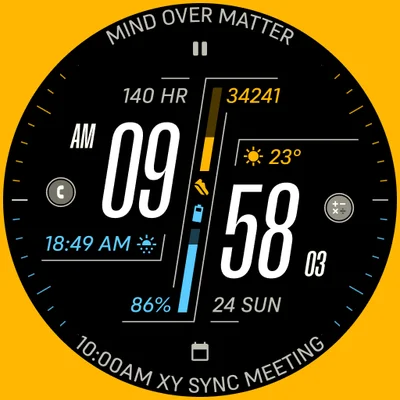
A Customizable Digital Wear OS Watch Face
Axis: A Highly Customizable, Digital Wear OS Watch Face. Featuring a Subtle Animation, 4 Customizable Complications, 2 App Shortcuts, and 30 Color Palettes.
Key Features:
- Subtle Animation That Can Be Turned Off.
- 30 Color Palettes: Vibrant and Muted Colors. With AMOLED-friendly True Black Backgrounds.
- 2 AOD Modes: Show Or Hide Complications In AOD.
- 12/24 Hour Time Format Support.
- 3 Digital Clock Font Weights
- 4 Customizable Complications: With Calendar/Long Text Complication Support.
- 2 App Shortcuts.
How to Install and Apply the Watch Face:
1. Ensure your smartwatch is selected during purchase.
2. Install the optional companion app on your phone (if desired).
3. Long press your watch display, swipe through available faces, tap "+", and select "TKS 33 Axis Watch Face".
Ran into any issues or need a hand? We're happy to help! Just send us an email at dev.tinykitchenstudios@gmail.com
Data safety
What Tiny Kitchen Studios declares on Google Play about the data this app collects and shares.
- No data shared with third partiesLearn more about how developers declare sharing
- No data collectedLearn more about how developers declare collection
What’s new
Sep 6, 2026
Target SDK Update
Developer contact
- Websiteinstagram.com
- Emaildev.tinykitchenstudios@gmail.com
- Privacy policysites.google.com
- AddressAl Jandaweel, An Nubough street, 4, 5 Amman 11817 Jordan
Information
- Offered by
- Tiny Kitchen Studios
- Category
- Personalization
- Updated
- Sep 6, 2026
- Released
- Sep 25, 2025
- Age rating
- Everyone
- Price
- $1.49
- Package name
- com.tks.axis