Ultra Digital Dashboard Face
GenZync by GPhoenixContains ads
- EveryoneAge rating
- PersonalizationCategory
- Aug 27, 2026Updated
- $1.79Price
Links to the official Google Play listing of com.gphoenix.ultradigitaldashboard. Last checked on Nov 23, 2026.
About this app
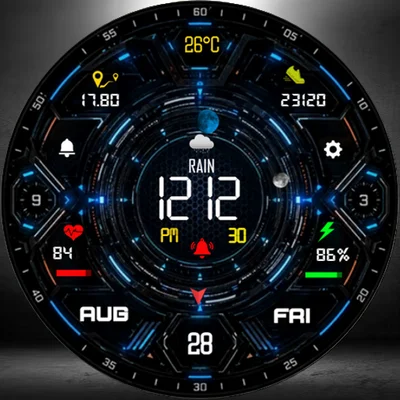
The ultimate sci-fi dashboard for Wear OS. Highly customizable & data-rich.
Elevate your Wear OS experience with the Ultra Digital Dashboard—a masterpiece of futuristic engineering and functional design.
Inspired by advanced sci-fi interfaces and tactical cockpit displays, this watch face transforms your smartwatch into a high-performance information hub. Whether you are a tech enthusiast, a fitness buff, or a professional on the go, the Ultra Digital Dashboard puts everything you need right on your wrist.
CORE FEATURES:
Futuristic Visuals: Choose between a mechanical "Circuit Core" background or a "Sacred Geometry" line-art style to match your aesthetic.
Deep Customization: Multiple color themes (Neon Cyan, Tactical Green, Solar Yellow, and Classic White) for time, date, and data readouts.
Comprehensive Health Suite: Real-time Heart Rate (BPM) monitoring with visual progress bars and a Step Counter with daily goal tracking.
Weather & Environment: Stay prepared with live weather conditions (Rain/Sun/Clouds), temperature in Celsius/Fahrenheit, and Moon Phase tracking.
Productivity at a Glance: Digital time (12H/24H), full date display (Day, Month, Year), and Distance Tracked (KM).
Power Management: Dedicated Battery percentage indicator with a color-coded status bar to keep you powered up.
Quick Access: Interactive shortcuts for Alarms, Settings, and Notifications (indicated by intuitive icons).
WHY CHOOSE ULTRA DIGITAL DASHBOARD?
Optimized for Battery Life: Built with the latest Watch Face Format for minimal battery drain.
Always-On Display (AOD): A sleek, dimmed version of the face keeps the time visible while saving power.
Universal Compatibility: Perfectly optimized for Samsung Galaxy Watch 4, 5, 6, & 7, Google Pixel Watch 1 & 2, TicWatch, and other Wear OS devices (API 30+).
How to Install:
Ensure your watch is connected to your phone via Bluetooth.
Select "Install on Watch" from the Play Store dropdown on your phone.
Long-press your current watch face and swipe to find "Ultra Digital Dashboard."
Data safety
What GenZync by GPhoenix declares on Google Play about the data this app collects and shares.
- No data shared with third partiesLearn more about how developers declare sharing
- No data collectedLearn more about how developers declare collection
- Data is encrypted in transit
Developer contact
- Websitec224ce9ff.app-ads-txt.com
- Emailgphoenix.challenges@gmail.com
- Privacy policygphoenixapps.online
- AddressDGP Compound, Sitio 4, Bagumbayan, Sta. Cruz 4009 Philippines
Information
- Offered by
- GenZync by GPhoenix
- Category
- Personalization
- Updated
- Aug 27, 2026
- Released
- Aug 17, 2026
- Age rating
- Everyone
- Price
- $1.79
- Package name
- com.gphoenix.ultradigitaldashboard