UsA Circle Bubble - USA118
USA Design Watch Face- EveryoneAge rating
- PersonalizationCategory
- Oct 30, 2026Updated
- $0.99Price
Links to the official Google Play listing of com.usadesign.usacirclebubble. Last checked on Nov 26, 2026.

Screenshots






About this app
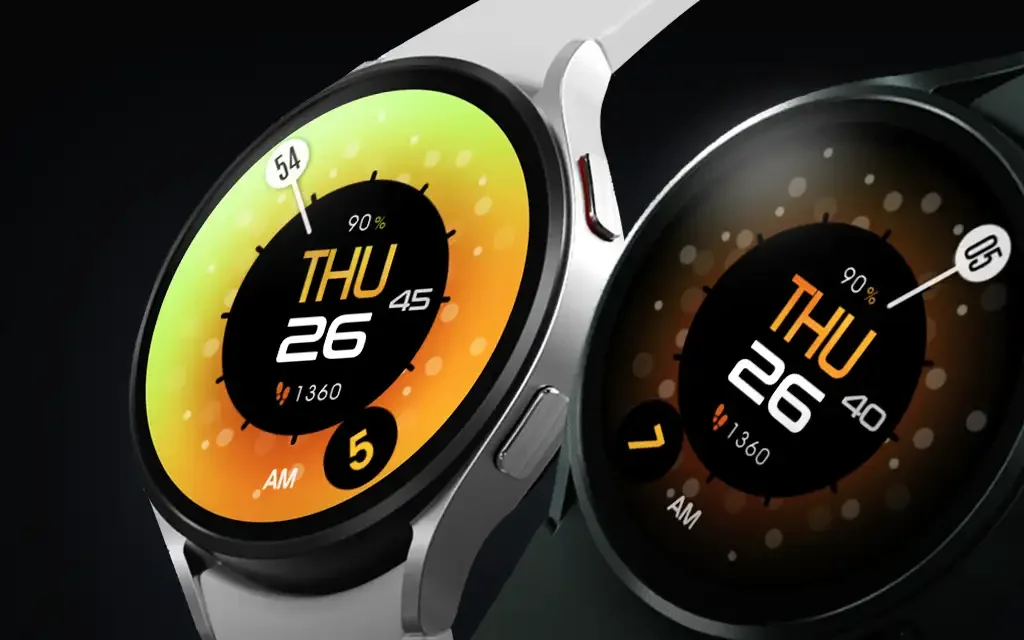
Unique colorful circle bubble watch face for Wear OS
Now available for Wear OS watches! Unique pop color circular motion with animated bubbles watch face. The digit hour and minutes moving as in the analog watch position. Custom the looks to fit your style. Introducing dark mode for a seamless experience.
This watch face requires Wear OS API 33+ (Wear OS 4 or newer). Compatible with Galaxy Watch 4/5/6/7/8 Series and newer, Pixel Watch series and other watch face with Wear OS 4 or newer.
Make sure you are purchasing using the same Google account registered on your watch. The installation should begin automatically on the watch after a few moments.
After the installation is completed on your watch, do these steps to open the watch face on your watch :
1. Open the watch face list on your watch (tap and hold the current watch face)
2. Scroll to the right and tap "add watch face"
3. Scroll down and find new installed watch face in the "downloaded" section
Features:
- 12/24 hour mode with seconds
- Battery and step Information
- Customize menu for easy styling
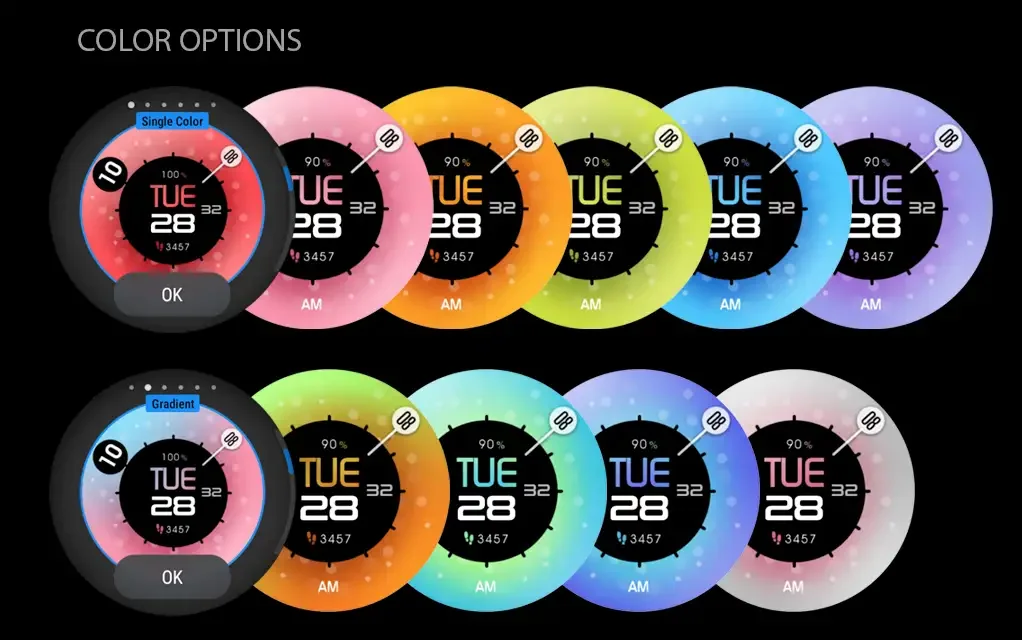
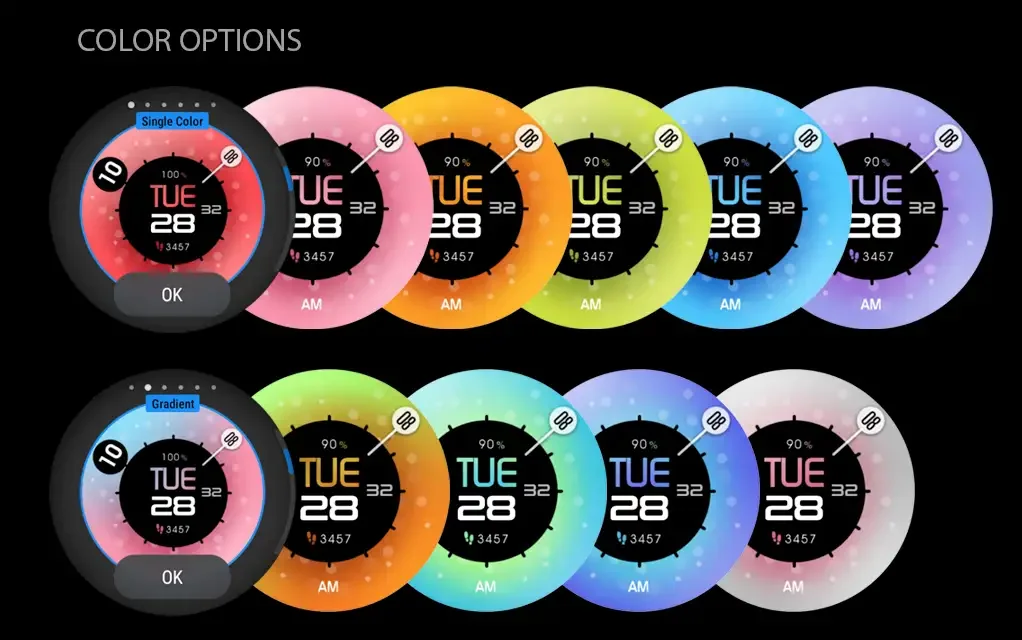
- 6 Single color and 5 gradient color backgrounds. Set the gradient color to the first position to customize the single color background.
- Dark Mode, make the watch face seamless
- Bubbles adjustment (Default, less, or no bubbles)
- Hour digit color customization
- Custom app shortcuts
- Special Designed AOD, color synced with normal mode
Tap and hold the watch face and go to the "customize" menu (or settings icon under the watch face) to change the styles and also manage the custom shortcut complication.
You can select 6 "single color" backgrounds from the menu. To extend the background you can select 5 "gradient" backgrounds on the next menu. To choose a "single color" background, please set the "gradient" background to the first position (default). Then you can change the "single color" background through the "single color" menu.
To change between 12 or 24-hour mode, go to your phone date and time settings and there is an option to use 24-hour mode or 12-hour mode. The watch will sync with your new settings after a few moments.
Special designed Always On Display ambient mode. Turn on the Always On Display mode on your watch settings to show a low power display on idle. Please be aware, this feature will use more batteries.
Join our Telegram group for live support and discussion
https://t.me/usadesignwatchface
Data safety
What USA Design Watch Face declares on Google Play about the data this app collects and shares.
- No data shared with third partiesLearn more about how developers declare sharing
- No data collectedLearn more about how developers declare collection
Developer contact
- Emailusawatchface@gmail.com
- Privacy policyprofilku.com
- AddressJL. Bango 9 RT/RW 002/04 BUNULREJO, BLIMBING Malang Jawa Timur 65123 Indonesia
Information
- Offered by
- USA Design Watch Face
- Category
- Personalization
- Updated
- Oct 30, 2026
- Released
- Sep 25, 2021
- Age rating
- Everyone
- Price
- $0.99
- Package name
- com.usadesign.usacirclebubble
Similar apps
-
 ML2U 192 Watch Face
Personalization
-
 Digital Love watch face
Personalization
-
 Soft Light PinkWhite Wear OS
Personalization
-
 KZY008
Personalization
-
 HMKWatch Digital 082
Personalization
-
 Simple Modern watch face
Personalization
-
 Modular: Digital Watch Face
Personalization
-
 Neon Mountain WatchFace SAM-04
Personalization
-
 SamWatch SIGN F 2024
Personalization
-
 SamWatch PointColor 40
Personalization
-
 UsA Rose Gold Bubbles - USA109
Personalization
-
 Blush Pink Stylish Watch Face
Personalization