Watch face 10h08.com #64
10h08.com - Wear Os Watch Face- EveryoneAge rating
- PersonalizationCategory
- Aug 11, 2025Updated
- $0.99Price
Links to the official Google Play listing of com.watchfacestudio.wf10h08com64. Last checked on Nov 18, 2026.
About this app
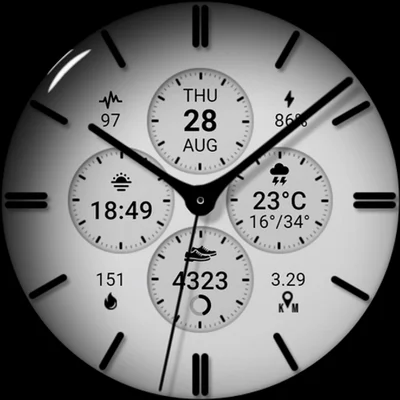
Complication. Full shadow on/off. 2 mode of AOD. 30 Themes color palette
⌚️ Watch face 10h08.com #64
🟥 Information:
- High resolution, sharp image quality
- Classic watch face
- Analog time
- Day, date and month
- Weather
- Sunrise & sunset
- Steps count, steps goal, distance, heart rate, calories
- Battery level
- Complication
- Full shadow on/off
- Shadow brightness level
- 2 mode of AOD: Full AOD or Simple AOD
- 30 Themes color palette
🟨 How to custom this watch face?
1. Press and hold watch face screen
2. Tap “Customize” button
3. Swipe left or right, up or down to customize watch face
🟦 How to install watch face on your watch?
1. Install watch face from Google Play store
2. Press and hold watch face screen
3. Swipe right to left and tap “Add watch face”
4. Scroll to the bottom of the page and selectwatch face in the “downloaded” section
🟧 Compatible with smart watches running Wear OS 5+ SDK 34+
For example: Galaxy Watch 6, Galaxy Watch 7 Ultra, Ticwatch Pro 5, Pixcel Watch 2, Watch 2 Pro,...
🟩 See all my watch faces: https://play.google.com/store/apps/dev?id=5487081600241990978
🟪 Follow my social media pages for the latest watch face updates:
https://www.facebook.com/10h08com/
https://www.instagram.com/10h08com/
https://www.pinterest.com/10h08com/
https://x.com/10h08com/
https://www.threads.com/@10h08com/
Data safety
What 10h08.com - Wear Os Watch Face declares on Google Play about the data this app collects and shares.
- No data shared with third partiesLearn more about how developers declare sharing
- No data collectedLearn more about how developers declare collection
What’s new
Version 1.0.0 · Aug 11, 2025
Release
Developer contact
- Emailcuonguyen.nvc@gmail.com
- Privacy policysites.google.com
- AddressĐường Đà Nẵng 4/6/246A Hải Phòng 180000 Vietnam
Information
- Offered by
- 10h08.com - Wear Os Watch Face
- Category
- Personalization
- Version
- 1.0.0
- Updated
- Aug 11, 2025
- Released
- Aug 11, 2025
- Age rating
- Everyone
- Price
- $0.99
- Package name
- com.watchfacestudio.wf10h08com64