Watch Face CUE142
Creation Cue- EveryoneAge rating
- PersonalizationCategory
- Aug 4, 2026Updated
- $1.99Price
Links to the official Google Play listing of com.creation.cue142watchface. Last checked on Nov 13, 2026.
About this app
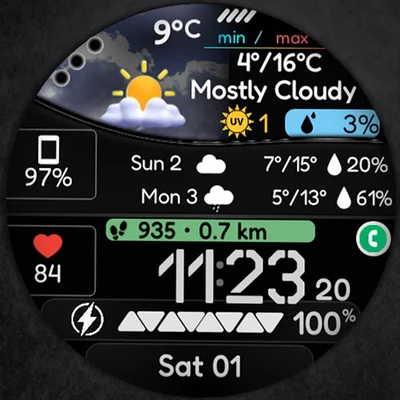
A watch face with weather, forecast, 2 shortcuts, and 2 custom complications.
𝐢 This watch face is compatible with Wear OS 5 Samsung watches only with API Level 34+, like Samsung Galaxy Watch 4, 5, 6, 7, 8, Ultra. Other devices running Wear OS 4 and earlier are not supported.
Key Features:
▸Provides current weather conditions (text & icon), temperature, min/max (°C or °F), precipitation chance, UV index, 2 days forecast (min/max temp. & precipitation chance).
▸24-hour format or AM/PM for the digital display.
▸Steps and distance-made display in km or miles.
▸Battery power indication with low battery red flashing warning light.
▸The display highlights minimum and maximum BPM values at the bottom of the screen.
▸You can add 2 complications plus 2 shortcuts on the Watch Face. ▸Multiple color themes available.
All details like the weather and date will automatically appear in the language set as default on the system.
🌦️ Weather Info Not Showing?
If the weather data doesn’t appear, make sure your watch is connected to your phone via Bluetooth and that location permissions are enabled in both the phone and watch settings. Also, ensure the default Weather app on your watch is set up and working. Sometimes it helps to switch to another watch face and then back. A few minutes may be needed for the data to sync.
If you encounter any problems or installation difficulties, please contact us so we can assist you with the process.
✉️ Email: creationcuespace@gmail.com
Data safety
What Creation Cue declares on Google Play about the data this app collects and shares.
- No data shared with third partiesLearn more about how developers declare sharing
- No data collectedLearn more about how developers declare collection
What’s new
Aug 4, 2026
Updated for Wear OS target SDK 35 compatibility, performance improvements, and bug fixes.
Developer contact
- Websitecreationcue.web.app
- Emailcreationcuespace@gmail.com
- Privacy policycreationcuespace.github.io
- AddressΑΣΗΜΑΚΟΠΟΥΛΟΥ 15 ΙΩΑΝΝΙΝΑ 45332 Greece
Information
- Offered by
- Creation Cue
- Category
- Personalization
- Updated
- Aug 4, 2026
- Released
- Feb 1, 2025
- Age rating
- Everyone
- Price
- $1.99
- Package name
- com.creation.cue142watchface