Weather watchface 3
VG Faces- EveryoneAge rating
- PersonalizationCategory
- Aug 14, 2026Updated
- $0.30Price
Links to the official Google Play listing of com.watchfacestudio.weather3. Last checked on Nov 13, 2026.
About this app
Weather Watchface 3 for Wear OS - Full Weather Forecast on Your Wrist
This watch face supports all WearOS 5 devices with API level 34 or higher, such as Samsung Galaxy Watch 4, 5, 6, 7, 8, Pixel Watch, etc.
---------------------------
[How to install]
Before pressing the payment button, make sure your watch is selected.
Select your watch by pressing the small triangle next to the payment button.
Select the menu at the top right of the Play Store app (three dots) > Share > Chrome browser > Install on other devices > Clock and proceed.
After installation, select it from the download list, register it as a favorite, and use it. You can view the download list by clicking 'Add Watch Screen' on the far right of the favorites list that appears when you press the watch screen.
---------------------------
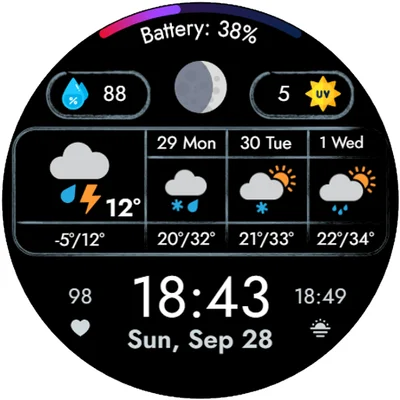
Stay informed and stylish with Weather Watchface 3. This digital watch face for Wear OS gives you instant access to detailed weather data, battery level, moon phase, UV index, and more.
🔍 Main Features:
Digital time and full date
AM/PM in the 12-hour format
Leading Zero Show/Hide
2 customizable complications
4-day weather forecast
Weather condition icons
UV index
Moon phase
Chance of precipitation
Battery percentage
Always On Display (AOD)
Multiple color themes
• Tap Time: Quick access to Alarm functions.
• Tap Date: Opens your Calendar.
• Tap Weather Icon: weather info
🎨 Color your style
Pick from many different color options to match your day, night, or personal vibe.
📱 Designed for Wear OS smartwatches
Pixel Watch, Samsung Galaxy Watch, Fossil, TicWatch, and others running Wear OS.
Data safety
What VG Faces declares on Google Play about the data this app collects and shares.
- No data shared with third partiesLearn more about how developers declare sharing
- No data collectedLearn more about how developers declare collection
- Committed to follow the Play Families Policy
What’s new
Aug 14, 2026
app-release
Developer contact
- Emailvolder83@gmail.com
- Privacy policysites.google.com
- AddressW.-I.-Lenin-Straße 51 19370 Parchim Germany
Information
- Offered by
- VG Faces
- Category
- Personalization
- Updated
- Aug 14, 2026
- Released
- Jul 18, 2025
- Age rating
- Everyone
- Price
- $0.30
- Package name
- com.watchfacestudio.weather3