Weofly Fitpro
Creek Wearable- EveryoneAge rating
- Health & FitnessCategory
- Nov 10, 2026Updated
- FreePrice
Links to the official Google Play listing of com.weoflyfit.app. Last checked on Nov 23, 2026.

Screenshots



About this app
Automatic translation by Google from Chinese (Simplified).
Use the Weofly Fitpro App to pair and sync Weofly Fitpro Watch with your phone.
Pair the Weofly Fitpro with your phone, and you will be able to receive message notifications from "Calendar", "Contacts", "Mail" and other apps on your phone on the Weofly Fitpro.
Customize the notifications sent to Weofly Fitpro, including the reminder method, sound and touch of each App.
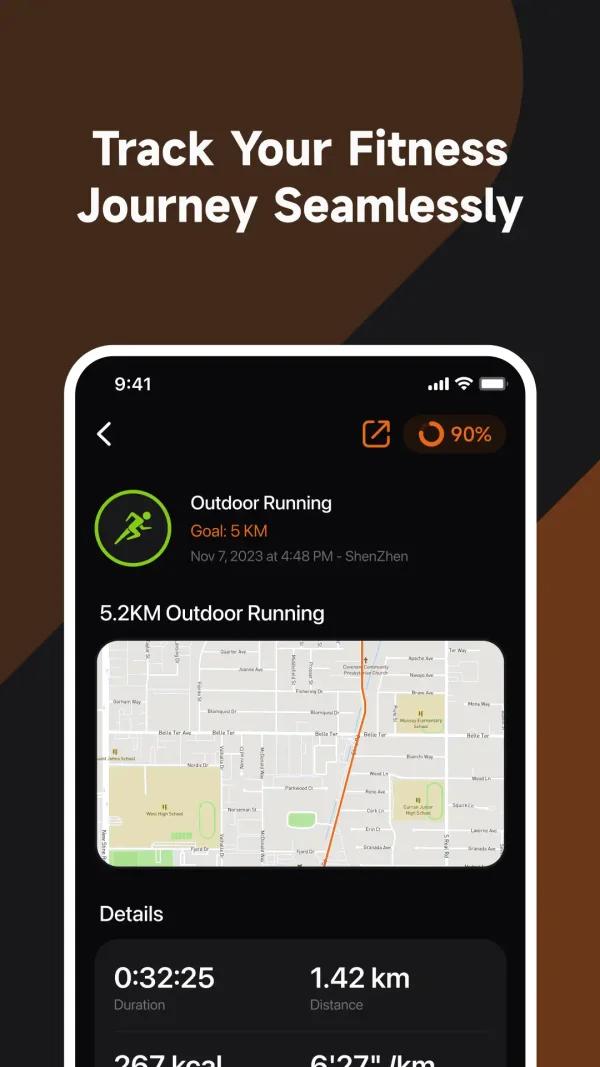
View and manage your health data.
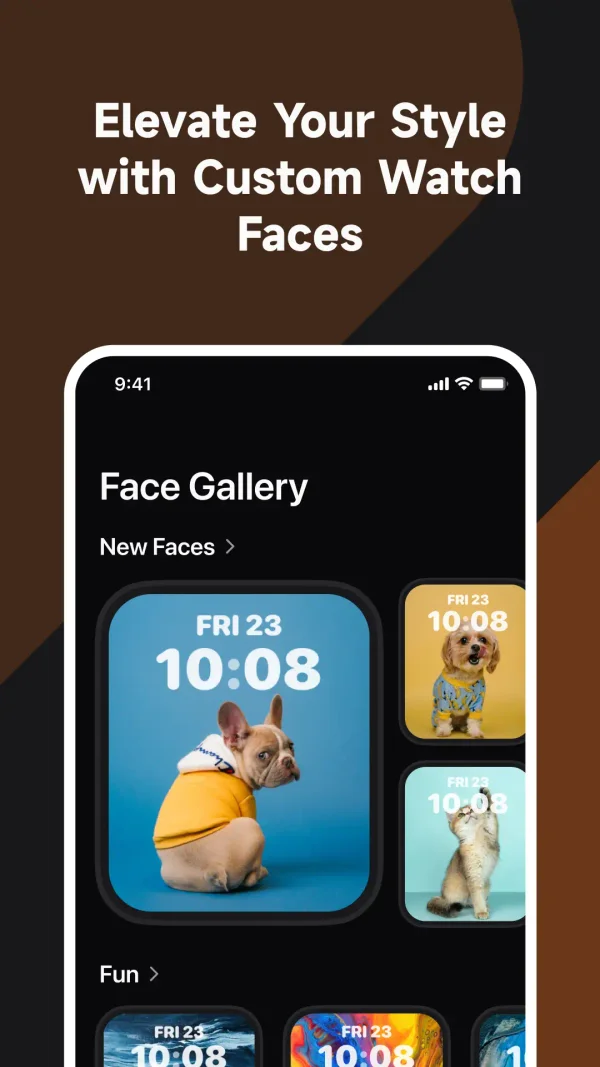
Manage your watch faces, and there are 150+ rich watch faces available for download.
Get more tips and tricks, check out the Manual, and more in the Explore tab.
Permission description
After the app is installed, you can manage these permissions in "Settings". If you deny them, the relevant functions will not be available.
1.Address book
Read contacts: Allows the application to read and save phone-related data for watch functions such as answering and making calls. If rejected, the related functions cannot be used.
2.Information
Receive/reply text messages: Support the synchronization of phone notifications (such as calls, text messages, social software messages) with smartwatches and fitness bands to ensure you do not miss important information while exercising or in daily life. You can also quickly reply to text messages or manage incoming calls via the watch, with supported devices including CWS01, CWR01G, etc.
3.Storage
Access local media and files: Allows the app to read photos and files on the memory card to provide photo watch face setting services. If rejected, related functions cannot be used.
2. Location
Access location information: Allows applications to obtain location information based on network sources such as GPS, base stations, and Wi-Fi, which can be used to provide location-based services such as checking the weather and selecting the country/region. After rejection, the relevant functions cannot be used.
Using location information in the background: If the app has obtained the "Access location information" permission, allowing the app to use location information while running in the background may reduce your battery life.
5.Camera
Allows the app to take photos and videos to provide services such as photo dial settings and uploading photos or video files when reporting problems. If rejected, the relevant functions will not be available.
3. List of installed application software
Read the list of installed applications: Allow the application to read the list of installed applications on the device so that you can receive and view application notifications on the watch. If rejected, the relevant functions cannot be used.
Show the original text
Pair the Weofly Fitpro with your phone, and you will be able to receive message notifications from "Calendar", "Contacts", "Mail" and other apps on your phone on the Weofly Fitpro.
Customize the notifications sent to Weofly Fitpro, including the reminder method, sound and touch of each App.
View and manage your health data.
Manage your watch faces, and there are 150+ rich watch faces available for download.
Get more tips and tricks, check out the Manual, and more in the Explore tab.
Permission description
After the app is installed, you can manage these permissions in "Settings". If you deny them, the relevant functions will not be available.
1. Address book
Read contacts: Allows the application to read and save phone-related data for watch functions such as answering and making calls. If rejected, the related functions cannot be used.
2.Information
Receive/reply text messages: Support the synchronization of phone notifications (such as calls, text messages, social software messages) with smartwatches and fitness bands to ensure you do not miss important information while exercising or in daily life. You can also quickly reply to text messages or manage incoming calls via the watch, with supported devices including CWS01, CWR01G, etc.
3.Storage
Access local media and files: Allows the app to read photos and files on the memory card to provide photo watch face setting services. If rejected, related functions cannot be used.
2. Location
Access location information: Allows applications to obtain location information based on network sources such as GPS, base stations, and Wi-Fi, which can be used to provide location-based services such as checking the weather and selecting the country/region. After rejection, the relevant functions cannot be used.
Using location information in the background: If the app has obtained the "Access location information" permission, allowing the app to use location information while running in the background may reduce your battery life.
5.Camera
Allows the app to take photos and videos to provide services such as photo dial settings and uploading photos or video files when reporting problems. If rejected, the relevant functions will not be available.
3. List of installed application software
Read the list of installed applications: Allow the application to read the list of installed applications on the device so that you can receive and view application notifications on the watch. If rejected, the relevant functions cannot be used.
Data safety
What Creek Wearable declares on Google Play about the data this app collects and shares.
- This app may share these data types with third partiesLocation and Photos and videos
- This app may collect these data typesPersonal info, Health and fitness and 3 others
- Data is encrypted in transit
- You can request that data be deleted
Developer contact
- Emailchenyx@creekwearable.com
- Privacy policyh5.creekfits.com
- Address光明区凤凰街道东坑社区光明凤凰广场3栋1501 深圳市, 广东省 China 518000
Information
- Offered by
- Creek Wearable
- Category
- Health & Fitness
- Version
- 1.0.7
- Updated
- Nov 10, 2026
- Released
- Jul 1, 2024
- Requires
- Android 9 or later
- Age rating
- Everyone
- Price
- Free
- Package name
- com.weoflyfit.app