ACHS-1
Eugeniy Radzivill- USK ab 0 JahrenAltersfreigabe
- PersonalisierungKategorie
- 26.08.2025Aktualisiert
- 0,99 €Preis
Verlinkt auf den offiziellen Google Play-Eintrag von com.watchfacestudio.achs. Zuletzt geprüft am 14.11.2026.
Über diese App
Automatische Übersetzung von Google. Originalsprache: Russisch (Russland).
„ACHS-1“-Zifferblatt für Smartwatches auf der Wear OS-Plattform
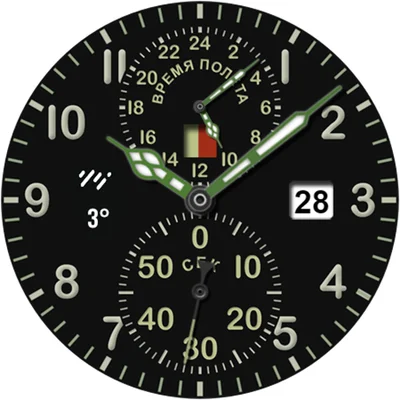
Das Zifferblatt für Smartwatches auf der Wear OS-Plattform unterstützt die folgenden Funktionen:
- Arbeiten Sie in zwei automatischen Modi:
• Tagmodus (schaltet sich von 6:00 bis 20:00 Uhr ein)
• Nachtmodus (schaltet sich von 20:00 bis 6:00 Uhr ein). In diesem Modus wird das fluoreszierende Leuchten von mit Phosphor beschichteten Elementen simuliert
- Der Akkuladestand wird im kleinen oberen Zifferblattfenster angezeigt. Je roter, desto weniger Batterieleistung bleibt übrig. Wenn das gesamte Fenster rot wird, ist dies ein Signal zum Aufladen der Uhr.
- Das kleine obere Zifferblatt zeigt die Uhrzeit im 24-Stunden-Modus an
- Das kleine untere Zifferblatt zeigt die Sekunden an.
- In den Einstellungen des Wählmenüs können Sie 4 Tippzonen zum Aufrufen von auf Ihrer Uhr installierten Anwendungen und eine Informationszone zum Anzeigen von Daten aus beliebigen Anwendungen konfigurieren.
Bitte beachten Sie, dass möglicherweise nicht alle Uhren-Apps für die Informationszone optimiert sind und Daten möglicherweise nicht oder nicht korrekt angezeigt werden. Wenn Sie die Anzeige der Informationszone ausblenden möchten, stellen Sie sie einfach im Wählmenü auf „Abwesend“ (aufgrund von Übersetzungsproblemen in einigen Ländern kann dieser Menüpunkt möglicherweise anders heißen).
Ich kann die Einrichtung und den Betrieb von Tippzonen nur auf Samsung-Uhren garantieren. Wenn Sie eine Uhr eines anderen Herstellers besitzen, funktionieren die Tippzonen möglicherweise nicht richtig. Bitte berücksichtigen Sie dies beim Kauf Ihres Zifferblatts.
Ich habe auch einen Original-AOD-Modus für dieses Zifferblatt erstellt. Damit es angezeigt wird, müssen Sie es im Menü Ihrer Uhr aktivieren. Bitte beachten Sie, dass im AOD-Modus das Bild auf der Uhr einmal pro Minute neu gezeichnet wird. Daher stoppt der Sekundenzeiger in diesem Modus.
Für Kommentare und Vorschläge schreiben Sie bitte an E-Mail: eradzivill@mail.ru
Treten Sie uns in den sozialen Netzwerken bei
https://vk.com/eradzivill
https://radzivill.com
https://t.me/eradzivill
https://www.facebook.com/groups/radzivill
Aufrichtig
Evgeniy
Originaltext anzeigen
The watch face for smart watches on the Wear OS platform supports the following functionality:
- Work in two automatic modes:
• Day mode (turns on from 6:00 AM to 8:00 PM)
• Night mode (turns on from 8:00 PM to 6:00 AM). In this mode, the fluorescent glow of elements coated with a phosphor is simulated
- The battery charge is displayed in the window of the small upper dial. The more red, the less battery charge remains. If the entire window turns red, this is a signal to charge the watch.
- The small upper dial shows the time in 24-hour mode
- The small lower dial shows the seconds.
- In the dial menu settings, you can set up 4 tap zones to call up applications installed on your watch and one information zone to display data from any application.
Please note that not all watch applications can be optimized to work with the information zone and may not display data or display it incorrectly. If you want to remove the display of the information zone, then simply set it to "None" in the dial menu (due to translation peculiarities in some countries, this menu item may be called differently)
I can guarantee the setup and operation of tap zones only on watches from Samsung. If you have a watch from another manufacturer, the tap zones may not work correctly. Please take this into account when purchasing a dial.
I also made an original AOD mode for this dial. To display it, you need to activate it in the menu of your watch. Please note that in AOD mode, the picture on the watch is redrawed once per minute. Therefore, the second hand stops in this mode.
For comments and suggestions, please write to e-mail: eradzivill@mail.ru
Join us on social networks
https://vk.com/eradzivill
https://radzivill.com
https://t.me/eradzivill
https://www.facebook.com/groups/radzivill
Sincerely,
Eugeniy Radzivill
Datensicherheit
Was Eugeniy Radzivill bei Google Play zu den Daten angibt, die diese App erfasst und weitergibt.
- Keine Daten werden mit Drittunternehmen oder -organisationen geteiltWeitere Informationen dazu, wie Entwickler Angaben zur Weitergabe von Daten machen
- Keine Daten erhobenWeitere Informationen dazu, wie Entwickler Angaben zur Datenerhebung machen
Kontakt zum Entwickler
- Websiteradzivill.com
- E-Maileradzivill@mail.ru
- Datenschutzerklärungeradzivill.wixsite.com
- Adresseдер. Терновка, ул. Песочная, д. 4 Наро-Фоминск Московская область Россия 143300
Informationen
- Angeboten von
- Eugeniy Radzivill
- Kategorie
- Personalisierung
- Aktualisiert
- 26.08.2025
- Veröffentlicht
- 02.11.2024
- Altersfreigabe
- USK ab 0 Jahren
- Preis
- 0,99 €
- Paketname
- com.watchfacestudio.achs