Active Vivid 2
ChronoHarvest- USK ab 0 JahrenAltersfreigabe
- PersonalisierungKategorie
- 24.02.2026Aktualisiert
- 0,55 €Preis
Verlinkt auf den offiziellen Google Play-Eintrag von com.watchfacestudio.activevivid2. Zuletzt geprüft am 21.11.2026.
Über diese App
Automatische Übersetzung von Google. Originalsprache: Englisch (Vereinigte Staaten).
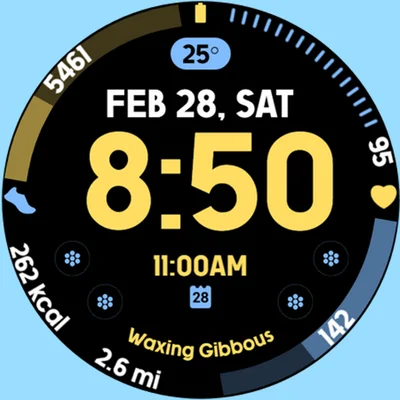
Aktive und funktionale Uhr
📍INSTALLATIONSHINWEISE
⭐️Hinweis für Galaxy Watch-Nutzer: Der Zifferblatt-Editor in der Samsung Wearable App kann komplexe Zifferblätter häufig nicht synchronisieren und laden.
Dies liegt nicht am Zifferblatt selbst. Es wird empfohlen, das Zifferblatt direkt auf der Uhr anzupassen, bis Samsung dieses Problem behebt.
📍Dieses Zifferblatt unterstützt alle Wear OS-Geräte mit API-Level 34+. Wear OS 4 und neuere Versionen
(Einige Funktionen sind möglicherweise nicht auf allen Uhren verfügbar)
⭐️WICHTIGE FUNKTIONEN:
– Analoguhr mit künstlerischem Mandala-Motiv
– Voreingestellte App-Verknüpfungen – FEST (Alarm, Kalender, Herzfrequenz, Akku und Schritte)
– 4 benutzerdefinierte App-Verknüpfungen
– 1 benutzerdefinierte Komplikation (Sie können die Komplikation mit beliebigen Daten anpassen.
Zum Beispiel können Sie Datum, Wetter, Schritte, Weltzeituhr, Sonnenuntergang/Sonnenaufgang, nächsten Termin, zurückgelegte Strecke und mehr auswählen.
***Möglicherweise müssen Sie zusätzliche Komplikationen von Drittanbietern installieren.
– Benutzerdefinierte Farbpalette
HINWEIS❗️❗️❗️
1️⃣ Zifferblätter werden automatisch auf der WEAR OS-Uhr installiert.
2️⃣ STELLEN SIE SICHER, DASS DIE UHR MIT IHREM TELEFON ÜBER DIE GLEICHE E-MAIL-ADRESSE SYNCHRONISIERT IST, UM EINE REIBUNGSLOSE INSTALLATION ZU ERFOLGEN.
3️⃣ WARTEN SIE NACH DEM DOWNLOAD Warten Sie einige Minuten, bis das Zifferblatt auf die Uhr übertragen wurde. (Sie erhalten eine Benachrichtigung auf Ihrer Uhr, wenn das Zifferblatt erfolgreich übertragen wurde.)
4️⃣ Falls keine Benachrichtigung angezeigt wird, rufen Sie den Playstore auf Ihrer Uhr auf und geben Sie in das Suchfeld „Active Vivid 2“ ein.
⭐️ Zifferblätter werden nach erfolgreicher Installation nicht automatisch angezeigt/geändert. Kehren Sie zum Startbildschirm zurück. Tippen und halten Sie das Display, wischen Sie bis zum Ende und tippen Sie auf +, um das Zifferblatt hinzuzufügen. Drehen Sie die Lünette oder scrollen Sie, um das Zifferblatt zu finden.
📍 Alle Berechtigungen unter Einstellungen -> Anwendungen -> Berechtigungen zulassen/aktivieren.
⚠️⚠️⚠️ Rückerstattungen sind NUR innerhalb von 24 Stunden möglich.
Kontaktieren Sie uns unter: ajgearbusiness@gmail.com
Installationsanleitung: https://www.youtube.com/watch?v=vMM4Q2-rqoM
Originaltext anzeigen
📍INSTALLATION NOTES
⭐️Note for Galaxy Watch Users: The watch face editor in the Samsung Wearable app often fails to sync and load complex watch faces.
This is not an issue with the watch face. It is recommended to customize the watch face directly on the watch until Samsung resolves this issue.
📍This watch face supports all Wear OS devices with API Level 34+ | Wear OS 4 and later versions
(Some features may not be available on some watches)
⭐️KEY FEATURES:
- Artistic Mandala-Themed Analog Clock
- Pre-Set App Shortcut - FIXED (Alarm, Calendar, Heart Rate, Battery and Steps)
- 4 Custom App Shortcuts
- 1 Custom Complication (you can customize the complication with the any data you want.
For example, you can select Date, weather, steps, world clock, sunset/sunrise, next appointment, distance walked and more.
***You may need to install additional third-party complications.
- Custom Color Palette
TAKE NOTE❗️❗️❗️
1️⃣ Watch faces automatically install on WEAR OS watch.
2️⃣ MAKE SURE THE WATCH IS SYNCED TO YOUR PHONE USING THE SAME EMAIL ADDRESS FOR SEAMLESS INSTALLATION.
3️⃣ After download, WAIT for a few minutes for the watch face to be transferred on watch. (There will be a notification on your watch if the watch face was successfully transferred.)
4️⃣ If incase there is no notification, Go to PLAYSTORE ON YOUR WATCH and type on the SEARCH BOX "Active Vivid 2"
⭐️ Watch faces don't automatically display/change after successful installation. Go back to home display. Tap and hold display, swipe until the end and tap + to add the watch face. Rotate Bezel or scroll to find the watch face.
📍ALLOW / ENABLE all permissions from settings -> applications -> permissions.
⚠️⚠️⚠️ Refund is ONLY allowed within 24 hours.
Contact us at: ajgearbusiness@gmail.com
Installation Tutorial: https://www.youtube.com/watch?v=vMM4Q2-rqoM
Datensicherheit
Was ChronoHarvest bei Google Play zu den Daten angibt, die diese App erfasst und weitergibt.
- Keine Daten werden mit Drittunternehmen oder -organisationen geteiltWeitere Informationen dazu, wie Entwickler Angaben zur Weitergabe von Daten machen
- Keine Daten erhobenWeitere Informationen dazu, wie Entwickler Angaben zur Datenerhebung machen
Kontakt zum Entwickler
- E-Mailajgearbusiness@gmail.com
- Datenschutzerklärungsites.google.com
- AdresseB 5 L 15 BEVERLY HOMES HUGO PEREZ, TRECE MARTIRES CITY 4109 Philippines
Informationen
- Angeboten von
- ChronoHarvest
- Kategorie
- Personalisierung
- Aktualisiert
- 24.02.2026
- Veröffentlicht
- 24.12.2024
- Altersfreigabe
- USK ab 0 Jahren
- Preis
- 0,55 €
- Paketname
- com.watchfacestudio.activevivid2