AE KUDRAT [CLASSIC]
Alithir Elements (Malaysia)- USK ab 0 JahrenAltersfreigabe
- PersonalisierungKategorie
- 23.10.2026Aktualisiert
- 0,59 €Preis
Verlinkt auf den offiziellen Google Play-Eintrag von com.watchfacestudio.kudrak. Zuletzt geprüft am 24.11.2026.
Über diese App
Automatische Übersetzung von Google. Originalsprache: Englisch (Vereinigte Staaten).
Wear OS-Zifferblatt, erstellt mit Watch Face Studio von Samsung.
AE KUDRAT [KLASSISCH]
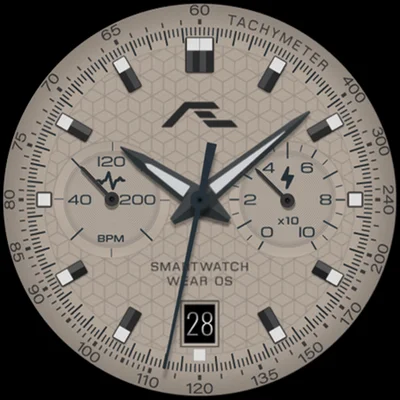
Klassisches Kunst-Zifferblatt für Gesundheitsaktivitäten. Zwei Hilfszifferblätter für Herzfrequenz und Batterie. Andere Gesundheits- und Aktivitätsinformationen werden in Verknüpfungen umgewandelt. Verfügt über einen Dunkelmodus, um die fantastische Leuchtkraft der Elemente auszustrahlen.
MERKMALE
• Datum
• Batterie-Hilfszifferblatt
• Herzfrequenz-Hilfszifferblatt
• Dunkler Modus
• Fünf Verknüpfungen
• Aktives Always-ON-Display
VOREINGESTELLTE VERKNÜPFUNGEN
• Kalender
• Nachricht
• Alarm
• Herzfrequenz messen
• Dunkler Modus
Erster Download und Installation
Platzieren Sie die Uhr während des Downloads fest am Handgelenk und „erlauben“ Sie den Zugriff auf die Datensensoren.
Sollte der Download nicht sofort erfolgen, koppeln Sie Ihre Uhr mit Ihrem Gerät. Tippen Sie lange auf den Bildschirm der Uhr. Scrollen Sie gegen die Uhr, bis Sie „+ Zifferblatt hinzufügen“ sehen. Tippen Sie darauf, suchen Sie nach der gekauften App und installieren Sie sie.
ÜBER DIE APP
Dies ist eine Wear OS-Zifferblattanwendung (App), die mit Watch Face Studio von Samsung erstellt wurde. Getestet auf der Samsung Watch 4 Classic funktionierten alle Features und Funktionen wie vorgesehen. Das Gleiche gilt möglicherweise nicht für andere Wear OS-Uhren. Der Sekundenzeiger funktioniert im Umgebungsmodus nicht. Die Platzierung erfolgt ausschließlich zu Designzwecken. Diese App nutzt die Sensoren des Uhrengehäuses, um Herzfrequenzschläge pro Minute anzuzeigen und gegebenenfalls die Anzahl der Schritte, Distanzen und/oder Kilokalorien zu extrapolieren.
Obwohl diese App mit API Level 33+ mit Ziel-SDK 34 erstellt wurde, ist sie im Play Store nicht auffindbar, wenn über etwa 13.840 Android-Geräte (Telefone) darauf zugegriffen wird. Wenn Ihr Telefon die Meldung „Dieses Telefon ist nicht mit dieser App kompatibel“ anzeigt, ignorieren Sie es einfach und laden Sie es trotzdem herunter. Nehmen Sie sich einen Moment Zeit und schauen Sie auf Ihre Uhr, um die App zu öffnen.
Der Sekundenzeiger funktioniert im Umgebungsmodus nicht. Die Platzierung erfolgt ausschließlich zu Designzwecken.
Alternativ können Sie die Seite auch über den Webbrowser auf Ihrem PC durchsuchen und herunterladen.
Vielen Dank für Ihren Besuch bei Alithir Elements (Malaysia).
Originaltext anzeigen
AE KUDRAT [CLASSIC]
Classic art health activity watch face. Two Subdial rendition for Heart rate and battery. Other health and activity info’s are converted into shortcuts. Comes with dark mode to radiate the awesome element luminosity.
FEATURES
• Date
• Battery Subdial
• Heartrate Subdial
• Dark mode
• Five shortcuts
• Active Always ON Display
PRESET SHORTCUTS
• Calendar
• Message
• Alarm
• Measure Heartrate
• Dark mode
INITIAL DOWNLOAD & INSTALLATION
During download, place the watch firmly on the wrist and ‘allow’ access to data sensors.
If the download does not take place immediately, pair your watch with your device. Long tap the watch screen. Scroll counter clock until you see “+ Add watch face”. Tap on it and look for the purchased app and install it.
ABOUT THE APP
This is Wear OS watch face application (app), built with Watch Face Studio powered by Samsung. Tested on Samsung Watch 4 Classic, all features, and functions worked as intended. The same may not apply to other Wear OS watches. The second’s hand does not function on ambient mode. It is placed for design purpose only. This app utilizes the watch body sensors to display heart rate beats per minute and where applicable extrapolate steps count, distance count and/or kilocalories.
Although this app is built with API Level 33+ with target SDK 34, it will not be discoverable on Play Store if accessed via some 13,840 Android devices (phones). If your phone prompts "This phone isn't compatible with this app", simply ignore and download anyway. Give it a moment and check your watch to open the app.
The second’s hand does not function on ambient mode. It is placed for design purpose only.
Alternatively, you may browse and download from the web browser on your personal computer (PC).
Thank you for visiting Alithir Elements (Malaysia).
Datensicherheit
Was Alithir Elements (Malaysia) bei Google Play zu den Daten angibt, die diese App erfasst und weitergibt.
- Keine Daten werden mit Drittunternehmen oder -organisationen geteiltWeitere Informationen dazu, wie Entwickler Angaben zur Weitergabe von Daten machen
- Keine Daten erhobenWeitere Informationen dazu, wie Entwickler Angaben zur Datenerhebung machen
Neue Funktionen
Version CLASSICK · 23.10.2026
Annual compliance to update Wear OS app to target Android 15 (API level 35).
Kontakt zum Entwickler
- Websitefacebook.com
- E-Mailalithome@gmail.com
- Datenschutzerklärungalithir-elements.wixsite.com
- AdresseNO 59, Jalan USJ 1/24, USJ 1 47500 Subang Jaya Selangor Malaysia
Informationen
- Angeboten von
- Alithir Elements (Malaysia)
- Kategorie
- Personalisierung
- Version
- CLASSICK
- Aktualisiert
- 23.10.2026
- Veröffentlicht
- 30.04.2025
- Altersfreigabe
- USK ab 0 Jahren
- Preis
- 0,59 €
- Paketname
- com.watchfacestudio.kudrak