AI MOONPHASE
AIwatch- USK ab 0 JahrenAltersfreigabe
- PersonalisierungKategorie
- 08.08.2026Aktualisiert
- 0,99 €Preis
Verlinkt auf den offiziellen Google Play-Eintrag von com.watchfacestudio.ai_moonphase. Zuletzt geprüft am 24.11.2026.
Über diese App
Automatische Übersetzung von Google. Originalsprache: Englisch (Vereinigte Staaten).
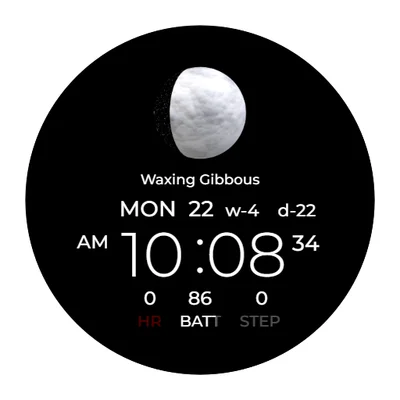
Mondphasen-Zifferblatt
AIwatch Digitales Zifferblatt.
- Unterstützt Wear OS
- Wear OS API 30+, z. B. Samsung Galaxy Watch Series, Google Pixel Watch
- Der quadratische Uhrenmodus wird nicht unterstützt.
Mondphase 28 Schritte
12h/24h Digitalzeit
d-[TAG_IM_JAHR], w-[WOCHE_IM_JAHR]
Herzfrequenz
Batterieladung in Prozent
Schrittzahl
Drücken und Halten (benutzerdefiniert)
8 Farbstilwechsel
Sternschnuppe EIN/AUS
Stern EIN/AUS
2 x Benutzereinstellungen für Komplikationen
1 x App-Verknüpfung
*** Installationsanleitung ***
Die mobile App dient als Hilfs-App für die Installation der Uhren-App.
1. Uhr und Smartphone müssen per Bluetooth verbunden sein.
2. Tippen Sie in der Begleit-App Ihres Smartphones auf „KLICKEN“.
3. Folgen Sie den Anweisungen auf dem Bildschirm der Uhr, um das Zifferblatt in wenigen Minuten zu installieren.
Sie können das Zifferblatt auch direkt in der Google App der Uhr suchen und installieren. Sie können die App in Ihrem mobilen Webbrowser suchen und installieren.
Support: aiwatchdesign@gmail.com
* Unterstützt Wear OS*
Originaltext anzeigen
AIwatch Digital watch face.
- Support wear os
- Wear os API 30+ , ex) Samsung Galaxy Watch series , Google pixel watch
- Square screen watch mode is not supported.
Moonphase 28 step
12h/24h Digital Time
d-[DAY_IN_YEAR] , w-[WEEK_IN_YEAR]
Heart Rate
Battery percent
step count
Press&Hold (custom)
8 color style change
shooting star ON/OFF
star ON/OFF
2 x Complication user setting
1 x appshortcut
*** Installation Guide ***
The mobile app is a helper app for installing the watch app.
1. The watch and mobile phone must be connected via Bluetooth.
2. Tap the "CLICK" button on your phone's companion app.
3. Follow the screen of the watch to install the watch face in a few minutes.
You can also directly search for the watch face in the watch's Google app and install it.
You can search and install it in your mobile Mobile web browser.
support : aiwatchdesign@gmail.com
* Support Wear OS *
Datensicherheit
Was AIwatch bei Google Play zu den Daten angibt, die diese App erfasst und weitergibt.
- Keine Daten werden mit Drittunternehmen oder -organisationen geteiltWeitere Informationen dazu, wie Entwickler Angaben zur Weitergabe von Daten machen
- Keine Daten erhobenWeitere Informationen dazu, wie Entwickler Angaben zur Datenerhebung machen
Kontakt zum Entwickler
- Websiteinstagram.com
- E-Mailaiwatchdesign@gmail.com
- Datenschutzerklärungsites.google.com
- Adresse완정로65번안길 17 (마전동, 금호어울림아파트) 101동204호 검단구, 인천광역시 23469 South Korea
Informationen
- Angeboten von
- AIwatch
- Kategorie
- Personalisierung
- Version
- 1.0.0
- Aktualisiert
- 08.08.2026
- Veröffentlicht
- 13.08.2023
- Altersfreigabe
- USK ab 0 Jahren
- Preis
- 0,99 €
- Paketname
- com.watchfacestudio.ai_moonphase