Analog watchface A7
VG Faces- USK ab 0 JahrenAltersfreigabe
- PersonalisierungKategorie
- 05.08.2026Aktualisiert
- 1,29 €Preis
Verlinkt auf den offiziellen Google Play-Eintrag von com.watchfacestudio.a7. Zuletzt geprüft am 18.11.2026.
Über diese App
Automatische Übersetzung von Google. Originalsprache: Englisch (Vereinigte Staaten).
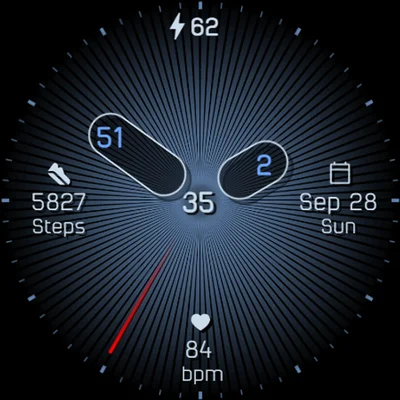
A7-Analog-Zifferblatt mit lebendigen Farben, Komplikationen und batteriesicherem AOD.
Verwandeln Sie Ihre Wear OS Smartwatch mit dem A7 Analog-Zifferblatt, das futuristisches Design mit alltagstauglicher Funktionalität vereint. Dieses atemberaubende Zifferblatt kombiniert die Eleganz einer klassischen Analoganzeige mit einer lebendigen, leuchtenden Neon-Ästhetik und lässt Ihre Uhr in jeder Situation hervorstechen.
Hauptmerkmale:
- Hybrid-Analog- und Digitalanzeige: Profitieren Sie von den Vorteilen beider Welten – klassische Analogzeiger für die schnelle Zeitanzeige und wichtige digitale Informationen direkt auf Ihrem Display.
- Lebendige Farbanpassung: Personalisieren Sie Ihre Uhr passend zu Ihrem Stil, Outfit oder Ihrer Stimmung. Wählen Sie aus einer breiten Palette atemberaubender Farbthemen und machen Sie die A7 zu Ihrem ganz persönlichen Unikat.
- 4 anpassbare Komplikationen: Bleiben Sie informiert, ohne Ihr Smartphone in die Hand nehmen zu müssen. Richten Sie bis zu 4 Komplikationen ein, um Ihre wichtigsten Daten anzuzeigen.
- Integrierter Akkustatus: Behalten Sie den Akkustand Ihrer Uhr mit der eleganten, integrierten analogen Akkuanzeige im Blick.
Energiesparender AOD-Modus: Das elegante Always-On-Display (AOD) zeigt wichtige Informationen in einem minimalistischen, energiesparenden Modus an, um die Akkulaufzeit zu verlängern und gleichzeitig stets ein ansprechendes Aussehen zu gewährleisten.
Installation:
1. Stellen Sie sicher, dass Ihre Smartwatch mit Ihrem Smartphone verbunden ist.
2. Installieren Sie das Zifferblatt aus dem Google Play Store. Es wird automatisch auf Ihrem Smartphone und Ihrer Smartwatch installiert.
3. Zum Anwenden tippen und halten Sie das aktuelle Zifferblatt auf Ihrer Smartwatch, wischen Sie nach rechts und tippen Sie auf die Schaltfläche „+“, um ein neues Zifferblatt hinzuzufügen. Suchen und wählen Sie das Zifferblatt „A7 Analog“ aus.
Kompatibilität:
Dieses Zifferblatt ist für alle Wear OS 5+ Geräte geeignet, darunter:
- Samsung Galaxy Watch
- Google Pixel Watch
- Fossil
- TicWatch
- und andere Wear OS-kompatible Smartwatches.
Originaltext anzeigen
Transform your Wear OS smartwatch with the A7 Analog Watch Face, where futuristic design meets everyday functionality. This stunning watch face combines the elegance of a classic analog display with a vibrant, glowing neon aesthetic, making your watch stand out in any situation.
Key Features:
- Hybrid Analog & Digital Display: Get the best of both worlds with classic analog hands for time-telling at a glance and essential digital information right on your screen.
- Vibrant Color Customization: Personalize your watch to match your style, outfit, or mood. Choose from a wide palette of stunning color themes to make the A7 uniquely yours.
- 4 Customizable Complications: Stay informed without reaching for your phone. Set up to 4 complications to display your most-needed data.
- Integrated Battery Status: Keep an eye on your watch's power level with the sleek, integrated analog battery indicator.
Power-Efficient AOD Mode: The beautifully designed Always-On Display (AOD) shows essential information in a minimalist, low-power mode to conserve your battery life while always looking great.
Installation:
1. Make sure your watch is connected to your phone.
2. From the Google Play Store, install the watch face. It will be installed on your phone and automatically on your watch.
3. To apply, long-press on your current watch face on your watch, scroll to the right, and tap the '+' button to add a new watch face. Find and select the A7 Analog Watch Face.
Compatibility:
This watch face is designed for all Wear OS 5+ devices, including:
-Samsung Galaxy Watch
- Google Pixel Watch
- Fossil
- TicWatch
- And other Wear OS compatible smartwatches.
Datensicherheit
Was VG Faces bei Google Play zu den Daten angibt, die diese App erfasst und weitergibt.
- Keine Daten werden mit Drittunternehmen oder -organisationen geteiltWeitere Informationen dazu, wie Entwickler Angaben zur Weitergabe von Daten machen
- Keine Daten erhobenWeitere Informationen dazu, wie Entwickler Angaben zur Datenerhebung machen
- Hat sich verpflichtet, den Google Play-Richtlinien für familienfreundliche Inhalte zu folgen
Neue Funktionen
05.08.2026
app-release
Kontakt zum Entwickler
- E-Mailvolder83@gmail.com
- Datenschutzerklärungsites.google.com
- AdresseW.-I.-Lenin-Straße 51 19370 Parchim Germany
Informationen
- Angeboten von
- VG Faces
- Kategorie
- Personalisierung
- Aktualisiert
- 05.08.2026
- Veröffentlicht
- 19.09.2025
- Altersfreigabe
- USK ab 0 Jahren
- Preis
- 1,29 €
- Paketname
- com.watchfacestudio.a7