Aurora: AMOLED Minimal
Orvixa Bilişim Teknoloji Tic. Ltd. Şti.- USK ab 0 JahrenAltersfreigabe
- PersonalisierungKategorie
- 28.07.2026Aktualisiert
- KostenlosPreis
Verlinkt auf den offiziellen Google Play-Eintrag von com.orvixa.watchface.aurora. Zuletzt geprüft am 13.11.2026.
Über diese App
Automatische Übersetzung von Google. Originalsprache: Englisch (Vereinigte Staaten).
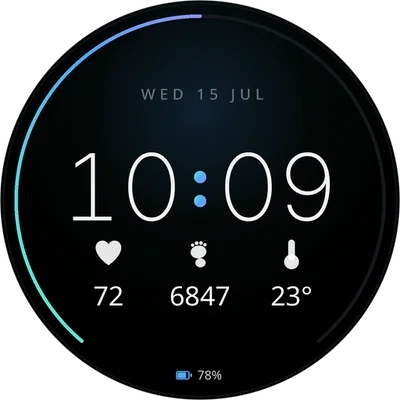
Minimalistisches AMOLED-Zifferblatt: Aurora-Gradient, Always-on-Display, Whisper Motion, 3 Stile.
Dezente Eleganz am Handgelenk: Aurora Minimal ist ein minimalistisches Wear OS-Zifferblatt mit tiefschwarzem AMOLED-Hintergrund und schlanker, moderner Typografie. Die gesamte Komposition basiert auf einem einzigen Aurora-Borealis-Farbverlauf; Farbe kommt nur dort zum Einsatz, wo sie hingehört, großzügiger Negativraum sorgt für einen direkten Blick auf die Uhrzeit.
MINIMAL FÜR AMOLED
Der tiefschwarze Hintergrund schont den Akku von AMOLED-Displays und maximiert den Kontrast. Schmale Stundenziffern heben sich deutlich vom optischen Zentrum ab; Datum, Herzfrequenz, Schritte, Wetter und Akkustand bilden darunter eine dezente Hierarchieebene. Kein billiges Design – sondern diszipliniertes Minimalismus.
AURORA-FARBVERLAUF, DREI STILE
Das Zifferblatt besticht durch einen einzigen Akzent – einen Aurora-Farbverlauf –, der nur an zwei Stellen erscheint: im Doppelpunkt der Uhrzeit und im Akku-Bogen am äußeren Rand. Verwenden Sie die Einstellung „Akzentfarbe“, um eine von drei charakteristischen Farbpaletten auszuwählen:
• Aurora – Mint, Cyan und Violett (Standard)
• Ember – Bernstein, Koralle und Rosa (warm)
• Frost – Eis, Stahl und Indigo (kühles, einfarbiges Blau)
FLÜSTERNDE ANIMATIONEN
Bewegung in Aurora Minimal ist dezent, nicht aufdringlich. Die beiden Doppelpunkte leuchten sanft und gleichmäßig für 4 Sekunden; der Batteriebogen bewegt sich beim Wechsel des Levels in seine neue Position. Die Animationen sind nie störend und schonen Ihren Akku. Sie möchten sie lieber im Hintergrund? Deaktivieren Sie sie einfach mit einem Fingertipp in der Einstellung „Animationen“: Der ausgeschaltete Zustand ist kein Zufall, sondern ein bewusst gestaltetes, statisch elegantes Gegenstück – nichts geht verloren.
INDIVIDUALISIERT
Gestalten Sie das Zifferblatt direkt im Editor nach Ihren Wünschen:
• Animationen – Ein/Aus
• Zeitformat – System/12-Stunden/24-Stunden
• Herzfrequenz anzeigen · Schritte anzeigen · Wetter anzeigen – Blenden Sie alle Datenfelder aus, die Sie nicht benötigen. Das Layout bleibt symmetrisch und ausgewogen.
• Akzentfarbe: Aurora / Ember / Frost
Jede Einstellung ist lokalisiert und wird mit einem Symbol angezeigt. Ihre Auswahl wird automatisch auf das Always-On-Display (AOD) übertragen.
ALWAYS-ON-DISPLAY (AOD)
Im Always-On-Display-Modus wechselt das Zifferblatt in ein dezentes, energiesparendes Layout: tiefschwarzer Hintergrund, schmale Uhr, dezenter Doppelpunkt und ein feiner Batteriebogen. Die Uhrzeit bleibt jederzeit lesbar, und Animationen werden im AOD nicht abgespielt – das schont den Akku und verhindert Einbrennen.
KOMPATIBILITÄT
Kompatibel mit Smartwatches ab Wear OS 5; funktioniert reibungslos auf aktuellen Wear OS-Geräten, einschließlich der Galaxy Watch.
Wenn Sie ein klares, unaufdringliches Zifferblatt suchen, das sich Ihrem Geschmack anpasst, ist Aurora Minimal genau das Richtige für Sie. Einmal angelegt, genießen Sie die Ruhe des offenen Designs und des dezenten Akzents.
Originaltext anzeigen
A quiet elegance, on your wrist: Aurora Minimal is a "less but better" Wear OS watch face built on a true black (AMOLED) background with thin, modern typography. The whole composition rests on a single aurora-borealis gradient; color appears only where it belongs, negative space is generous, and your eye goes straight to the time.
MINIMAL FOR AMOLED
The deep, true-black background protects battery on AMOLED screens and pushes contrast to the maximum. Thin hour digits sit large in the optical center; date, heart rate, steps, weather and battery rest quietly below as a second layer of hierarchy. Not a cheap template — a disciplined minimal design.
AURORA GRADIENT, THREE STYLES
The face has a single accent — an aurora gradient — and it appears in just two places: the two-dot colon of the clock and the battery arc along the outer edge. Use the "Accent color" setting to pick one of three signature palettes:
• Aurora — mint, cyan and violet (default)
• Ember — amber, coral and rose (warm)
• Frost — ice, steel and indigo (cool mono-blue)
WHISPER ANIMATIONS
Motion in Aurora Minimal is a whisper, not a show. The two colon dots glow ever so slightly with a soft 4-second breath; the battery arc flows into its new position when the level changes. It never distracts and never drains your battery. Prefer it still? Turn it off in one tap with the "Animations" setting: the off state is not a frozen accident but a designed, statically elegant twin — nothing is lost.
MADE YOUR WAY
Shape the face to your taste right in the editor:
• Animations — On / Off
• Time format — System / 12-hour / 24-hour
• Show heart rate · Show steps · Show weather — hide any data field you don't want; the layout stays symmetric and balanced
• Accent color — Aurora / Ember / Frost
Every setting is localized and shown with an icon, and your choice always carries over to the always-on display (AOD).
ALWAYS-ON DISPLAY (AOD)
In Always-On Display mode the face switches to a dim, thin, low-power layout: true-black background, a thin clock, a dim colon and a hairline battery arc. The time stays readable at all times, and animations never enter AOD — burn-in safe and battery friendly.
COMPATIBILITY
Compatible with smartwatches running Wear OS 5 and above; works smoothly on current Wear OS devices, including Galaxy Watch.
If you are looking for a clean, quiet watch face that bends to your taste, Aurora Minimal is for you. Put it on once, and settle into the calm of open space and a single accent.
Datensicherheit
Was Orvixa Bilişim Teknoloji Tic. Ltd. Şti. bei Google Play zu den Daten angibt, die diese App erfasst und weitergibt.
- Keine Daten werden mit Drittunternehmen oder -organisationen geteiltWeitere Informationen dazu, wie Entwickler Angaben zur Weitergabe von Daten machen
- Keine Daten erhobenWeitere Informationen dazu, wie Entwickler Angaben zur Datenerhebung machen
Neue Funktionen
Version 1.1.0 · 28.07.2026
Version 1.1
- AM/PM: the marker sits next to the minutes now - larger, in the accent colour, and readable at a glance. It stays visible in always-on display, and is hidden completely in 24-hour mode.
- Settings: clearer titles and option names, so each one tells you what it changes (Motion, Outer ring shows, Left/Center/Right data slot).
- Small visual fixes and consistency tidy-ups.
Kontakt zum Entwickler
- E-Mailorvixa@gmail.com
- Datenschutzerklärungmorphaven.github.io
- AdresseKorkutreis Mah. Sezenler Cad. Gunes Apt. No: 1 Ic Kapi No: 15 Cankaya 06430 Ankara Türkiye
Informationen
- Angeboten von
- Orvixa Bilişim Teknoloji Tic. Ltd. Şti.
- Kategorie
- Personalisierung
- Version
- 1.1.0
- Aktualisiert
- 28.07.2026
- Veröffentlicht
- 23.07.2026
- Altersfreigabe
- USK ab 0 Jahren
- Preis
- Kostenlos
- Paketname
- com.orvixa.watchface.aurora