BFF64- Technology Earth & Map
BFF-KING STORM- USK ab 0 JahrenAltersfreigabe
- PersonalisierungKategorie
- 01.10.2026Aktualisiert
- 1,39 €Preis
Verlinkt auf den offiziellen Google Play-Eintrag von com.BFF.watchfacestudio.bff64.animation.bff.technology.hud.earth.map.radar. Zuletzt geprüft am 21.11.2026.
Über diese App
Automatische Übersetzung von Google. Originalsprache: Englisch (Vereinigte Staaten).
Animationstechnologie für Wear OS von BFF-Storm (außer dem quadratischen Zifferblatt)
HINWEIS: Stellen Sie sicher, dass Ihr Google Play-Konto auf Ihrem Smartphone und Ihrer Smartwatch identisch ist. Vermeiden Sie sonst die Fehlermeldung „Ihre Geräte sind nicht kompatibel“.
HINWEIS: Die von BFF-Storm im Play Store angebotenen Zifferblätter werden derzeit basierend auf Samsungs neuem Wear OS Google/One UI-Betriebssystem weiterentwickelt. Wir aktualisieren das Zifferblatt so schnell wie möglich, sobald eine neue Funktion verfügbar ist. Bei Problemen kontaktieren Sie uns bitte per E-Mail: support@bffstormwatchface.com. Wir sind rund um die Uhr für Sie da.
HINWEIS: Stellen Sie sicher, dass Sie alle Berechtigungen unter Einstellungen → Anwendungen aktiviert haben.
HINWEIS: So installieren Sie ein Zifferblatt:
1. Stellen Sie sicher, dass Ihre Smartwatch per Bluetooth mit Strom verbunden ist. Öffnen Sie die Seite der Zifferblatt-App, um die Installation zu starten.
2. Aktivieren Sie die Option „Auf weiteren Geräten installieren“ (Dreieckssymbol rechts neben der Schaltfläche „Kostenlos installieren“ oder „Kaufen“).
3. Deaktivieren Sie die Einstellungen auf Ihrem Smartphone, um das Zifferblatt auf der Smartwatch zu installieren. Führen Sie anschließend die Installation durch. Nach erfolgreicher Installation wird eine Benachrichtigung auf Ihrer Uhr angezeigt. Sie können die Anwendung dann direkt auf der Uhr suchen.
Falls die App nicht auf Ihrer Uhr erscheint, öffnen Sie die Galaxy Wearable App auf Ihrem Smartphone, wählen Sie „Zifferblätter“ und scrollen Sie zu den heruntergeladenen Apps. Wählen Sie dort „Zifferblätter“ aus, um sie auf Ihrer Uhr anzuzeigen.
2. Falls Sie versehentlich Begleit-Apps auf Ihrem Smartphone installiert haben, können Sie diese nach der Installation des Zifferblatts löschen.
3. Bei Synchronisierungsproblemen zwischen Ihrem Smartphone, dem Play Store und Ihrer Uhr installieren Sie das Zifferblatt direkt auf Ihrer Uhr oder versuchen Sie es über einen Webbrowser auf Ihrem PC oder besuchen Sie unsere Website, um nach dem Produkt zu suchen.
Dieses Zifferblatt unterstützt alle Wear OS-Geräte ab API-Level 30.
HINWEIS: Schaltfläche „Anpassen“:
- Tippen Sie, um eine App-Verknüpfung auszuwählen.
- Tippen Sie, um die App-Verknüpfung zu öffnen.
HINWEIS: Tippen Sie auf das Akkusymbol, um das Menü zu öffnen. Tippen Sie erneut, um zurückzukehren. Das Menü hilft Ihnen bei der Verwendung der installierten Verknüpfungen. (Die Anleitung finden Sie in der Bildbeschreibung.)
HINWEIS: Einige Funktionen sind möglicherweise nicht auf allen Uhren verfügbar. Dieses Zifferblatt ist nicht für Uhren mit quadratischem Zifferblatt geeignet.
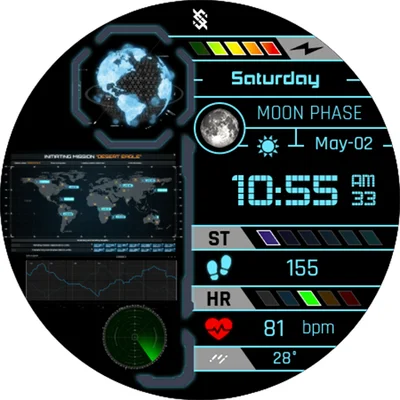
BFF64 – Technologie Erde & Karte von BFF-Storm.
Zifferblattfunktionen: (Siehe Bildbeschreibung)
- 12-/24-Stunden-Anzeige (abhängig von den Telefoneinstellungen)
- Zeitinformationen: Tag, Monat
- Gesundheitsinformationen: Schrittzähler, Herzfrequenz
- Akku
Weitere anpassbare Informationen
- Optionaler Rahmen (8)
- Optionale Stoppanimation
- Optionale Farbe (16)
Always-on-Display-Unterstützung:
- Das Always-on-Display wird vollständig wie Ihr normales Display angezeigt.
App-Verknüpfungen:
- 3 anpassbare App-Verknüpfungen. (Die Position der 3 Schaltflächen ist in der Bildbeschreibung dargestellt.)
Weitere Details finden Sie in unserer Bildbeschreibung.
Anpassen:
1. Bildschirm berühren und halten.
2. Auf „Anpassen“ tippen.
Video-Tutorial und Beschreibung des Zifferblatts:
https://www.youtube.com/watch?v=koiiZEM0r90
Besuchen Sie uns auf:
Facebook: https://www.facebook.com/BFFKINGSTORM
Instagram: https://www.instagram.com/bffstormer/
Webseite: https://bffstormwatchface.com/
Vielen Dank!
Originaltext anzeigen
NOTE : You need to make sure the Google Play account on your phone and watch is the same. To avoid the situation: "Your devices are not compatible".
NOTE: The Watch faces sold by BFF-Storm on the Play Store are currently in the process of feature completion based on Samsung's new Wear Os Google / One UI operating system. So we are committed to update the watch face as soon as possible if a new function is completed. And when you have problems using it, you can contact us via gmail:
support@bffstormwatchface.com
We will support and answer questions 24/7.
NOTE: Make sure you have enabled all permissions from settings -> Applications.
NOTE: How to install watch face?
1 - Make sure the watch is connected to the electricity via bluetooth, open the watch face app page to install.
Open the "Install on more device" option (Triangle icon to the right of the free install or purchase button).
Turn off the settings on the phone just to set it on the watch. And do the installation.
After successful installation, a notification will be displayed on the watch, you can search the application on the watch.
If the app doesn't appear on the watch, open the Galaxy Wearable app on your phone, select watch faces and scroll down to the downloaded apps section and select watch faces to have them show up on the watch.
2 - If you have installed companion apps on your phone by mistake, you can delete them once the watch face has been installed.
3 - If you have sync problems between your phone, Play Store and watch, install watch face directly from your watch, or you can try from your PC web browser or visit our website to Search product.
This watch face supports all Wear OS devices with API Level 30+.
NOTE : Customize button:
-Tap to select app shortcut
-Tap to open the app shortcut
NOTE : You can tap the battery icon to open the Menu. And tap again if you want to back. The menu will assist you to use the shortcuts we have installed. (You can see the instructions in the picture section)
NOTE : Some features may not be available on some watches. This watch face will not apply to square face watches.
The BFF64- Technology Earth & Map by BFF-Storm.
Watch Face Features: (You can see them on the picture description)
- 12/24Hr based on phone settings
- Time information: Day, Month
- Health information: Step counts, Heart rate.
- Battery
Other customized information
- Optional Border *8
- Optional Stop Animation
- Optional color *16
Always on display supports:
- The AOD screen will be fully displayed as the normal screen you have installed.
App shortcuts :
-3 customize app shortcuts. (You can see in the image description for where the 3 buttons are.)
You can see more details on our image description.
Customize :
1 - Touch and hold the screen
2 - Tap on customize option
Video tutorial and description of watch face:
https://www.youtube.com/watch?v=koiiZEM0r90
Please visit us at:
Facebook: https://www.facebook.com/BFFKINGSTORM
Instagram: https://www.instagram.com/bffstormer/
Webpage: https://bffstormwatchface.com/
Thank You !!
Datensicherheit
Was BFF-KING STORM bei Google Play zu den Daten angibt, die diese App erfasst und weitergibt.
- Keine Daten werden mit Drittunternehmen oder -organisationen geteiltWeitere Informationen dazu, wie Entwickler Angaben zur Weitergabe von Daten machen
- Keine Daten erhobenWeitere Informationen dazu, wie Entwickler Angaben zur Datenerhebung machen
Neue Funktionen
01.10.2026
BFF64- Technology Earth & Map
Kontakt zum Entwickler
- Websitebffstormwatchface.com
- E-Mail13kdollarmonth@gmail.com
- Datenschutzerklärungbffstormwatchface.com
- AdresseT. Dong Vien - X. Phu Dong - H. Gia Lam - TP. Ha Noi Hà Nội 10000 Vietnam
Informationen
- Angeboten von
- BFF-KING STORM
- Kategorie
- Personalisierung
- Aktualisiert
- 01.10.2026
- Veröffentlicht
- 26.05.2026
- Altersfreigabe
- USK ab 0 Jahren
- Preis
- 1,39 €
- Paketname
- com.BFF.watchfacestudio.bff64.animation.bff.technology.hud.earth.map.radar