Binary Clock Watch Face
Open Sourcerer- USK ab 0 JahrenAltersfreigabe
- PersonalisierungKategorie
- 30.10.2026Aktualisiert
- 0,99 €Preis
Verlinkt auf den offiziellen Google Play-Eintrag von com.opensourcerer.watchface.premium.binaryclock. Zuletzt geprüft am 13.11.2026.
Über diese App
Automatische Übersetzung von Google. Originalsprache: Englisch (Vereinigtes Königreich).
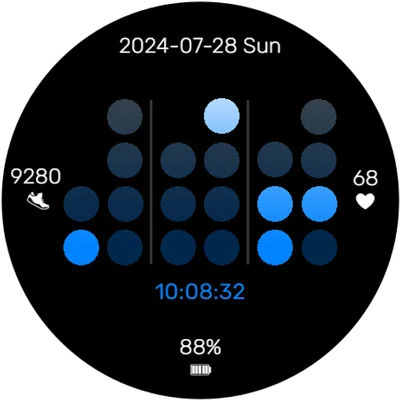
Zifferblatt, das die Zeit im Binärformat anzeigt!
Heben Sie sich von der Masse ab mit einem Zifferblatt, das die Zeit im Binärsystem anzeigt!
Funktionen:
- 8 farbenfrohe Designs
- 2 anpassbare Komplikationsplätze
- Binär- und Digitalanzeige der Zeit
- Lade-/Akkustandsanzeige
- Klares und effizientes Always-On-Display
- Kompatibel mit fast allen Wear OS Smartwatches
Angezeigte Informationen:
- Uhrzeit
- Datum
- Wochentag
- Akkustand (mit zusätzlichen Lade- und Akkustandsanzeigen)
- Schrittzähler
- Herzfrequenz
- 2 anpassbare Komplikationsplätze
Für Smartwatches mit Wear OS.
Auch auf Ihrem Smartphone! Dieses Zifferblatt ist als Smartphone-App verfügbar. Betrachten Sie es in allen Stilen, in Originalgröße und direkt an Ihrem Handgelenk – per Kamera oder Foto. Erfahren Sie, was die einzelnen Einstellungen bewirken, bevor Sie sie auf der Uhr ändern, wählen Sie die passenden Hintergrundbilder und öffnen Sie das Zifferblatt mit einem Fingertipp im Play Store Ihrer Uhr. Schritt-für-Schritt-Anleitungen helfen Ihnen bei der Installation, Anpassung und Einrichtung. Entdecken Sie die gesamte Open Sourcerer-Kollektion und erfahren Sie mehr über neue Zifferblätter.
Originaltext anzeigen
Stand out from the crowd with a watch face that shows time in Binary!
Features:
- 8 colorful themes
- 2 customizable complication slots
- Binary & Digital time display
- Charging / low battery indicator
- Clean and efficient Always On Display
- Compatible with almost all Wear OS smartwatches
Displayed information:
- Time
- Date
- Weekday
- Battery level (with additional charging and low battery indicators)
- Step count
- Heart rate
- 2 customizable complication slots
For smartwatches with Wear OS operating system.
On your phone, too
This watch face comes with a phone app. See it in every style, at its true size, and on your own wrist through the camera or a photo. Find out what each setting does before you change it on the watch, set the matching wallpapers, and open the face in your watch’s Play Store in a tap. Step-by-step guides help you install it, customise it and put things right. Browse the whole Open Sourcerer collection, and hear about new faces.
Datensicherheit
Was Open Sourcerer bei Google Play zu den Daten angibt, die diese App erfasst und weitergibt.
- Keine Daten werden mit Drittunternehmen oder -organisationen geteiltWeitere Informationen dazu, wie Entwickler Angaben zur Weitergabe von Daten machen
- Keine Daten erhobenWeitere Informationen dazu, wie Entwickler Angaben zur Datenerhebung machen
- Hat sich verpflichtet, den Google Play-Richtlinien für familienfreundliche Inhalte zu folgen
Neue Funktionen
30.10.2026
This watch face now has a phone app. See it in every style, at its true size and on your own wrist through the camera. Find out what each setting does, set the matching wallpapers, and open the face in your watch’s Play Store in a tap. Browse the whole Open Sourcerer collection, and hear about new faces.
Kontakt zum Entwickler
- E-MailOpenSourcerer.help@gmail.com
- Datenschutzerklärungsites.google.com
- AdresseBrolių g. 10 02152 Vilnius Lithuania
Informationen
- Angeboten von
- Open Sourcerer
- Kategorie
- Personalisierung
- Aktualisiert
- 30.10.2026
- Veröffentlicht
- 09.07.2024
- Altersfreigabe
- USK ab 0 Jahren
- Preis
- 0,99 €
- Paketname
- com.opensourcerer.watchface.premium.binaryclock