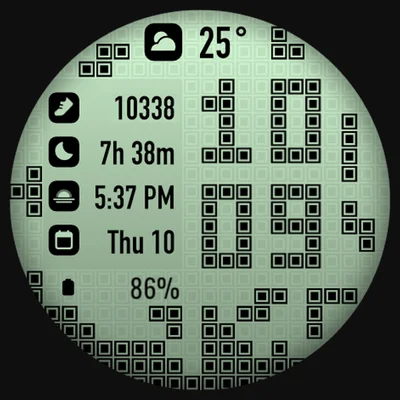
Bricks Game Watch Face
MDS Watch Faces- USK ab 0 JahrenAltersfreigabe
- PersonalisierungKategorie
- 11.04.2025Aktualisiert
- 1,39 €Preis
Verlinkt auf den offiziellen Google Play-Eintrag von com.mdswatchfaces.bricksgameretro. Zuletzt geprüft am 28.11.2026.
Über diese App
Automatische Übersetzung von Google. Originalsprache: Englisch (Vereinigte Staaten).
Spiel – Retro – Steine – Digital – LCD – Display – Oldschool
Nur für Wear OS-Geräte
Telegram-Kanal
t.me/mdswatchfaces
Einige der benutzerdefinierten Komplikationen, die in Screenshots von Store-Einträgen angezeigt werden, stammen von Apps von Drittanbietern. Dieses Zifferblatt enthält sie nicht.
Stellen Sie sicher, dass Sie alle Berechtigungen unter „Einstellungen“ > „Anwendungen“ aktiviert haben.
Merkmale:
- 12h/24h basierend auf Ihren Telefoneinstellungen
- Verschiedene Farben
- 5 individuelle Komplikationen
- Zifferblattformat ansehen
- Mehrsprachig
- Immer zu sehen
Berühren und halten Sie das Display und tippen Sie dann auf die Option „Anpassen“.
Einige Funktionen sind auf verschiedenen Uhren und Telefonen möglicherweise nicht verfügbar.
WETTER EINSTELLEN
Sie müssen den Standort festlegen, bevor Sie das Zifferblatt einstellen, damit das Wetter funktioniert.
Wir empfehlen
Wetter von Google
https://play.google.com/store/apps/details?id=com.google.android.wearable.weather
Wetterkomplikationen
https://play.google.com/store/apps/details?id=com.weartools.weathercomplications
SimpleWeather-App
https://play.google.com/store/apps/details?id=com.thewizrd.simpleweather
Website
https://mdswatchfaces.com
Instagram
https://www.instagram.com/mdswatchfaces
Facebook
https://www.facebook.com/mdswatchfaces
Originaltext anzeigen
Only for Wear OS devices
Telegram Channel
t.me/mdswatchfaces
Some of the custom complications presented in store listing screenshots come from 3rd party apps. This watch face doesn't include them.
Make sure you have enabled all permission from settings > applications.
Features:
- 12h/24h based on your phone settings
- Different Colors
- 5 Custom complications
- Watch Face Format
- Multi Language
- Always on display
Touch and hold the display, then tap on customize option.
Some features may not be available on different watches and phones.
SETTING WEATHER
You need to set the location before setting the watch face for the weather to work.
We recommend
Weather by Google
https://play.google.com/store/apps/details?id=com.google.android.wearable.weather
Weather Complications
https://play.google.com/store/apps/details?id=com.weartools.weathercomplications
SimpleWeather app
https://play.google.com/store/apps/details?id=com.thewizrd.simpleweather
Website
https://mdswatchfaces.com
Instagram
https://www.instagram.com/mdswatchfaces
Facebook
https://www.facebook.com/mdswatchfaces
Datensicherheit
Was MDS Watch Faces bei Google Play zu den Daten angibt, die diese App erfasst und weitergibt.
- Keine Daten werden mit Drittunternehmen oder -organisationen geteiltWeitere Informationen dazu, wie Entwickler Angaben zur Weitergabe von Daten machen
- Keine Daten erhobenWeitere Informationen dazu, wie Entwickler Angaben zur Datenerhebung machen
Kontakt zum Entwickler
- Websitemdswatchfaces.com
- E-Mailsupport@mdswatchfaces.com
- Datenschutzerklärungmdswatchfaces.com
- AdresseR. Araquém, 258 - Apto 302 Parque Potira CAUCAIA - CE 61648-370 Brasil
Informationen
- Angeboten von
- MDS Watch Faces
- Kategorie
- Personalisierung
- Version
- 1.0.0
- Aktualisiert
- 11.04.2025
- Veröffentlicht
- 11.04.2025
- Altersfreigabe
- USK ab 0 Jahren
- Preis
- 1,39 €
- Paketname
- com.mdswatchfaces.bricksgameretro