CLA022 Dual Face
DB Watch Face- USK ab 0 JahrenAltersfreigabe
- PersonalisierungKategorie
- 22.08.2026Aktualisiert
- 1,29 €Preis
Verlinkt auf den offiziellen Google Play-Eintrag von com.watchfacestudio.cla022dualface. Zuletzt geprüft am 17.11.2026.

Screenshots
Über diese App
Automatische Übersetzung von Google. Originalsprache: Englisch (Vereinigte Staaten).
Exklusiv für Smartwatches mit Wear OS entwickelt.
CLA022 Dual Face ist kompatibel mit allen Wear OS-Geräten mit API Level 34+ oder Wear OS 5+ (Samsung Galaxy Watch 4, 5, 6, 7 und andere).
Funktionen:
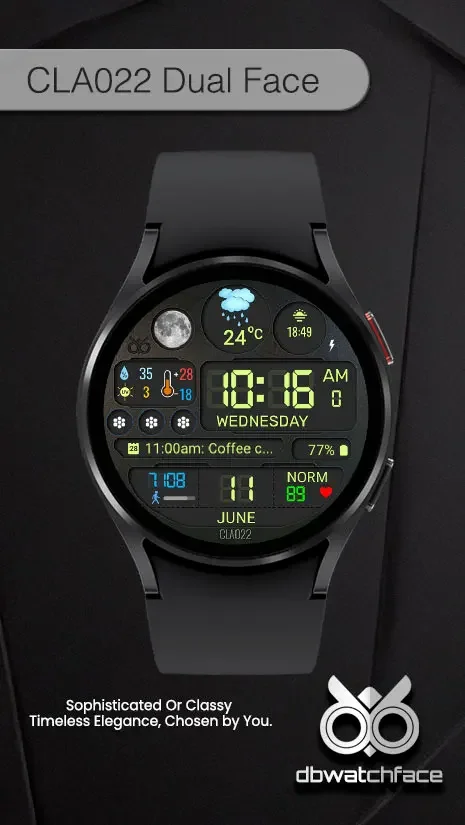
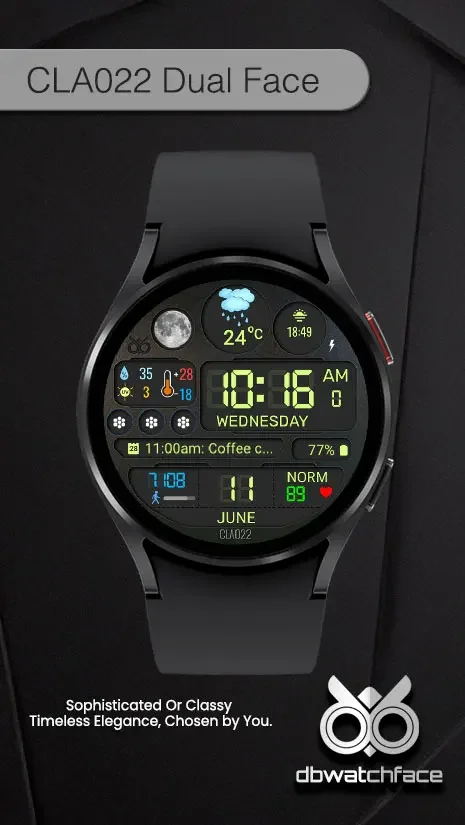
- Dual Face (digital oder analog) – Sie haben die Wahl. Dieses Zifferblatt bietet sowohl digitale als auch analoge Optionen, sodass Sie den passenden Stil für jeden Anlass finden.
Komplikationen sind nur auf dem digitalen Zifferblatt verfügbar.
- Wetterinformationen
- Datum, Monat
- Mondphase
- 12-Stunden-/24-Stunden-Format
- Schrittzähler
- Herzfrequenz
- Batteriestatus
- 2 bearbeitbare Komplikationen
- 3 bearbeitbare App-Verknüpfungen
- Verschiedene Farben
- AOD-Modus (AOD-Helligkeit wählbar)
So passen Sie die Komplikationsinformationen, die Dual Face-Option oder eine Farboption an:
1. Halten Sie das Uhrendisplay gedrückt.
2. Tippen Sie auf die Schaltfläche „Anpassen“.
3. Sie können die Komplikationen mit allen verfügbaren Daten an Ihre Bedürfnisse anpassen, zwischen Kilometern/Meilen wechseln oder aus den verfügbaren Farboptionen wählen.
Das Zifferblatt wird nach der Installation nicht automatisch auf Ihrem Uhrendisplay angezeigt. Sie müssen es manuell auf Ihrer Uhr anwenden.
Originaltext anzeigen
CLA022 Dual Face compatible with all Wear OS devices with API Level 34+ or Wear OS 5+ ( Samsung Galaxy Watch 4, 5, 6, 7 and others).
Features :
- Dual Face (Digital or Analog), The choice is yours. This watch face offers
both digital and analog options, so you can choose the style that suits any
occasion. The Complication only available on the digital watch face.
- Weather Info
- Date, Month
- Moon Phase
- 12H/24H Format
- Step Count
- Heart Rate
- Battery Status
- 2 Editable Complication
- 3 Editable Apps Shortcut
- Different colors
- AOD Mode ( you can choose AOD Brightness )
To customize the complication information, Dual Face Option or choose a color option :
1. Press and hold the watch display
2. Tap the Customize button
3. You can customize the complications with any available data to suit your needs, switch between kilometers/miles or choose from the available color options.
The watch face doesn’t automatically apply to your watch screen after installation, you need to apply it manually from your watch.
Datensicherheit
Was DB Watch Face bei Google Play zu den Daten angibt, die diese App erfasst und weitergibt.
- Keine Daten werden mit Drittunternehmen oder -organisationen geteiltWeitere Informationen dazu, wie Entwickler Angaben zur Weitergabe von Daten machen
- Keine Daten erhobenWeitere Informationen dazu, wie Entwickler Angaben zur Datenerhebung machen
Kontakt zum Entwickler
- E-Maildbwatchface@gmail.com
- Datenschutzerklärungdbwatchface.wordpress.com
- AdresseKomp. Velodrom Kav. 19 RT 004 RW 021 Kel. Padasuka Kec. Cimahi Tengah Cimahi Jawa Barat 40526 Indonesia
Informationen
- Angeboten von
- DB Watch Face
- Kategorie
- Personalisierung
- Aktualisiert
- 22.08.2026
- Veröffentlicht
- 12.06.2025
- Altersfreigabe
- USK ab 0 Jahren
- Preis
- 1,29 €
- Paketname
- com.watchfacestudio.cla022dualface