Control Dash: Watch face
amoledwatchfaces™- USK ab 0 JahrenAltersfreigabe
- EffizienzKategorie
- 04.08.2026Aktualisiert
- 1,49 €Preis
Verlinkt auf den offiziellen Google Play-Eintrag von com.amoledwatchfaces.controldash. Zuletzt geprüft am 13.11.2026.
Über diese App
Automatische Übersetzung von Google. Originalsprache: Englisch (Vereinigte Staaten).
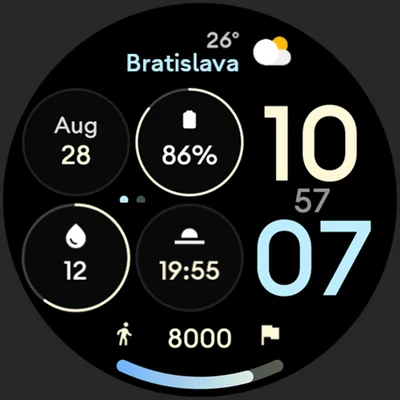
Produktivitäts-Zifferblatt mit 6 benutzerdefinierten Komplikationen und reinschwarzem Hintergrund.
Nur für Geräte mit Wear OS API 28+
// Nicht für rechteckige Uhren geeignet
Unterstützt von Watch Face Format
amoledwatchfaces.com
KAUFEN SIE EINEN, ERHALTEN SIE EIN ANGEBOT!
amoledwatchfaces.com/bogo
BENUTZERDEFINIERTE KOMPLIKATIONS-APPS
amoledwatchfaces.com/apps
FUNKTIONEN
• Zifferblattformat 1
• Dashboard-Optik mit 4 Hauptkomplikationsplätzen
• digitale Sekunden + AMPM-Anzeige (Punkte)
• LONG_TEXT-Komplikation, geeignet für Wetter- oder Nächstes-Ereignis-Komplikationen
• Echtschwarzer Hintergrund
• hohe Auflösung
• Schritte-Fortschrittsbalken
• nutzt WFF (Watch Face Format)
• Wear OS 4-Unterstützung
• PNGQuant-optimierte Ebenen > batteriefreundlich
• Einzigartiger Umgebungsmodus mit niedrigem OPR und adaptiver Farbe sowie zwei optionalen Layouts
• 1x App-Verknüpfungskomplikation
BENUTZERKONFIGURATIONEN
• Farbe (30x)
• Stufenleiste
• AOD (2x)
• Benutzerdefinierte Komplikationen (6x)
Anleitung zur Installation und Fehlerbehebung
amoledwatchfaces.com/guide
Bitte senden Sie etwaige Problemberichte oder Hilfeanfragen an unsere Support-Adresse
support@amoledwatchfaces.com
Treten Sie unserer Telegram-Gruppe für Live-Support und Diskussionen bei
t.me/amoledwatchfaces
Newsletter
amoledwatchfaces.com/contact#newsletter
amoledwatchfaces™ – Awf
Originaltext anzeigen
Only for Wear OS API 28+ devices
// Not suitable for rectangular watches
Powered by Watch Face Format
amoledwatchfaces.com
BUY ONE GET ONE OFFER!
amoledwatchfaces.com/bogo
CUSTOM COMPLICATION APPS
amoledwatchfaces.com/apps
FEATURES
• Watch Face Format 1
• dashboard look with 4 main complication slots
• digital seconds + AMPM indicator (dots)
• LONG_TEXT complication suitable for Weather or Next Event complications
• true black background
• high resolution
• steps progress bar
• utilizes WFF (Watch Face Format)
• Wear OS 4 support
• PNGQuant optimized layers > battery friendly
• unique ambient mode with low OPR & adaptive color & two optional layouts
• 1x app shortcut complication
USER CONFIGURATIONS
• Color (30x)
• Steps Bar
• AOD (2x)
• Custom Complications (6x)
Installation and troubleshooting guide
amoledwatchfaces.com/guide
Please send any issues reports or help requests to our support address
support@amoledwatchfaces.com
Join our Telegram group for live support and discussion
t.me/amoledwatchfaces
Newsletter
amoledwatchfaces.com/contact#newsletter
amoledwatchfaces™ - Awf
Datensicherheit
Was amoledwatchfaces™ bei Google Play zu den Daten angibt, die diese App erfasst und weitergibt.
- Keine Daten werden mit Drittunternehmen oder -organisationen geteiltWeitere Informationen dazu, wie Entwickler Angaben zur Weitergabe von Daten machen
- Keine Daten erhobenWeitere Informationen dazu, wie Entwickler Angaben zur Datenerhebung machen
Neue Funktionen
Version 1.0.10 · 04.08.2026
v1.1.0
• added Am-Pm Indicator toggle
v1.0.8
• huge optimizations (decreased watchface.xml size by 75%)
• bottom slot Arc is now fully customizable (RANGED_VALUE, LONG_TEXT)
• better gradient previews
• correct AOD handling
v1.0.7
• minified watchface.xml
v1.0.6
• rebuilt in Android Studio using Watch Face Format 1
• removed unused resources
• optimizations
Note: Remove watch face from favorites and add it back to ensure watch face runs smoothly after update.
Kontakt zum Entwickler
- Websiteamoledwatchfaces.com
- E-Mailsupport@amoledwatchfaces.com
- Datenschutzerklärungamoledwatchfaces.com
- Adresse51 Nižný Kručov 09301 Nižný Kručov Slovakia
Informationen
- Angeboten von
- amoledwatchfaces™
- Kategorie
- Effizienz
- Version
- 1.0.10
- Aktualisiert
- 04.08.2026
- Veröffentlicht
- 16.08.2023
- Altersfreigabe
- USK ab 0 Jahren
- Preis
- 1,49 €
- Paketname
- com.amoledwatchfaces.controldash