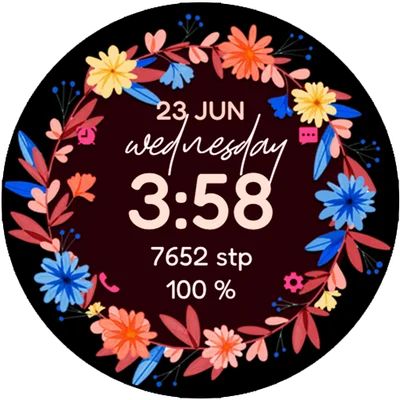
Digital Flowers Watchface
Bloomfield Watchfaces- USK ab 0 JahrenAltersfreigabe
- PersonalisierungKategorie
- 19.09.2022Aktualisiert
- 1,19 €Preis
Verlinkt auf den offiziellen Google Play-Eintrag von com.bloomfield.digitalflowerswatchface. Zuletzt geprüft am 21.11.2026.
Über diese App
Automatische Übersetzung von Google. Originalsprache: Englisch (Vereinigte Staaten).
Stilvolles digitales Zifferblatt
Blumen-Zifferblatt für WEAR OS
INSTALLATIONSHINWEISE!
* Stellen Sie sicher, dass die Uhr richtig mit dem Telefon verbunden ist. Warten Sie einige Minuten, bis das Watchface auf die Uhr übertragen wurde, öffnen Sie die Playstore-App auf Ihrer Uhr, suchen Sie nach dem Watchface und installieren Sie es.
* Wenn Sie Synchronisierungsprobleme zwischen Ihrem Telefon und dem Play Store haben, installieren Sie die App direkt von der Uhr: Suchen Sie das Zifferblatt von Play Store ON WATCH und klicken Sie auf die Schaltfläche „Installieren“.
* Verwenden Sie bei Geräteinkompatibilität / „Diese App ist für Ihr Gerät nicht verfügbar“ den Play Store in einem WEB-Browser (CHROME) auf einem PC oder Laptop, anstatt die Playstore-App auf dem Telefon zu verwenden.
Kopieren Sie den Watchface-Link, fügen Sie ihn in einen WEB-Browser (CHROME) ein und installieren Sie ihn.
* Aktivieren Sie alle Berechtigungen von Einstellungen -> Anwendungen -> Berechtigungen.
* Dieses Watchface wurde mit Samsungs „Watch Face Studio“-Tool für Geräte entwickelt, die auf dem neuen Samsung-Betriebssystem Wear OS Google / One UI wie Samsung Galaxy Watch 4 basieren.
Merkmale:
-12/24-Stunden-Digitalzeit (automatische Synchronisierung, basierend auf den Telefoneinstellungen)
-Datum (mehrsprachig)
-5 voreingestellte App-Shortcuts (einmaliges Antippen zum Öffnen)
Einstellungen, Wecker, Kalender, Nachrichten und Telefon
*** Einige Komplikationen werden möglicherweise nicht sofort auf dem Display angezeigt. Die Anzeige hängt von den installierten Apps auf Ihrer Uhr ab.
-Always-On (AOD)
-Änderbare LCD- und Schriftfarben (Display berühren und halten. Tippen Sie auf die Option zum Anpassen)
*Einige Funktionen sind bei manchen Uhren möglicherweise nicht verfügbar.
Vollständige Sammlung: https://play.google.com/store/apps/developer?id=Bloomfield+Watchfaces
Kontaktieren Sie uns unter: bloomfieldwatchfaces@gmail.com
Facebook-Seite: https://www.facebook.com/bloomfieldwatchfaces
Galaxy-Store: https://galaxy.store/ALwatches
https://www.youtube.com/watch?v=IIi7s0Uio8Q
Originaltext anzeigen
Flowers Themed Watch Face for WEAR OS
INSTALLATION NOTES!
* Make sure the watch is properly connected to the phone. Wait for a few minutes for the watchface to be transferred on watch, open the playstore app on your watch and search for the watchface then install.
* If you are having synchronization problems between your phone and Play Store, install the app directly from watch: search the watchface from Play Store ON WATCH and hit on install button.
* For device incompatibility / "This app is not available for your device", use Play Store on a WEB browser (CHROME) from PC or Laptop instead of using the playstore app on phone.
Copy and paste the watch face link on a WEB browser (CHROME) and install.
* Enable all permissions from settings -> applications -> permissions.
* This watch face was developed with Samsung's "Watch Face Studio" tool for devices based on the new Wear OS Google / One UI Samsung operating system like Samsung Galaxy Watch 4.
Features:
-12/24hr digital time (auto-sync, based on phone settings)
-Date (Multi-language)
-5 Preset App Shortcuts (Single tap to open)
Settings, Alarm, Calendar, Messages & Phone
***Some complications data may not appear immediately on display. Display depends on the installed apps on your watch.
-Always-On (AOD)
-Changeable LCD and font colors (Touch and hold display. Tap on customize option)
*some features may not be available on some watches.
Full Collection: https://play.google.com/store/apps/developer?id=Bloomfield+Watchfaces
Contact us at: bloomfieldwatchfaces@gmail.com
Facebook Page: https://www.facebook.com/bloomfieldwatchfaces
Galaxy Store: https://galaxy.store/ALwatches
https://www.youtube.com/watch?v=IIi7s0Uio8Q
Datensicherheit
Was Bloomfield Watchfaces bei Google Play zu den Daten angibt, die diese App erfasst und weitergibt.
- Keine Daten werden mit Drittunternehmen oder -organisationen geteiltWeitere Informationen dazu, wie Entwickler Angaben zur Weitergabe von Daten machen
- Keine Daten erhobenWeitere Informationen dazu, wie Entwickler Angaben zur Datenerhebung machen
Kontakt zum Entwickler
- Websitefacebook.com
- E-Mailbloomfieldwatchfaces@gmail.com
- Datenschutzerklärungsites.google.com
- Adresse0015 BLOCK 5 BLK Beverly Homes Hugo Perez, Trece Martirez City 4109 Philippines
Informationen
- Angeboten von
- Bloomfield Watchfaces
- Kategorie
- Personalisierung
- Aktualisiert
- 19.09.2022
- Veröffentlicht
- 19.09.2022
- Erfordert
- Android 9 oder höher
- Altersfreigabe
- USK ab 0 Jahren
- Preis
- 1,19 €
- Paketname
- com.bloomfield.digitalflowerswatchface