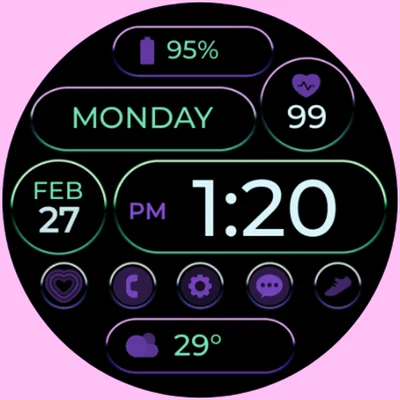
Digital Watchface
Bloomfield Watchfaces- USK ab 0 JahrenAltersfreigabe
- PersonalisierungKategorie
- 02.11.2023Aktualisiert
- 0,79 €Preis
Verlinkt auf den offiziellen Google Play-Eintrag von com.bloomfield.digitalwatchface. Zuletzt geprüft am 24.11.2026.
Über diese App
Automatische Übersetzung von Google. Originalsprache: Englisch (Vereinigte Staaten).
Bitte vor dem Kauf lesen!
⚠️⚠️⚠️WICHTIGE HINWEISE
*** Unser Ziel ist es, Ihnen das beste Zifferblatt zu bieten und es zu genießen. Einige 1-Stern ⭐️-Bewertungen stammen normalerweise von denen, die wir mit der Installation von Watchfaces nicht so vertraut sind. Bevor Sie wütend werden und uns unfair bewerten, kontaktieren Sie uns unter bloomfieldwatchfaces@gmail.com und wir senden Ihnen Screenshots und Anweisungen zur Installation des Watchface. Wir sind gerne bereit, Ihnen Schritt für Schritt zu helfen.
ACHTUNG❗️❗️❗️
1️⃣ Watchfaces werden automatisch auf der Uhr installiert. (Während der Installation wird ein Download-Symbol auf dem Bildschirm angezeigt)
2️⃣ STELLEN SIE SICHER, DASS DIE UHR STARK ÜBER BLUETOOTH MIT IHREM TELEFON VERBUNDEN IST UND DASSELBE WLAN VERWENDET. FÜR DIE NAHTLOSE INSTALLATION MÜSSEN SIE SICH AUCH „ON WATCH“ BEI IHREM GOOGLE-KONTO ANMELDEN.
3️⃣ WARTEN Sie nach dem Herunterladen einige Minuten, bis das Zifferblatt auf die Uhr übertragen wurde. (Es wird eine Benachrichtigung auf Ihrer Uhr angezeigt, wenn das Watchface erfolgreich übertragen wurde.)
4️⃣ Wenn es keine Benachrichtigung gibt, gehen Sie zu PLAYSTORE AUF IHRER UHR und geben Sie im SUCHFELD „Digital Watchface“ ein.
5️⃣ Das Zifferblatt wird angezeigt, dann klicken Sie auf die Schaltfläche „Installieren“.
❗️Watchfaces ändern sich nach erfolgreicher Installation nicht automatisch. Gehen Sie zurück zur Startanzeige. Tippen und halten Sie das Display, wischen Sie bis zum Ende und tippen Sie auf +, um das Zifferblatt hinzuzufügen. Drehen Sie die Lünette, um das Zifferblatt zu finden.
📍Weitere Informationen zur Installation finden Sie in den Funktionsgrafiken.
📍Samsung-Entwickler haben ein hilfreiches Video zur Installation des Wear OS-Zifferblatts auf so viele Arten bereitgestellt: https://youtu.be/vMM4Q2-rqoM
* ERLAUBEN / AKTIVIEREN Sie alle Berechtigungen von Einstellungen -> Anwendungen -> Berechtigungen.
⚠️ Rückerstattung ist nur innerhalb von 48 Stunden möglich.
📍Dieses Watchface wurde mit Samsungs „Watch Face Studio“-Tool für Geräte entwickelt, die auf dem neuen Wear OS Google / One UI Samsung-Betriebssystem wie Samsung Galaxy Watch 4 basieren.
📍WEAR OS API Llevel 28+ Geräte werden unterstützt.
📍EIGENSCHAFTEN:
-12/24-Stunden-Digitalzeit (automatische Synchronisierung, basierend auf den Telefoneinstellungen)
-Datum (mehrsprachig)
- Voreingestellte App-Verknüpfungen (einmaliges Antippen zum Öffnen / fest, nicht bearbeitbar) Alarm, Kalender und Herzfrequenzaktivität
📍7 anpassbare Komplikationen (ÄNDERBAR)
Verschiedene Komplikationen zur Auswahl; Wetter, Schritte, Sonnenuntergang/Sonnenaufgang, nächster Termin, Einstellungsverknüpfung, Telefonverknüpfung, Nachrichtenverknüpfung und mehr.
-Always-On (AOD)
-Änderbare LCD-Stile und Schriftfarbenpalette (Display berühren und halten. Tippen Sie auf die Option zum Anpassen. Sehen Sie sich die Funktionsgrafiken für das Tutorial an)
Messung der Herzfrequenz
❤️ Tippen Sie einmal auf das Herzsymbol, um die Herzfrequenzaktivität zu öffnen. Dieses Zifferblatt zeigt die Herzfrequenz zum Zeitpunkt der Messung an und kann von der Wear OS-App abweichen.
❤️ Falls die Herzfrequenzdaten nicht angezeigt werden, wechseln Sie zu einem anderen Zifferblatt und dann zurück, um die Benachrichtigung anzuzeigen, um dem Sensor die Erlaubnis zu geben, HR-Daten anzuzeigen. (mach es 2 mal)
📍GEDULD IST DER SCHLÜSSEL!
Bitte haben Sie etwas Geduld und denken Sie daran, dass wir keine Kontrolle über das Installationsproblem haben. Unsere Watchface-Apps werden gründlich auf einem echten Gerät (Galaxy Watch 4) getestet und vom Google Play Store-Team überprüft und genehmigt, bevor sie veröffentlicht werden. Wir möchten sicherstellen, dass die Benutzer unsere Zifferblätter genießen.
📍Einige Funktionen sind möglicherweise auf einigen Uhren nicht verfügbar.
Vollständige Sammlung: https://play.google.com/store/apps/developer?id=Bloomfield+Watchfaces
Kontaktieren Sie uns unter: bloomfieldwatchfaces@gmail.com
Facebook-Seite: https://www.facebook.com/bloomfieldwatchfaces
YouTube-Installationsanleitung: https://www.youtube.com/watch?v=vMM4Q2-rqoM
Originaltext anzeigen
⚠️⚠️⚠️IMPORTANT NOTES
***It is our aim to give you the best watchface and enjoy it. Some 1 star ⭐️ ratings are usually from those who we're not so familiar in installing watchfaces. Before you get angry and rate us unfairly, reach us out at bloomfieldwatchfaces@gmail.com and we will send you sceeenshots and instructions how to install the watchface. We are more than willing to help you step by step.
TAKE NOTE❗️❗️❗️
1️⃣ Watchfaces automatically install on watch. (There will be a download icon on screen while installing)
2️⃣ MAKE SURE THE WATCH IS STRONGLY CONNECTED TO YOUR PHONE VIA BLUETOOTH AND ARE USING THE SAME WIFI. MUST ALSO LOG IN TO YOUR GOOGLE ACCOUNT "ON WATCH" FOR SEAMLESS INSTALLATION.
3️⃣ After download, WAIT for a few minutes for the watchface to be transferred on watch. (There will be a notification on your watch if the watchface was successfully transferred.)
4️⃣ If incase there is no notification, Go to PLAYSTORE ON YOUR WATCH and type on the SEARCH BOX "Digital Watchface"
5️⃣ The watchface will show up, then hit on install button.
❗️Watchfaces don't automatically change after successful installion. Go back to home display. Tap and hold display, swipe until the end and tap + to add the watchface. Rotate Bezel to find the watchface.
📍Please see Feature Graphics for more details how to install.
📍Samsung Developers provided a helpful video in installing Wear OS watch face in so many ways: https://youtu.be/vMM4Q2-rqoM
* ALLOW / ENABLE all permissions from settings -> applications -> permissions.
⚠️ Refund is only allowed within 48 hours.
📍This watch face was developed with Samsung's "Watch Face Studio" tool for devices based on the new Wear OS Google / One UI Samsung operating system like Samsung Galaxy Watch 4.
📍WEAR OS API Llevel 28+ devices are supported.
📍FEATURES:
-12/24hr Digital Time (auto-sync, based on phone settings)
-Date (Multi-language)
-Preset App Shortcuts (Single tap to open/ fixed not editable) Alarm, Calendar and Hear Rate Activity
📍7 Customizable Complications (CHANGEABLE)
Different complications to choose from; weather, steps, sunset/sunrise, next appointment, settings shortcut, phone shortcut, message shortcut and more.
-Always-On (AOD)
-Changeable LCD styles and font color palette (Touch and hold display. Tap on customize option. See feature graphics for tutorial)
Measuring Heart Rate
❤️ Single TAP heart icon to open heart rate activity. This watch face displays the heart rate at the time of measurement and it may have different reading from the Wear OS app.
❤️ In case the heart rate data is not showing, switch to another watchface and then switch back to show the notification to allow sensor permission to show HR data. (Do it 2 times)
📍PATIENCE IS THE KEY!
Please be patient and be reminded that we don't have control over the installation issue. Our watch face apps are thoroughly tested in a real device (Galaxy Watch 4) and are reviewed and approved by the Google Play Store team before publishing them. We aim to make sure users will enjoy our watch faces.
📍Some features may not be available on some watches.
Full Collection: https://play.google.com/store/apps/developer?id=Bloomfield+Watchfaces
Contact us at: bloomfieldwatchfaces@gmail.com
Facebook Page: https://www.facebook.com/bloomfieldwatchfaces
Youtube Installation Tutorial: https://www.youtube.com/watch?v=vMM4Q2-rqoM
Datensicherheit
Was Bloomfield Watchfaces bei Google Play zu den Daten angibt, die diese App erfasst und weitergibt.
- Keine Daten werden mit Drittunternehmen oder -organisationen geteiltWeitere Informationen dazu, wie Entwickler Angaben zur Weitergabe von Daten machen
- Keine Daten erhobenWeitere Informationen dazu, wie Entwickler Angaben zur Datenerhebung machen
Kontakt zum Entwickler
- Websitefacebook.com
- E-Mailbloomfieldwatchfaces@gmail.com
- Datenschutzerklärungsites.google.com
- Adresse0015 BLOCK 5 BLK Beverly Homes Hugo Perez, Trece Martirez City 4109 Philippines
Informationen
- Angeboten von
- Bloomfield Watchfaces
- Kategorie
- Personalisierung
- Version
- 1.10
- Aktualisiert
- 02.11.2023
- Veröffentlicht
- 23.09.2022
- Erfordert
- Android 11 oder höher
- Altersfreigabe
- USK ab 0 Jahren
- Preis
- 0,79 €
- Paketname
- com.bloomfield.digitalwatchface