DS D011+
Douglas Silva :: Dect- USK ab 0 JahrenAltersfreigabe
- PersonalisierungKategorie
- 08.09.2025Aktualisiert
- 1,79 €Preis
Verlinkt auf den offiziellen Google Play-Eintrag von dev.dect.wear.watchface.dsd011plus. Zuletzt geprüft am 23.11.2026.
Über diese App
Automatische Übersetzung von Google. Originalsprache: Englisch (Vereinigte Staaten).
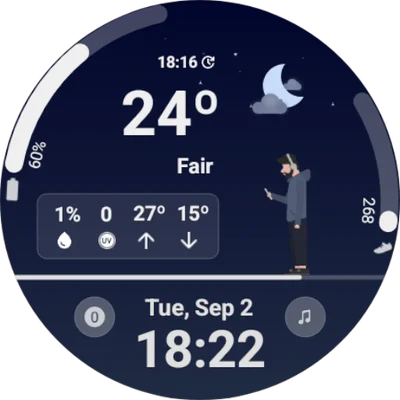
DS D011 Plus ist ein animiertes Wetter-Zifferblatt für Wear OS.
DS D011 Plus ist ein animiertes Wetter-Zifferblatt für Wear OS.
Funktionen¹:
– 4 Schriftarten (+ Geräteschriftart) für die Digitaluhr;
– 4 Schriftarten (+ Geräteschriftart) für Wetterinformationen;
– Zweiter Fortschrittsbalken ein-/ausblenden;
– Letzte Wetteraktualisierungszeit ein-/ausblenden;
– 5 Optionen für zusätzliche Wetterinformationen²:
= Detailliert;
= Niederschlag (nächste Tage);
= Wetter (nächste Stunden);
= Wetter (nächste Tage);
= Temperatur (nächste Stunden).
– Hintergrund für zusätzliche Informationen ein-/ausblenden;
– 3 Animationsoptionen:
= Auf dem Zifferblatt sichtbar;
= Beim Minutenwechsel (einmal pro Minute);
= Beim Stundenwechsel (einmal pro Stunde).
– Option zur Anzeige einer statischen Hintergrundfarbe:
= 20 Farben.
– 3 AOD-Modi:
= Schwarzer Hintergrund;
= Dunkel;
= Nur Uhr/Datum.
– Mehrere Instanzen zulässig.
- 4 Komplimente:
= 2 Shortcuts (jeweils einer auf jeder Seite der Uhr/des Datums | MONOCHROMATIC_IMAGE oder SMALL_IMAGE);
= Komplikation am linken Rand (RANGED_VALUE, GOAL_PROGRESS, LONG_TEXT oder SHORT_TEXT);
= Komplikation am rechten Rand (RANGED_VALUE, GOAL_PROGRESS, LONG_TEXT oder SHORT_TEXT).
¹ Ich empfehle, die kostenlose Version vor dem Kauf zu testen!
² Es kann nur eine zusätzliche Information angezeigt/ausgewählt werden.
Warnungen und Alarme
- Erstellt im Watch Face Format Version 2 (WFF);
- Wetterdaten, Verfügbarkeit, Genauigkeit und Aktualisierungsfrequenz werden von Wear OS bereitgestellt. Dieses Zifferblatt zeigt nur die vom System bereitgestellten Daten an. Falls keine Informationen zur Anzeige verfügbar sind, wird ein „?“ angezeigt.
- Dieses Zifferblatt ist für Wear OS;
- Es werden keine Daten erfasst!
Originaltext anzeigen
DS D011 Plus is an animated weather watch face for Wear OS.
Features¹:
- 4 fonts (+ device's font) for digital clock;
- 4 fonts (+ device's font) for weather information;
- Show/hide second progress bar;
- Show/hide last weather update time;
- 5 weather extra info option²:
= Detailed;
= Precipitation (next days);
= Weather (next hours);
= Weather (next days);
= Temperature (next hours).
- Show/hide extra info background;
- 3 character animation options:
= On watch face visible;
= On minute change (once per minute);
= On hour change (once per hour).
- Option to show static background color:
= 20 colors.
- 3 AOD mode:
= Black background;
= Dim;
= Clock/date only.
- Multiple instances allowed.
- 4 compliations:
= 2 shortcuts (one on each side of the clock/date | MONOCHROMATIC_IMAGE or SMALL_IMAGE);
= Left edge complication (RANGED_VALUE, GOAL_PROGRESS, LONG_TEXT or SHORT_TEXT);
= Right edge complication (RANGED_VALUE, GOAL_PROGRESS, LONG_TEXT or SHORT_TEXT).
¹ I recommend testing the free version before buying this one!
² Only one extra info can be displayed/picked.
Warning and Alerts
- Built using Watch Face Format version 2 (WFF);
- Weather data, availability, precision and update frequency are provided by Wear OS, this watch face only displays the data provided by the system. In case of no information available to be displayed a "?" will be displayed.
- This watch face is for Wear OS;
- No data is collected!
Datensicherheit
Was Douglas Silva :: Dect bei Google Play zu den Daten angibt, die diese App erfasst und weitergibt.
- Keine Daten werden mit Drittunternehmen oder -organisationen geteiltWeitere Informationen dazu, wie Entwickler Angaben zur Weitergabe von Daten machen
- Keine Daten erhobenWeitere Informationen dazu, wie Entwickler Angaben zur Datenerhebung machen
Neue Funktionen
08.09.2025
v1.0.0
- Release.
Kontakt zum Entwickler
- Websitehms-douglas.github.io
- E-Maildect@outlook.com.br
- Datenschutzerklärunghms-douglas.github.io
- AdresseRua Lino Calda Campos Vila Nunes LORENA - SP 12603-060 Brazil
Informationen
- Angeboten von
- Douglas Silva :: Dect
- Kategorie
- Personalisierung
- Aktualisiert
- 08.09.2025
- Veröffentlicht
- 05.09.2025
- Altersfreigabe
- USK ab 0 Jahren
- Preis
- 1,79 €
- Paketname
- dev.dect.wear.watchface.dsd011plus