Dual Time Watch Face
Corepilots- USK ab 0 JahrenAltersfreigabe
- ToolsKategorie
- 12.10.2026Aktualisiert
- KostenlosPreis
Verlinkt auf den offiziellen Google Play-Eintrag von de.corepilots.dualtime. Zuletzt geprüft am 26.11.2026.
Über diese App
Automatische Übersetzung von Google. Originalsprache: Englisch (Vereinigte Staaten).
Wear OS-Zifferblatt, das Ihre Uhrzeit und die Uhrzeit einer zweiten Stadt sowie die Zeitverschiebung anzeigt.
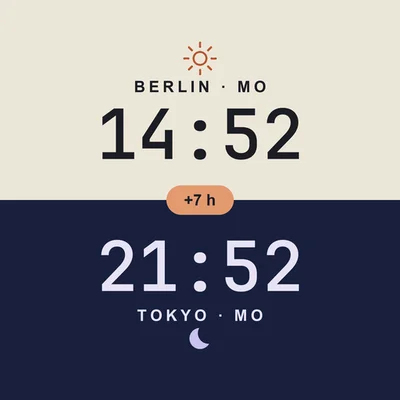
Dual Time ist ein Zifferblatt für Wear OS, das zwei Zeitzonen gleichzeitig anzeigt: Ihre Ortszeit in der oberen Bildschirmhälfte und die Zeit einer zweiten Stadt Ihrer Wahl in der unteren. Ein kleines Symbol in der Mitte zeigt die Zeitdifferenz zwischen beiden Orten an, beispielsweise „+7 Stunden“. Die Sommerzeitumstellung erfolgt automatisch.
... Was das Zifferblatt anzeigt
• Obere Hälfte: Aktuelle Uhrzeit Ihrer Uhr, Stadtname und Wochentag
• Untere Hälfte: Aktuelle Uhrzeit der zweiten Stadt, deren Name und Wochentag
• Mitte: Zeitdifferenz zwischen den beiden Orten, z. B. „+7 Std.“ oder „-13 Std.“
Einstellungen (Zifferblatt gedrückt halten, dann auf das Bearbeitungssymbol tippen)
• Zweite Stadt: Wählen Sie aus 13 Orten: Tokio, Kumamoto, Seoul, Shanghai, Singapur, Sydney, Dubai, London, New York, San Francisco, São Paulo, Berlin oder UTC
• Akzentfarbe: Die mittlere Farbe kann Pfirsich, Bernstein oder Mint sein
• Automatischer Tag-/Nacht-Look (optional): Jede Hälfte wird je nach Ortszeit in ihrer Zeitzone hell oder dunkel angezeigt
Always-on-Display
Im Umgebungsmodus wird der Bildschirm schwarz und beide Uhrzeiten werden als dünne Konturen dargestellt, um Akku zu sparen und das Display zu schonen.
Datenschutz
Das Zifferblatt sammelt keine Daten, benötigt keine Berechtigungen und hat keinen Internetzugang.
Systemvoraussetzungen
Wear OS 6 oder neuer. Es handelt sich hierbei nur um ein Zifferblatt, es gibt keine zugehörige Telefon-App.
Originaltext anzeigen
Dual Time is a watch face for Wear OS that shows two time zones at once: your local time on the top half of the screen and the time in a second city of your choice on the bottom half. A small pill in the middle shows the time difference between both places, for example "+7 h". Daylight saving time is handled automatically.
What the watch face shows
• Top half: current time of your watch, city name and weekday
• Bottom half: current time of the second city, its name and its weekday
• Center: time difference between the two places, for example "+7 h" or "-13 h"
Settings (long-press the watch face, then tap the edit icon)
• Second city: choose from 13 places: Tokyo, Kumamoto, Seoul, Shanghai, Singapore, Sydney, Dubai, London, New York, San Francisco, São Paulo, Berlin or UTC
• Accent color: the center pill can be peach, amber or mint
• Automatic day/night look (optional): each half is shown light or dark depending on the local hour in its own time zone
Always-on display
In ambient mode the screen turns black and both times are drawn as thin outlines to save battery and protect the display.
Privacy
The watch face collects no data, needs no permissions and has no internet access.
Requirements
Wear OS 6 or newer. This is a watch face only and has no phone app.
Datensicherheit
Was Corepilots bei Google Play zu den Daten angibt, die diese App erfasst und weitergibt.
- Keine Daten werden mit Drittunternehmen oder -organisationen geteiltWeitere Informationen dazu, wie Entwickler Angaben zur Weitergabe von Daten machen
- Keine Daten erhobenWeitere Informationen dazu, wie Entwickler Angaben zur Datenerhebung machen
Neue Funktionen
Version 1.0.0 · 12.10.2026
Initial release
Kontakt zum Entwickler
- E-Mailramon.beckmann@gmail.com
- Datenschutzerklärungcorepilots.github.io
- AdresseMoorstraße 13 27367 Hassendorf Germany
Informationen
- Angeboten von
- Corepilots
- Kategorie
- Tools
- Version
- 1.0.0
- Aktualisiert
- 12.10.2026
- Veröffentlicht
- 12.10.2026
- Altersfreigabe
- USK ab 0 Jahren
- Preis
- Kostenlos
- Paketname
- de.corepilots.dualtime