Expressive Island
Sam BeckmanIn-App-Käufe
- USK ab 0 JahrenAltersfreigabe
- ToolsKategorie
- 23.11.2026Aktualisiert
- KostenlosPreis
Verlinkt auf den offiziellen Google Play-Eintrag von app.expressiveisland. Zuletzt geprüft am 23.11.2026.
Screenshots
Über diese App
Automatische Übersetzung von Google. Originalsprache: Englisch (Vereinigte Staaten).
Bringen Sie eine intelligentere, ausdrucksstärkere schwebende Insel auf Ihr Android-Smartphone.
Erleben Sie Expressive Island auf Ihrem Android-Gerät!
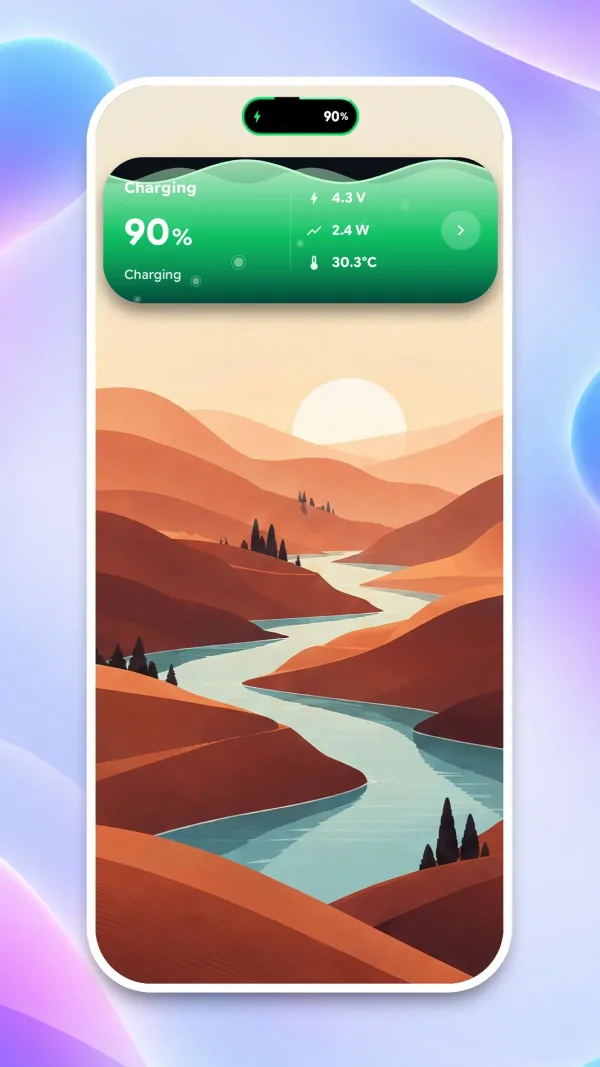
Expressive Island revolutioniert die Bedienung Ihres Smartphones: Nützliche Informationen, Benachrichtigungen, Live-Aktivitäten und Schnellzugriffe werden in einem eleganten, interaktiven Overlay im Pillen-Stil übersichtlich dargestellt.
🎵 LIVE-KARTEN & APP-INTEGRATIONEN
Behalten Sie wichtige Aktivitäten immer im Blick – dank einer stetig wachsenden Sammlung an Integrationen:
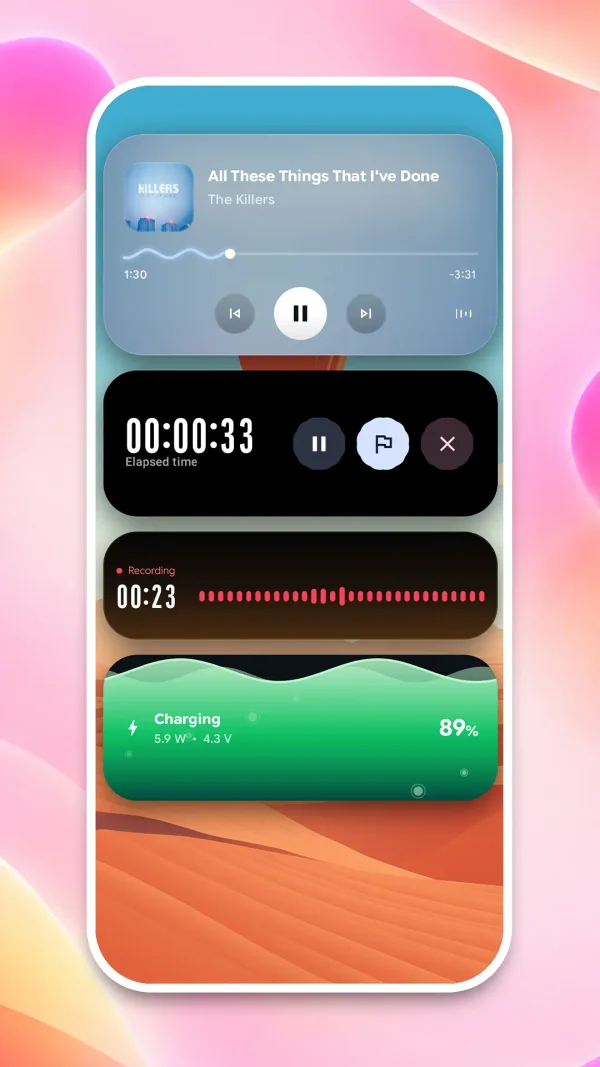
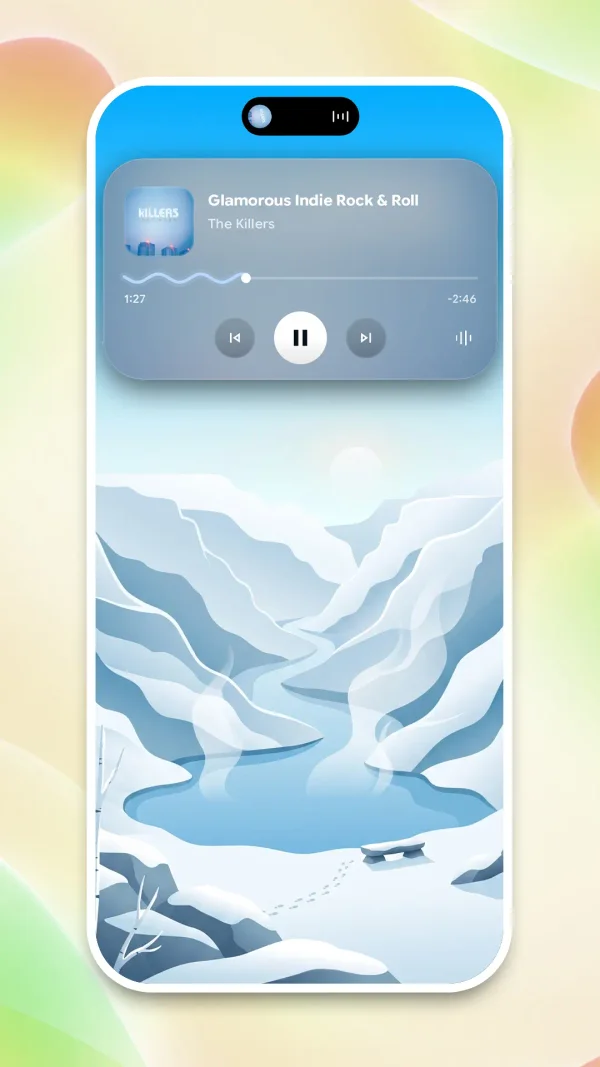
• Mediaplayer: Musik, Podcasts und Hörbücher mit Wiedergabesteuerung ansehen.
• Uhr: Timer und Stoppuhren im Blick behalten.
• Gravl: Trainingspausen-Timer anzeigen.
• Navigation: Unterstützte Google Maps-Navigations-Updates mit Abbiegehinweisen sehen.
• Taschenlampe: Helligkeit der Taschenlampe anpassen.
• Laden: Akkustand und Ladestatus anzeigen.
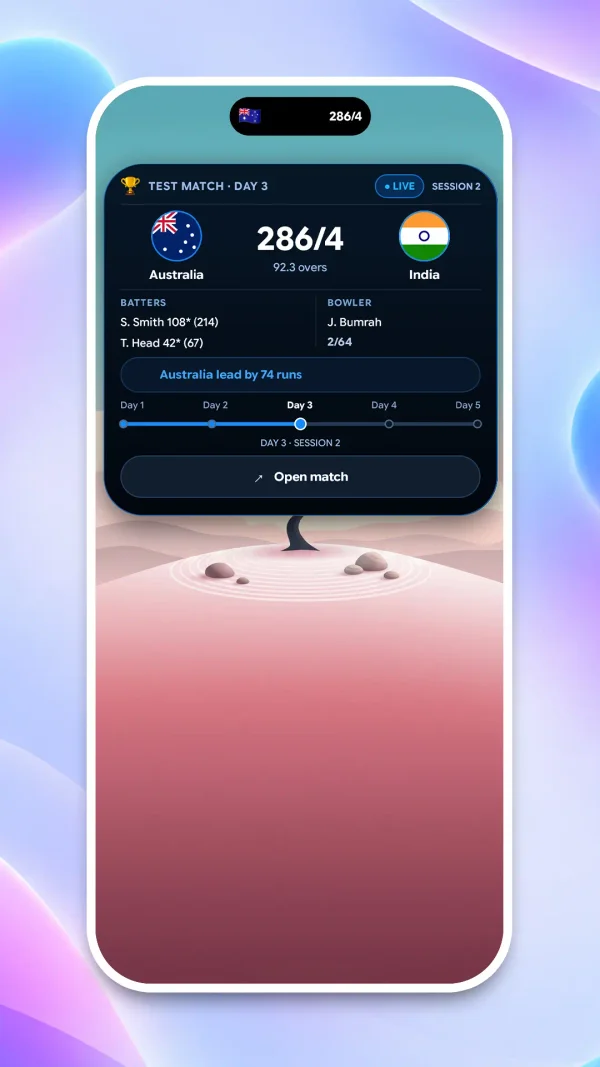
• Sport-Ergebnisse: Unterstützte Google Sports-Live-Ergebnisse und Spiel-Updates verfolgen.
• Sprachaufzeichnung: Unterstützte Google Recorder-Aktivitäten und Aufnahmestatus anzeigen.
• Fortschrittsanzeige: Unterstützte Downloads, Installationen, Kopien und Uploads im Überblick.
🔔 BENACHRICHTIGUNGEN
Inspirieren Sie eingehende Benachrichtigungen in Expressive Island und passen Sie deren Darstellung an.
• Wählen Sie zwischen minimierten und erweiterten Benachrichtigungskarten.
• Legen Sie fest, welche Apps Benachrichtigungen auslösen dürfen.
• Passen Sie an, wie lange minimierte Benachrichtigungen sichtbar bleiben.
• Testen Sie Ihre aktuellen Einstellungen mit einer Testbenachrichtigung.
• Reduzieren Sie die Anzahl der Benachrichtigungen, indem Sie stumme und unwichtige Benachrichtigungen herausfiltern.
👆 VERKNÜPFUNGEN & GESTEN
Konfigurieren Sie Aktionen mit nur einem Fingertipp, um alltägliche Aufgaben zu vereinfachen:
• Screenshot erstellen.
• Android-Widget anzeigen.
• App oder den Sprachassistenten Ihres Geräts starten.
• Taschenlampe ein-/ausschalten.
• Zwischen Ton-, Vibrations- und Stummmodus wechseln.
• Lautstärke- oder Helligkeitseinstellungen öffnen.
Passen Sie das haptische Feedback an und wählen Sie Ihr bevorzugtes haptisches Muster. Optionen für Gesten durch langes Drücken sind ebenfalls verfügbar.
⚙️ INDIVIDUELL ANPASSEN
• Einzelne Integrationen aktivieren oder deaktivieren.
• Unterstützte Karten neu anordnen.
• Ereignisse und Anzeigedauer der ausgeblendeten Kapseln anpassen.
• Verfügbare Positionierungs- und Ausrichtungsoptionen anpassen.
• Auswählen, welche Anwendungen unterstützte Funktionen auslösen dürfen.
💡 SCHNELLSTEUERUNG
Lautstärke, Klangprofile, Bildschirmhelligkeit, adaptive Helligkeit und Taschenlampensteuerung über unterstützte Karten steuern, ohne die aktuelle Anwendung verlassen zu müssen.
🔐 BERECHTIGUNGEN & BARRIEREFREIHEIT
Expressive Island verwendet ein Overlay, um seine Benutzeroberfläche über anderen Apps anzuzeigen. Einige Funktionen erfordern zusätzliche Android-Berechtigungen oder kompatible Apps und Benachrichtigungseinstellungen.
**Barrierefreiheitsdienst:** Expressive Island nutzt den Barrierefreiheitsdienst von Android, um sein interaktives Overlay und bestimmte Integrationen mit anderen Apps zu unterstützen. Dies umfasst das Auslesen relevanter Informationen aus unterstützten Apps, wie z. B. Timer- und Stoppuhrinformationen von Google Clock, und die Interaktion mit unterstützten Steuerelementen, falls erforderlich.
Der Zugriff auf die Barrierefreiheit wird ausschließlich für diese Funktionen verwendet. Die Verarbeitung von Daten zur Barrierefreiheit erfolgt lokal auf Ihrem Gerät. Expressive Island erfasst, speichert oder überträgt keine Daten, die auf Basis der Barrierefreiheitsdaten erhoben wurden.
Die Berechtigung für Bedienungshilfen ist optional. Sie können sie jederzeit ablehnen oder deaktivieren. Beachten Sie jedoch, dass einige Integrationen ohne diese Berechtigung möglicherweise nicht funktionieren. Andere Funktionen stehen Ihnen auch ohne Zugriff auf Bedienungshilfen zur Verfügung.
Der Funktionsumfang kann je nach Gerät, Android-Version und App-Konfiguration variieren.
Expressive Island ist eine unabhängige Android-Anwendung und steht in keiner Verbindung zu Apple, Google oder den Entwicklern integrierter Drittanbieter-Apps.
Originaltext anzeigen
Bring a Dynamic Island experience to Android with Expressive Island!
Expressive Island transforms the way you interact with your phone by bringing useful information, notifications, live activities and quick controls into a sleek, interactive pill-style overlay.
🎵 LIVE CARDS & APP INTEGRATIONS
Keep important activity close at hand with a growing collection of integrations:
• Media Player – View music, podcast and audiobook activity with playback controls.
• Clock – Keep track of timers and stopwatches.
• Gravl – Display workout rest timers.
• Navigation – See supported Google Maps turn-by-turn navigation updates.
• Flashlight – Access torch brightness controls.
• Charging – View battery level and charging status.
• Sports Scoreline – Follow supported Google Sports live scores and match updates.
• Voice Recording – View supported Google Recorder activity and recording status.
• Progress Indication – See supported progress updates for downloads, installations, copying and uploads.
🔔 NOTIFICATIONS
Bring incoming notifications into Expressive Island and customise how they appear.
• Choose minimised or expanded notification cards.
• Select which apps can trigger notifications.
• Adjust how long collapsed notification pills remain visible.
• Preview your current settings with a test notification.
• Reduce clutter by filtering silent and low-importance notifications.
👆 SHORTCUTS & GESTURES
Configure single-tap actions to make everyday tasks easier:
• Take a screenshot.
• Show an Android widget.
• Launch an app or your device's assistant.
• Toggle the flashlight.
• Cycle between Sound, Vibrate and Silent modes.
• Open the Volume or Brightness card.
Customise haptic feedback and choose your preferred haptic pattern. Long-press gesture options are also available.
⚙️ MAKE IT YOUR OWN
• Enable or disable individual integrations.
• Reorder supported cards.
• Customise collapsed capsule events and their display duration.
• Adjust available positioning and alignment options.
• Choose which applications can trigger supported features.
💡 QUICK CONTROLS
Access volume, sound profiles, screen brightness, adaptive brightness and flashlight controls through supported cards, without needing to navigate away from what you're doing.
🔐 PERMISSIONS & ACCESSIBILITY
Expressive Island uses an overlay to display its interface above other apps. Some features require additional Android permissions or compatible apps and notification settings.
**Accessibility Service:** Expressive Island uses Android's Accessibility Service to support its interactive overlay and specific integrations with other apps. This includes reading relevant interface information from supported apps, such as timer and stopwatch information from Google Clock, and interacting with supported controls where required.
Accessibility access is used only to provide these features. Accessibility-related processing is performed locally on your device, and Expressive Island does not collect, remotely store or transmit accessibility-derived content.
The Accessibility permission is optional. You can decline or disable it at any time, although certain integrations may not function without it. Other features remain available without Accessibility access.
Functionality may vary by device, Android version and app configuration.
Expressive Island is an independent Android application and is not affiliated with or endorsed by Apple, Google or the developers of integrated third-party apps.
Datensicherheit
Was Sam Beckman bei Google Play zu den Daten angibt, die diese App erfasst und weitergibt.
- Keine Daten werden mit Drittunternehmen oder -organisationen geteiltWeitere Informationen dazu, wie Entwickler Angaben zur Weitergabe von Daten machen
- Keine Daten erhobenWeitere Informationen dazu, wie Entwickler Angaben zur Datenerhebung machen
Neue Funktionen
Version 0.1.8 · 23.11.2026
What's new:
• Expanded Capsule Width calibration to nearly the full display width, with safe edge limits and support for all four display profiles.
• Fixed expanded-card touch alignment when using “Below status bar”.
• Refined expanded-card positioning to sit closer to the status bar.
• Updated calibration guidance and animations to show the correct folding, unfolding and rotation steps for your current display configuration.
• Preserved existing calibration settings and defaults.
Kontakt zum Entwickler
- E-Mailsupport@samuelbeckman.com
- Datenschutzerklärungsamuelbeckman.com
- AdresseSe 10 273 Fowler Rd Illawong NSW 2234 Australia
Informationen
- Angeboten von
- Sam Beckman
- Kategorie
- Tools
- Version
- 0.1.8
- Aktualisiert
- 23.11.2026
- Veröffentlicht
- 09.11.2026
- Erfordert
- Android 8.0 oder höher
- Altersfreigabe
- USK ab 0 Jahren
- Preis
- Kostenlos
- In-App-Käufe
- 2,19 €–18,99 € bei Abrechnung über Google Play
- Paketname
- app.expressiveisland