Fireworkmation Watch Face
Watcholate- USK ab 0 JahrenAltersfreigabe
- PersonalisierungKategorie
- 28.10.2026Aktualisiert
- 1,59 €Preis
Verlinkt auf den offiziellen Google Play-Eintrag von com.watcholate.fireworkmation. Zuletzt geprüft am 21.11.2026.
Über diese App
Automatische Übersetzung von Google. Originalsprache: Englisch (Vereinigte Staaten).
Animiertes Feuerwerks-Zifferblatt: eine Show über 5 Nachtszenen und ein stündliches Finale.
Fireworkmation ist ein animiertes Feuerwerks-Zifferblatt für Wear OS, entwickelt im Google Watch Face Format. Raketen steigen von vier Startplätzen auf und explodieren über einer nächtlichen Szenerie. Zu jeder vollen Stunde zünden alle vier ein fulminantes Finale. Ein Kauf, alles inklusive: Alle Szenen, Shows und die Uhr gehören Ihnen – ohne In-App-Käufe und ohne Einschränkungen.
FÜNF NACHTSZENEN
- Stadt: Eine Skyline, deren beleuchtete Fenster in den Farben des Feuerwerks flackern.
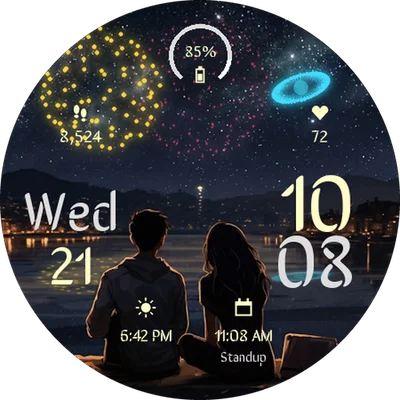
- Flussufer: Ein Paar am Fluss, jedes Feuerwerk erstrahlt erneut im Wasser.
- Hafen: Eine Lichterbrücke über einem ruhigen Hafen, die Feuerwerkskörper spiegeln sich im Wasser.
- Freiheitsstatue: Die Freiheitsstatue auf ihrer Insel, das Feuerwerk im Hintergrund.
- Winterdorf: Ein verschneites Bergdorf mit warmen Fenstern.
Zum Wechseln der Szenen berühren und halten Sie das Zifferblatt, tippen Sie auf „Anpassen“ und dann auf „Szene“. Im Always-On-Modus leuchten nur die Lichter der Szene und die Uhr.
DREI BEWEGUNGSMODI
- Lebhaft: Die Show läuft ununterbrochen, solange der Bildschirm eingeschaltet ist.
- Ruhig: Jedes Mal, wenn Sie Ihr Handgelenk heben, wird ein Feuerwerkskörper gezündet.
- Aus: Stille Nacht.
Im Modus „Ruhig“ startet das Gesicht auf Riverside, um Akku zu sparen. In den Modi „Lebhaft“ und „Ruhig“ zündet ein Tippen auf den Himmel sofort ein Feuerwerkskörper. Zum Wechseln tippen Sie auf „Anpassen“ und dann auf „Bewegung“.
STÜNDLICHES FINALE
Zur vollen Stunde zünden in den Modi „Lebhaft“ und „Ruhig“ alle vier Abschussrampen gleichzeitig für einige Sekunden.
ACHT FEUERWERKSKÖRPER
Pfingstrose, Chrysantheme, Weide, Palme, Ring, Kreuzchen, Knistern und Herz – jeweils zwei von jeder Abschussrampe, gestochen scharf und flüssig dargestellt. Jede Szene zeigt alle acht Feuerwerkskörper.
SECHS FEUERWERKSFARBEN
Vier Farben pro Show, eine für jede Abschussrampe: Festival, Gold, Rot-Weiß-Blau, Neon, Eis und Glut. Im Modus „Lebhaft“ flackert die Beleuchtung der Szene durch alle vier Farben. Zum Wechseln tippen Sie auf „Anpassen“ und dann auf „Farben anzeigen“.
ZEHN UHR-LAYOUTS
Fünf Designs – Gestapelt, Uhrzeit und Datum, Text, Fett und Kompakt – jeweils rechts oder links vom Himmel. Die Uhrzeit richtet sich nach der 12- oder 24-Stunden-Einstellung Ihrer Uhr; „Text“ zeigt die Uhrzeit im 12-Stunden-Format an. Zum Wechseln tippen Sie auf „Anpassen“ und dann auf „Uhr“.
EINUNDZWANZIG UHR-FARBEN
Jeweils drei Farben für Stunde, Minuten und Komplikationen: Weiß, Vanillegelb, Mandelweiß, Mintweiß, Roséweiß, Himmelblau, Cyanweiß, Cyangrün, Lavendel, Kaugummirosa, Grapefruitrosa, Zitronengelb, Zitronengelb, Zitronengelb, Minzgrün, Rosékupfer, Babyblau, Pink, Erdbeerrot, Kanariengelb, Frühlingsgrün und Grau. Zum Wechseln tippen Sie auf „Anpassen“ und dann auf „Uhr-Farben“.
SECHS ANPASSBARE KOMPLIKATIONEN
Ein runder Schlitz oben zeigt den Akkustand mit einem Ring an. Fünf Felder zeigen Schritte, Herzfrequenz, Sonnenaufgang und Sonnenuntergang sowie Ihr nächstes Event an. Der obere mittlere Bereich ist leer, damit der Himmel für die Show frei bleibt. Jedes Feld kann Wetterinformationen, eine Kurzbeschreibung einer App oder eine App-Verknüpfung enthalten und wird durch Antippen geöffnet. Die Komplikationen sind im Always-On-Modus ausgeblendet. Um eine Komplikation zu ändern, halten Sie das Zifferblatt gedrückt, tippen Sie auf „Anpassen“ und anschließend auf „Komplikationen“.
ALLES INKLUSIVE
Fireworkmation ist eine kostenpflichtige App mit vollem Funktionsumfang: alle 5 Szenen, 8 Feuerwerkskörper, 6 Showfarben, 10 Zifferblatt-Layouts und 21 Zifferblattfarben, inklusive der Shows „Lebhaft“ und „Ruhig“, dem stündlichen Finale und 6 Komplikationen. Keine In-App-Käufe, kein Abonnement, keine Einschränkungen. Das Zifferblatt funktioniert eigenständig: Es wird keine Smartphone-App benötigt. Die Watcholate Watch Faces-App auf Ihrem Smartphone spielt die Show jeder Szene ab und kann dieses Zifferblatt auf Ihrer Smartwatch öffnen.
GUT ZU WISSEN
- Die Screenshots zeigen Beispielwerte in den Komplikationen.
- Funktioniert mit Wear OS 5 und höher (Android 14 oder höher) auf runden Smartwatches, einschließlich Pixel Watch und Galaxy Watch.
So fügen Sie es hinzu: Berühren und halten Sie Ihr Zifferblatt, wischen Sie bis zum Ende, tippen Sie auf „Hinzufügen“ und wählen Sie „Fireworkmation“.
DATENSCHUTZ
Dieses Zifferblatt enthält keinen Code und sammelt keine Daten. Die angezeigten Komplikationen werden von Wear OS selbst generiert und verlassen Ihre Smartwatch nicht. Vollständige Datenschutzrichtlinien: https://watcholate.com/privacy
HINWEIS
Die Gesundheitsdaten stammen von den Sensoren Ihrer Smartwatch und sind nicht für medizinische Zwecke bestimmt.
Von Watcholate.
Originaltext anzeigen
Fireworkmation is an animated fireworks watch face for Wear OS, built in Google's Watch Face Format. Rockets climb from four launch sites and burst over a night scene, and at the top of every hour all four fire a finale. One purchase, everything included: every scene, show and clock is yours, with no in-app purchases and nothing locked.
FIVE NIGHT SCENES
- City: a skyline whose lit windows flicker in the show colors
- Riverside: a couple by the river, every burst shining again in the water
- Harbor: a bridge of lights over a calm harbor, the bursts reflected below
- Liberty: the Statue of Liberty on her island, the fireworks behind her
- Winter Village: a snowy mountain village with warm windows
To switch, touch and hold the face, tap Customize, then Scene. In always-on, only the scene's lights glow, with the clock.
THREE MOTION CHOICES
- Lively: the show plays nonstop while the screen is on
- Calm: one volley each time you raise your wrist
- Off: a still night
The face starts on Riverside in Calm, to save battery. In Lively and Calm a tap on the sky bursts a firework at once. To switch, tap Customize, then Motion.
AN HOURLY FINALE
At the top of every hour, in Lively and Calm, all four launch sites fire at once for a few seconds.
EIGHT FIREWORK SHELLS
Peony, Chrysanthemum, Willow, Palm, Ring, Crossette, Crackle and Heart, two from each launch site, drawn smooth and sharp. Every scene plays all eight.
SIX SHOW COLORS
Four colors per show, one for each launch site: Festival, Golden, Red White Blue, Neon, Ice and Ember. In Lively the scene's lights flicker through all four. To switch, tap Customize, then Show colors.
TEN CLOCK LAYOUTS
Five designs - Stacked, Time and date, Words, Bold and Compact - each on the right or the left of the sky. The time follows your watch's 12- or 24-hour setting; Words spells it out in 12-hour time. To switch, tap Customize, then Clock.
TWENTY-ONE CLOCK COLORS
Three colors each, for the hour, the minutes and the complications: White, Yellow Vanilla, White Almond, White Mint, White Rosy, White Sky, Cyan White, Green Cyan, Lavender, Bubblegum Pink, Grapefruit Pink, Banana Lemon, Lemon Chiffon, Mint Glow, Rosy Copper, Baby Blue Ice, Hot Pink, Strawberry Red, Canary Yellow, Spring Green and Gray. To switch, tap Customize, then Clock colors.
SIX CUSTOMIZABLE COMPLICATIONS
A round slot at the top shows your battery with a ring, and five boxes show steps, heart rate, sunrise and sunset, and your next event to start. Upper center comes empty, to keep the sky clear for the show. Each can hold the weather, any app's short reading or an app shortcut, and a tap opens it. They are hidden in always-on. To change one, touch and hold the face, tap Customize, then Complications.
EVERYTHING INCLUDED
Fireworkmation is a paid app with everything included: all 5 scenes, 8 firework shells, 6 show colors, 10 clock layouts and 21 clock colors, with Lively and Calm shows, the hourly finale and 6 complications. No in-app purchases, no subscription, nothing locked. The face works on its own: no phone app is needed. The Watcholate Watch Faces app on your phone plays every scene's show and can open this face on your watch.
GOOD TO KNOW
- The screenshots show example readings in the complications
- Works on Wear OS 5 and later (Android 14 or later), on round watches, including Pixel Watch and Galaxy Watch
To add it: touch and hold your watch face, swipe to the end, tap Add and choose Fireworkmation.
PRIVACY
This watch face contains no code and collects nothing. What the complications show is drawn by Wear OS itself and never leaves your watch. Full policy: https://watcholate.com/privacy
DISCLAIMER
Health readings come from your watch's own sensors and are not for medical use.
From Watcholate.
Datensicherheit
Was Watcholate bei Google Play zu den Daten angibt, die diese App erfasst und weitergibt.
- Keine Daten werden mit Drittunternehmen oder -organisationen geteiltWeitere Informationen dazu, wie Entwickler Angaben zur Weitergabe von Daten machen
- Keine Daten erhobenWeitere Informationen dazu, wie Entwickler Angaben zur Datenerhebung machen
Neue Funktionen
Version 1.0.0 · 28.10.2026
First release of Fireworkmation: fireworks burst over 5 night scenes - City, Riverside, Harbor, Liberty and Winter Village - in 8 firework shells and 6 show colors, with 10 clock layouts, 21 clock colors and a finale at the top of every hour - everything included.
Kontakt zum Entwickler
- Websitewatcholate.com
- E-Mailsupport@watcholate.com
- Datenschutzerklärungwatcholate.com
- Adresse14727 Cypress Creek Landing Houston, TX 77068-2527 United States
Informationen
- Angeboten von
- Watcholate
- Kategorie
- Personalisierung
- Version
- 1.0.0
- Aktualisiert
- 28.10.2026
- Veröffentlicht
- 28.10.2026
- Altersfreigabe
- USK ab 0 Jahren
- Preis
- 1,59 €
- Paketname
- com.watcholate.fireworkmation