GRBL Hybrid
Grubel- USK ab 0 JahrenAltersfreigabe
- PersonalisierungKategorie
- 07.10.2026Aktualisiert
- 0,49 €Preis
Verlinkt auf den offiziellen Google Play-Eintrag von com.grubel.hybrid. Zuletzt geprüft am 13.11.2026.
Über diese App
Automatische Übersetzung von Google. Originalsprache: Englisch (Vereinigte Staaten).
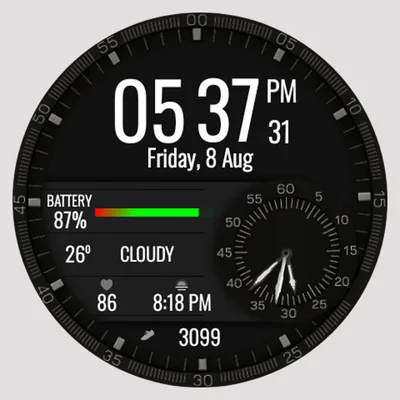
Modernes, hybrides Zifferblatt mit Wetter- und Batterieanzeige. Entwickelt für Wear OS
📢 WENN DIE WETTERKOMPLIKATION NACH DER INSTALLATION DES ZIFFERBLATTS NICHT ANGEZEIGT WIRD:
- BITTE AKTUALISIEREN SIE DAS WETTER MANUELL AUF DER UHR.
FALLS DAS NICHT FUNKTIONIERT:
- BITTE WECHSELN SIE ZU EINEM ANDEREN ZIFFERBLATT UND DANN ZURÜCK ZU DIESEM.
- FÜR FAHRENHEIT-BENUTZER: DIE WETTERKOMPLIKATION BRAUCHT ETWAS ZEIT, UM AKTUALISIERT UND MIT DER UHR SYNCHRONISIERT ZU WERDEN. DESHALB KÖNNEN TEMPERATUREN VON BIS ZU 69 °C ANGESEHEN WERDEN. NACH EINIGER ZEIT STELLT DIE ZEIT AUF F.
Entwickelt für Wear OS
FUNKTIONEN:
✅ Unterstützt AM/PM- und 12/24-Stunden-Format
✅ 3 benutzerdefinierte Komplikationen
✅ Batterieanzeige
✅ Wettertext und Temperatur in C und F
✅ Datum (Formatänderung je nach Standort des Benutzers)
✅ AOD – vollständig, batterieschonend und gut lesbar, mit themenspezifischen Farben
✅ 30 Designs
✅ Analoguhr
Bei Problemen wenden Sie sich bitte an grubel.watchfaces@gmail.com.
📢Zifferblätter ändern sich nach der Installation nicht automatisch. Um sie einzurichten, kehren Sie zum Startbildschirm zurück, tippen und halten Sie, wischen Sie bis zum Ende und tippen Sie auf „+“, um das Zifferblatt hinzuzufügen. Verwenden Sie die Lünette, um es zu finden.
Die Samsung-Entwickler bieten ein hilfreiches Video an, das verschiedene Möglichkeiten zur Installation eines Wear OS-Zifferblatts zeigt:
🎬 https://youtu.be/vMM4Q2-rqoM
📢DIE BEGLEIT-APP INSTALLIERT DAS ZIFFERBLATT NICHT AUF IHRER UHR. SIE ÖFFNET NUR DEN PLAY STORE-EINTRAG AUF IHRER UHR, WO SIE ES SELBST INSTALLIEREN KÖNNEN.
BITTE LESEN SIE DIE UNTENSTEHENDEN ANWEISUNGEN.
Es gibt zwei Möglichkeiten, dieses Zifferblatt auf Ihrem WearOS-Gerät zu installieren:
Über die PLAY STORE-APP:
1. Wählen Sie im Dropdown-Menü das Zielgerät in der PLAY STORE-APP aus:
Nach einigen Minuten wird das Zifferblatt auf die Uhr übertragen.
2. ZIFFERBLATT AKTIVIEREN:
Nach der Installation müssen Sie das Zifferblatt aktivieren.
Halten Sie den Bildschirm gedrückt, wischen Sie nach links und tippen Sie auf „ZIFFERBLATT HINZUFÜGEN“, um es zu aktivieren.
Über die Play Store-Website:
1 – Rufen Sie den Link zum Zifferblatt in einem Webbrowser auf Ihrem PC/Mac (z. B. Chrome, Safari usw.) auf. Sie können im Play Store nach dem Namen des Zifferblatts suchen.
Klicken Sie auf „Auf weiteren Geräten installieren“ und wählen Sie das Zielgerät aus.
Nach einigen Minuten wird das Zifferblatt auf die Uhr übertragen.
2 – Zifferblatt aktivieren:
Nach der Installation müssen Sie das Zifferblatt aktivieren.
Halten Sie den Bildschirm gedrückt, wischen Sie nach links und tippen Sie auf „Zifferblatt hinzufügen“, um es zu aktivieren.
Für API 34+
📢 Hinweis: Wenn Ihre Uhr den Akkustand Ihres Telefons anzeigen soll, installieren Sie die App „Phone Battery Complication“.
HAFTUNGSAUSSCHLUSS
📢 Jedes Gerät bietet unterschiedliche benutzerdefinierte Komplikationen, und die Auswahl variiert je nach Drittanbieter-App. Die in den Store-Screenshots gezeigten benutzerdefinierten Komplikationen stammen von der Drittanbieter-App „Phone Battery Complication“.
Originaltext anzeigen
📢 WHEN YOU CAN'T SEE THE WEATHER COMPLICATION AFTER INSTALLING THE WATCH FACE:
- PLEASE UPDATE THE WEATHER MANUALLY ON THE WATCH
IF THAT DOESNT WORK:
- PLEASE SWITCH TO OTHER WATCH FACE THEN SWITCH BACK TO THIS ONE
- FOR THOSE USING FAHRENHEIT - WEATHER COMPLICATION NEEDS SOME TIME TO UPDATE AND SYNC WITH THE WATCH. THAT IS WHY YOU MAY SEE TEMPS LIKE 69°C AFTER SOME TIME IT WILL SWITCH TO F
Designed for Wear OS
FEATURES:
✅ Supports AM/PM and 12H/24H format
✅ 3 custom complications
✅ Battery bar
✅ Weather text and temperature for C and F
✅ Date (format change based on user's locale)
✅ AOD - full, battery friendly and readable, with theme-matching colors
✅30 themes
✅ Analog clock
If you face any problem, please reach out to me at grubel.watchfaces@gmail.com.
📢Watch faces do not change automatically after installation. To set it up, return to the home display, tap and hold, swipe to the end, and tap ‘+’ to add the watch face. Use the bezel to find it.
Samsung Developers offer a helpful video showing multiple ways to install a Wear OS watch face:
🎬 https://youtu.be/vMM4Q2-rqoM
📢THE COMPANION APP DOES NOT INSTALL THE WATCH FACE ON YOUR WATCH. IT ONLY OPENS THE PLAY STORE LISTING ON YOUR WATCH, WHERE YOU CAN INSTALL IT YOURSELF.
PLEASE READ INSTRUCTIONS BELOW.
There are two ways to install this watchaface to your WearOS device:
From PLAY STORE APP:
1. Use the drop-down menu and select the target
device on the PLAY STORE APP:
after a few minutes the watch face will transferred on
watch.
2- ACTIVATE WATCH FACE:
Once installed, you need to activate the watch face.
Long press screen, swipe left and tap "ADD WATCH
FACE" to activate it.
From PLAY STORE WEBSITE:
1 - Go to the watch face link through a Web Browser on
PC / Mac such as Chrome, Safari (etc.). You can search
the watch face name on Play Store.
Click on "Install on more devices" and select the target
device:
after a few minutes the watch face will transferred on
watch.
2- ACTIVATE WATCH FACE:
Once installed, you need to activate the watch face.
Long press screen, swipe left and tap "ADD WATCH
FACE" to activate it.
for API 34+
📢 Remember , if you want your watch to show phone's battery status, you should install Phone Battery Complication app
DISCLAIMER
📢 Each device offers different custom complications, and selection varies by third-party apps. Custom complications shown in store screenshots come from third-party app - Phone Battery Complication
Datensicherheit
Was Grubel bei Google Play zu den Daten angibt, die diese App erfasst und weitergibt.
- Keine Daten werden mit Drittunternehmen oder -organisationen geteiltWeitere Informationen dazu, wie Entwickler Angaben zur Weitergabe von Daten machen
- Keine Daten erhobenWeitere Informationen dazu, wie Entwickler Angaben zur Datenerhebung machen
Kontakt zum Entwickler
- Websitegrubelwatchfaces.com
- E-Mailgrubel.watchfaces@gmail.com
- Datenschutzerklärungsites.google.com
- AdresseJuliana Tuwima 20/8a 90-002 Łódź Poland
Informationen
- Angeboten von
- Grubel
- Kategorie
- Personalisierung
- Aktualisiert
- 07.10.2026
- Veröffentlicht
- 08.08.2025
- Altersfreigabe
- USK ab 0 Jahren
- Preis
- 0,49 €
- Paketname
- com.grubel.hybrid