Haunted Watch Face
Tancha Watch Faces- USK ab 0 JahrenAltersfreigabe
- PersonalisierungKategorie
- 25.10.2026Aktualisiert
- 1,29 €Preis
Verlinkt auf den offiziellen Google Play-Eintrag von com.watchfacestudio.hauntedwatchface. Zuletzt geprüft am 13.11.2026.
Über diese App
Automatische Übersetzung von Google. Originalsprache: Englisch (Vereinigte Staaten).
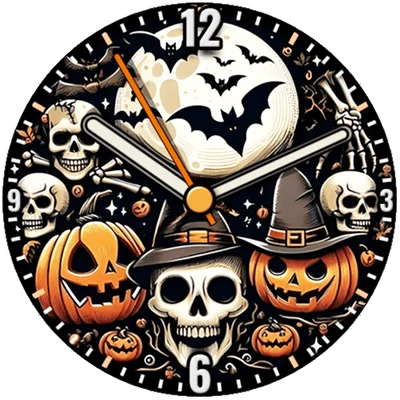
Unheimliches Zifferblatt mit Totenköpfen, Kürbissen, Fledermäusen und Hexenhüten für Halloween-Vibes!
Haunted-Zifferblatt
Eindringliches Zifferblatt mit Totenköpfen, Kürbissen, Fledermäusen und Hexenhüten für ultimative Halloween-Stimmung!
Dieses Zifferblatt ist für Wear OS konzipiert.
Dieses Zifferblatt bietet 3 anpassbare Halloween-Hintergründe.
Wählen Sie aus einem gruseligen Totenkopf-Design mit Kürbislaternen und einem Hexenhut.
eine eindringliche Szene mit einer Skelettfigur mit Hexenhut, umgeben von Fledermäusen
und Kürbisse,
oder eine unheimliche Komposition mit einem großen bedrohlichen Totenkopf, Fledermäusen und Kürbislaternen.
Jede Option fängt die Essenz von Halloween ein und ermöglicht es den Benutzern
Personalisieren Sie ihre Uhr mit ihrem bevorzugten Maß an gruseligem Charme.
FAQ:
1- Das Zifferblatt ist auf Ihrer Uhr installiert, erscheint aber nicht im Katalog?
FOLGEN SIE DIESEN SCHRITTEN:
Halten Sie den Bildschirm Ihrer Uhr gedrückt.
Wischen Sie nach rechts, bis Sie den Text „Zifferblatt hinzufügen“ sehen.
Klicken Sie auf die Schaltfläche „+ Zifferblatt hinzufügen“.
Suchen und aktivieren Sie das von Ihnen installierte Zifferblatt.
2- Wenn die Begleit-App installiert ist, das Zifferblatt jedoch nicht, führen Sie die folgenden Schritte aus:
FOLGEN SIE DIESEN SCHRITTEN:
Öffnen Sie die Begleit-App auf Ihrem Telefon (stellen Sie sicher, dass Ihre Smartwatch mit Ihrem Telefon verbunden ist).
Tippen Sie anschließend unten in der App auf die Schaltfläche „ZIFFERBLATT AUF DER UHR INSTALLIEREN“.
Dadurch wird der Play Store auf Ihrer WEAR OS-Smartwatch geöffnet, in dem das gekaufte Zifferblatt angezeigt wird und Sie es direkt installieren können.
Wenn Sie Fragen oder Wünsche haben, zögern Sie bitte nicht, mich unter tanchawatch@gmail.com zu kontaktieren.
Vielen Dank für Ihre Unterstützung.
Beste grüße,
Tancha-Zifferblätter
Originaltext anzeigen
Haunted Watch Face
Haunting watch face with skulls, pumpkins, bats & witch hats for ultimate Halloween vibes!
This watch face is designed for Wear OS.
This watch face offers 3 customizable Halloween-themed backgrounds.
Choose from a spooky skull-filled design with jack-o'-lanterns and a witch's hat,
a haunting scene featuring a skeletal figure in a witch's hat surrounded by bats
and pumpkins,
or an eerie composition with a large menacing skull, bats, and jack-o'-lanterns.
Each option captures the essence of Halloween, allowing users to
personalize their timepiece with their preferred level of spine-chilling charm.
FAQ :
1- The watch face is installed on your watch but does not appear in the catalog?
FOLLOW THESE STEPS:
Press and hold your watch screen.
Swipe right until you see the text 'Add watch face.'
Press the '+ Add watch face' button.
Find and activate the watch face you installed.
2- If the companion app is installed but the watch face is not, follow the steps below:
FOLLOW THESE STEPS:
Open the companion app on your phone (ensure that your smartwatch is connected to your phone).
Next, tap the 'INSTALL WATCH FACE ON WATCH' button at the bottom of the app.
This will open the Play Store on your WEAR OS smartwatch, displaying the purchased watch face and allowing you to install it directly.
If you have any questions or requests, please don't hesitate to get in touch with me at tanchawatch@gmail.com.
Thank you sincerely for your support.
Best regards,
Tancha Watch Faces
Datensicherheit
Was Tancha Watch Faces bei Google Play zu den Daten angibt, die diese App erfasst und weitergibt.
- Keine Daten werden mit Drittunternehmen oder -organisationen geteiltWeitere Informationen dazu, wie Entwickler Angaben zur Weitergabe von Daten machen
- Keine Daten erhobenWeitere Informationen dazu, wie Entwickler Angaben zur Datenerhebung machen
Neue Funktionen
25.10.2026
Target Android version: 14 (API 34)
Kontakt zum Entwickler
- Websitetanchawatch.com
- E-Mailtanchawatch@gmail.com
- Datenschutzerklärungtanchawatch.com
- Adresse13 STRATSIN str., 4th floor, apartment 8 6000 Stara Zagora Bulgaria
Informationen
- Angeboten von
- Tancha Watch Faces
- Kategorie
- Personalisierung
- Aktualisiert
- 25.10.2026
- Veröffentlicht
- 08.10.2024
- Altersfreigabe
- USK ab 0 Jahren
- Preis
- 1,29 €
- Paketname
- com.watchfacestudio.hauntedwatchface