Interference Wear OS
Croma Company- USK ab 0 JahrenAltersfreigabe
- PersonalisierungKategorie
- 19.08.2024Aktualisiert
- 1,79 €Preis
Verlinkt auf den offiziellen Google Play-Eintrag von com.watchfacestudio.interference. Zuletzt geprüft am 22.11.2026.
Über diese App
Automatische Übersetzung von Google. Originalsprache: Englisch (Vereinigtes Königreich).
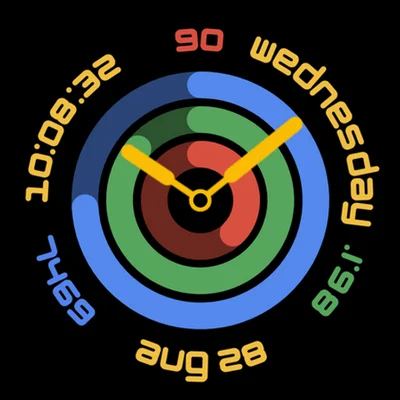
Interference ist ein hybrides und farbenfrohes Watch Face für Wear OS.
BESCHREIBUNG
Interference ist ein hybrides und farbenfrohes Watch Face für Wear OS. Das Herzstück des Zifferblatts sind die drei konzentrischen Balken, die Schritte, Akku und Herzfrequenzbereiche darstellen. In der oberen Hälfte des äußeren Rings befindet sich links ein Zeitplan, in der Mitte der Herzfrequenzwert und rechts der Wochentag. In der unteren Hälfte befindet sich links der Schrittwert, in der Mitte das Datum und rechts der Batterieprozentsatz.
Es gibt drei benutzerdefinierte Verknüpfungen, wie in den Screenshots beschrieben.
Die Herzfrequenzanzeige aktualisiert sich alle 10 Minuten und kann manuell durch Tippen auf den Herzfrequenzwert ausgelöst werden.
Der Always On Display-Modus zeigt alle Informationen außer Sekunden des digitalen Fahrplans an.
FUNKTIONEN DES ZIFFERBLATTS
• 12-Stunden-/24-Stunden-Format
• Schrittdaten
• Batteriedaten
• Herzfrequenzdaten
• 3x benutzerdefinierte Verknüpfungen
• Datum
• Zeitplan
KONTAKTE
Telegramm: https://t.me/cromacompany_wearos
Facebook: https://www.facebook.com/cromacompany
Instagram: https://www.instagram.com/cromacompany/
E-Mail: info@cromacompany.com
Website: www.cromacompany.com
Originaltext anzeigen
DESCRIPTION
Interference is an hybrid and colorful Watch Face for Wear OS. The core of the dial are the three concentric bars that represent steps, battery and heart rate ranges. In the upper half of the outer ring there is a timetable on the left, the heart rate value in the middle and the day of the week on the right. In the lower half there is the steps' value on the left, the date in the middle and the battery percentage on the right.
There are three custom shortcuts as described in the screenshots.
The heart rate indicator updates itself every 10 minutes and it can be triggered manually with a tap on the heart rate value.
Always On Display mode reports all information except seconds of the digital timetable.
WATCH FACE FEATURES
• 12h / 24h format
• Steps data
• Battery data
• Heart rate data
• 3x custom shortcuts
• Date
• Timetable
CONTACTS
Telegram: https://t.me/cromacompany_wearos
Facebook: https://www.facebook.com/cromacompany
Instagram: https://www.instagram.com/cromacompany/
E-mail: info@cromacompany.com
Website: www.cromacompany.com
Datensicherheit
Was Croma Company bei Google Play zu den Daten angibt, die diese App erfasst und weitergibt.
- Keine Daten werden mit Drittunternehmen oder -organisationen geteiltWeitere Informationen dazu, wie Entwickler Angaben zur Weitergabe von Daten machen
- Keine Daten erhobenWeitere Informationen dazu, wie Entwickler Angaben zur Datenerhebung machen
Neue Funktionen
19.08.2024
Bugfix
Kontakt zum Entwickler
- Websitecromacompany.com
- E-Mailinfo@cromacompany.com
- Datenschutzerklärungcromacompany.com
- AdresseVia Roma, 18b 28010 Agrate Italy
Informationen
- Angeboten von
- Croma Company
- Kategorie
- Personalisierung
- Aktualisiert
- 19.08.2024
- Veröffentlicht
- 01.09.2022
- Altersfreigabe
- USK ab 0 Jahren
- Preis
- 1,79 €
- Paketname
- com.watchfacestudio.interference