Iris578 Multi-Function Watch
Iriswatchfaces- USK ab 0 JahrenAltersfreigabe
- PersonalisierungKategorie
- 07.09.2026Aktualisiert
- 1,49 €Preis
Verlinkt auf den offiziellen Google Play-Eintrag von com.watchfacestudio.iris578. Zuletzt geprüft am 25.11.2026.
Über diese App
Automatische Übersetzung von Google. Originalsprache: Englisch (Vereinigte Staaten).
Elegantes, modernes Wear OS-Zifferblatt mit Stil und hoher Ablesbarkeit.
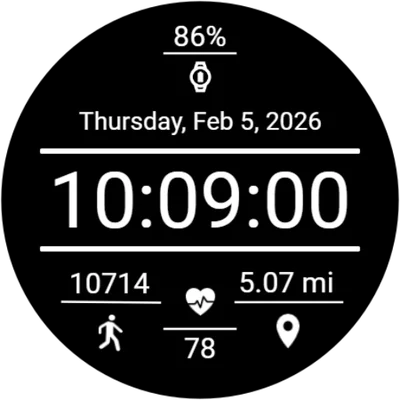
Iris578 ist ein multifunktionales Zifferblatt für Wear OS Smartwatches. Es bietet Nutzern maximale Flexibilität bei der Datenanzeige. Neben Uhrzeit und Datum können Daten wie Schrittzahl, Schrittziel, zurückgelegte Strecke, Temperatur, Herzfrequenz und Akkustand ausgewählt und individuell angeordnet werden. Praktische Verknüpfungen ermöglichen den schnellen Zugriff auf die gewünschten Informationen.
________________________________________
Erfordert Wear OS 4 oder neuer. Kompatibel mit: Galaxy Watch 6, 7, Ultra, Pixel Watch 2/3, OnePlus Watch 2, TicWatch Pro 5
Nicht kompatibel mit der Watch4/Watch5-Serie.
Weitere Informationen zur Uhrenkompatibilität finden Sie unter:
https://free-5181333.webadorsite.com/information
________________________________________
Hier ist eine detaillierte Übersicht der Funktionen:
Hauptfunktionen:
• Uhrzeit- und Datumsanzeige: Zeigt die aktuelle Uhrzeit sowie Tag, Monat, Datum und Jahr an.
• Digitaluhr: Die digitale Uhrzeit im 12- oder 24-Stunden-Format entspricht den Einstellungen Ihres Telefons.
• Zeitanzeige: Die Uhrzeit kann mit oder ohne führende Null angezeigt werden.
• Angezeigte Daten: Es stehen vier Bereiche zur Datenanzeige zur Verfügung, die vom Benutzer individuell ausgewählt werden können.
• Daten: Sieben Datenoptionen stehen zur Verfügung: Schrittzahl, Schrittziel, zurückgelegte Strecke (in Meilen oder Kilometern), Temperatur, Herzfrequenz und Akkustand.
• App-Verknüpfungen: Jeder Datenbereich ermöglicht die Erstellung einer benutzerdefinierten Verknüpfung mit zwei zusätzlichen Feldern auf dem Zifferblatt.
________________________________________
Anpassungsoptionen:
• Farbthemen: Wählen Sie aus zehn Farbthemen für das Zifferblatt, um das Aussehen Ihrer Uhr anzupassen.
• Hintergrund: Es stehen fünf Hintergrundoptionen zur Verfügung.
________________________________________
Always-On-Display (AOD):
• Energiesparende Anzeige: Das Always-On-Display reduziert den Stromverbrauch durch die Anzeige von weniger Funktionen und einfacheren Farben im Vergleich zum vollständigen Zifferblatt.
• Design-Synchronisierung: Das für das Hauptzifferblatt festgelegte Farbschema wird auch auf das Always-On-Display angewendet, um ein einheitliches Erscheinungsbild zu gewährleisten.
________________________________________
Kompatibilität:
Wenn Sie die Begleit-App zur Installation des Zifferblatts verwenden und Ihre Uhr nicht kompatibel ist, kann die Installation nicht durchgeführt werden.
Hinweis zur Kompatibilität
• Nur für Wear OS: Das Zifferblatt Iris578 wurde speziell für Smartwatches mit dem Betriebssystem Wear OS entwickelt.
• Kompatibilität: Die Mindestvoraussetzung für Ihre Uhr ist Wear OS 4 und API-Level 34 oder höher. Einige ältere Uhren erhalten dieses Update möglicherweise in Zukunft und sind dann kompatibel.
• Plattformübergreifende Unterschiede: Während die Kernfunktionen wie Uhrzeit, Datum und Akkuinformationen auf allen Geräten gleich sind, können sich bestimmte Funktionen (z. B. Always-On-Display, Designanpassung und Verknüpfungen) je nach Hardware- oder Softwareversion des Geräts unterschiedlich verhalten.
• Wenn Ihre Uhr die Anforderungen nicht erfüllt, kann das Zifferblatt nicht installiert werden. Dies liegt an der Gerätekompatibilität und nicht an einem Fehler der Zifferblatt-App selbst.
Sollten Sie Installationsprobleme haben, kontaktieren Sie uns bitte unter iriswatchfaces@gmail.com, bevor Sie eine Bewertung abgeben. Wir helfen Ihnen gerne weiter. Bei vollständiger Kompatibilität sollte die Installation schnell und problemlos verlaufen.
Vielen Dank für Ihr Verständnis!
________________________________________
Sprachunterstützung:
• Mehrere Sprachen: Das Zifferblatt unterstützt eine Vielzahl von Sprachen. Aufgrund unterschiedlicher Textgrößen und Sprachstile kann sich das Aussehen des Zifferblatts jedoch in einigen Sprachen leicht verändern.
________________________________________
Weitere Informationen:
Instagram: https://www.instagram.com/iris.watchfaces/
Website: https://free-5181333.webadorsite.com/
Installation mit der Begleit-App: https://www.youtube.com/watch?v=IpDCxGt9YTI
Originaltext anzeigen
Iris578 is a multi-function watch face for Wear OS smartwatches. It offers user flexibility in the way they want their data displayed. Other than time and date data can be selected from step count, step goal, distanced walked, temperature, heart rate and battery status and arranged by the user. Shortcuts are available to provide information quickly.
________________________________________
Requires Wear OS 4 or newer Compatible: Galaxy Watch 6 · 7 · Ultra · Pixel Watch 2/3 · OnePlus Watch 2 · TicWatch Pro 5
Not compatible with Watch4 / Watch5 series.
For more information on watch compatibility Please visit the site below
https://free-5181333.webadorsite.com/information
________________________________________
Here’s a detailed overview of its features:
Key Features:
• Time & Date Display: Displays the current digital time along with the day, month, date, and year.
• Digital Clock: The digital time in 12 or 24 hour time matches your phone setting
• Time Display: Time can be displayed with leading Zero or without as a user selection.
• Data Displayed: There are 4 areas to display data with each area selected by the user.
• Data: There is 7 choices of data to display step count, step goal, distanced walked in miles or kilometers, temperature, heart rate and battery status.
• App Short-cuts: Each Data area allows for a custom shortcut with 2 additional spot on the clock display.
________________________________________
Customization Options:
• Color Themes: You will have 10 face color themes to choose from to change the look of the watch.
• Background: There are 5 background options as well
________________________________________
Always-On Display (AOD):
• Limited Features for Battery Saving: The Always-On Display reduces power consumption by displaying fewer features and simpler colors compared to the full watch face.
• Theme Syncing: The color theme you set for the main watch face will also be applied to the Always-On Display for a consistent look.
________________________________________
Compatibility:
If you are using the companion app to install the watch face and your watch is not compatible it will not be installed.
Compatibility Disclaimer
• Wear OS Only: Iris578 watch face is designed specifically for Smart Watches using Wear OS operating system.
• Compatibility: The minimum required software version of your watch is Wear OS 4 and use API level 34 and above. Some older watches may receive this update in the future, which would then make them compatible.
• Cross-Platform Variability: While the core features like time, date, and battery information are consistent across devices, certain features (such as AOD, theme customization, and shortcuts) may behave differently depending on the specific hardware or software version of the device.
• If your watch does not meet the requirements, the watch face will not be installed. This is due to device compatibility and not an issue with the watch face app itself.
• If you encounter any installation issues, please contact us at iriswatchfaces@gmail.com before leaving a review—we’re happy to help resolve the problem. When everything is compatible, installation should be quick and seamless.
Thank you for your understanding!
________________________________________
Language Support:
• Multiple Languages: The watch face supports a wide range of languages. However, due to varying text sizes and language styles, some languages might slightly alter the visual appearance of the watch face.
________________________________________
Additional Information:
Instagram: https://www.instagram.com/iris.watchfaces/
Website: https://free-5181333.webadorsite.com/
Using the companion app for installation: https://www.youtube.com/watch?v=IpDCxGt9YTI
Datensicherheit
Was Iriswatchfaces bei Google Play zu den Daten angibt, die diese App erfasst und weitergibt.
- Keine Daten werden mit Drittunternehmen oder -organisationen geteiltWeitere Informationen dazu, wie Entwickler Angaben zur Weitergabe von Daten machen
- Keine Daten erhobenWeitere Informationen dazu, wie Entwickler Angaben zur Datenerhebung machen
Neue Funktionen
07.09.2026
This watch face is designed for Wear OS style smartwatches only. It will not install or function on non-compatible devices.
Kontakt zum Entwickler
- Websitefree-5181333.webadorsite.com
- E-Mailiriswatchfaces@gmail.com
- Datenschutzerklärungfree-5181333.webadorsite.com
- Adresse104 Snappy Ln Salina, NY 13090-3748 United States
Informationen
- Angeboten von
- Iriswatchfaces
- Kategorie
- Personalisierung
- Aktualisiert
- 07.09.2026
- Veröffentlicht
- 06.02.2026
- Altersfreigabe
- USK ab 0 Jahren
- Preis
- 1,49 €
- Paketname
- com.watchfacestudio.iris578