KF144 WATCH FACE
KF Watch Face- USK ab 0 JahrenAltersfreigabe
- PersonalisierungKategorie
- 29.09.2024Aktualisiert
- 1,39 €Preis
Verlinkt auf den offiziellen Google Play-Eintrag von com.watchfacestudio.kf144. Zuletzt geprüft am 21.11.2026.
Über diese App
Automatische Übersetzung von Google. Originalsprache: Englisch (Vereinigte Staaten).
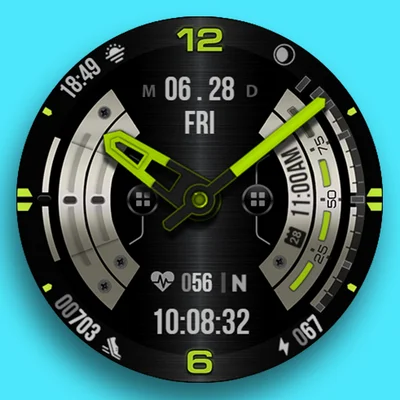
KF144 Hybrid-Zifferblatt. Klassischer und sportlicher Stil. Nur für Wear OS-Geräte.
BUE ONE ERHALTEN SIE EIN ANGEBOT:
https://sites.google.com/view/kfbogo?usp=sharing
Das KF144 ist ein stilvolles Hybrid-Zifferblatt für Wear OS von KF.
KF ist ein neues Produkt in der Auswahl an Zifferblättern für Smartwatches Wear OS. Analoge, digitale und Hybrid-Zifferblätter für Ihre Uhr.
Das Zifferblatt kann sowohl im klassischen als auch im sportlichen Stil individuell gestaltet werden. Hervorragende Farblösungen, 30 Variationen.
- WF mit anpassbaren Verknüpfungen, festen Verknüpfungen für Kalender- und Energieverbrauchsinformationen.
- Wochentag *
- Datum
- Monat *
- Mondphase
- BPM-Herzfrequenz (Schläge pro Minute)
- Schritte
- Distanz (KM, ML)**
- Batterie %
- Digitale Zeit
-
- Anpassbare Verknüpfung (2 Symbole können auf Wunsch des Benutzers ausgeblendet werden)
- Voreingestellte Verknüpfungen
- 2 anpassbare Felder/Komplikationen (abhängig von der Uhr)
- Immer sichtbar
- Veränderbare Farben
- Veränderbare Hände
* Die Reihenfolge, in der Datum und Monat angezeigt werden, hängt vom in Ihrem Land akzeptierten Anzeigeformat ab
** Der Kilometerstand wird auf Geräten mit eingestellter Sprache (britisches oder amerikanisches Englisch) automatisch angezeigt. Für andere Sprachen wird die Distanz in km angegeben.
Anpassung des Zifferblatts:
1 - Berühren und halten Sie das Display
2 – Tippen Sie auf die Option „Anpassen“.
Einige Funktionen sind bei manchen Uhren möglicherweise nicht verfügbar.
Hinweise zur Installation des Zifferblatts auf der Smartwatch:
Die Telefon-App dient nur als Platzhalter, um die Installation und das Auffinden des Zifferblatts auf Ihrer Wear OS-Uhr zu erleichtern. Sie müssen Ihr Uhrengerät aus dem Installations-Dropdown-Menü auswählen.
Notiz. Wenn Sie im Zahlungszyklus stecken bleiben, machen Sie sich keine Sorgen: Es wird nur eine Zahlung ausgeführt, auch wenn Sie ein zweites Mal zur Zahlung aufgefordert werden. Warten Sie 5 Minuten oder starten Sie die Uhr neu und versuchen Sie es erneut.
Möglicherweise liegt ein Problem bei der Synchronisierung Ihres Geräts mit den Google-Servern vor.
Bitte beachten Sie, dass etwaige Probleme auf dieser Seite nicht auf die Schuld des Entwicklers zurückzuführen sind. Auf dieser Seite hat der Entwickler keine Kontrolle über den Play Store.
Dieses Zifferblatt unterstützt alle Wear OS-Geräte mit API-Level 30+
TELEGRAMM:
https://t.me/KFwatchfaces
FACEBOOK:
https://www.facebook.com/groups/620092163327987/
INSTAGRAM:
https://www.instagram.com/krek_free_watchface
Originaltext anzeigen
BUE ONE GET ONE OFFER:
https://sites.google.com/view/kfbogo?usp=sharing
The KF144 is a Stylish Hybrid watch face for Wear OS by KF.
KF is a new product in the selection of dials for smart watches Wear OS. Analog, Digital, Hybrid watch faces for your watch..
The watch face be customized for yourself in both classic and sporty style. Excellent color solutions, 30 variations.
- WF with customizable shortcuts, fixed shortcuts for calendar and energy consumption information.
- Day of week *
- Date
- Month *
- Moon phase
- BPM Heart Rate (beats per minute)
- Steps
- Distance (KM, ML)**
- Battery %
- Digital time
-
- Customizable shortcut ( 2 icons can be hidden at the user's request)
- Preset Shortcuts
- 2 Customizable field / complication (depends on the watch)
- Always On Display
- Changeable colors
- Changeable Hands
* The order in which the date and month are displayed depends on the accepted display format in your country
** Mileage will be automatically displayed on devices with the language set (British or American English). For other languages, the distance will be indicated in km.
Watch face customization:
1 - Touch and hold display
2 - Tap on customize option
Some features may not be available on some watches.
Watch face installation notes on smart watch:
Phone app serves only as a placeholder to make it easier to install & find the watch face on your Wear OS watch. You have to select your watch device from the install dropdown menu.
Note. If you are stuck in the payment cycle, don't worry: only one payment will be made, even if you are asked to pay a second time. Wait 5 minutes or restart the watch and try again.
There may be a problem with syncing your device with Google servers.
Please note that any problems on this side are not the fault of the developer. On this side, the developer has no control over the Play Store.
This watch face supports all Wear OS devices with API level 30+
TELEGRAM:
https://t.me/KFwatchfaces
FACEBOOK:
https://www.facebook.com/groups/620092163327987/
INSTAGRAM:
https://www.instagram.com/krek_free_watchface
Datensicherheit
Was KF Watch Face bei Google Play zu den Daten angibt, die diese App erfasst und weitergibt.
- Keine Daten werden mit Drittunternehmen oder -organisationen geteiltWeitere Informationen dazu, wie Entwickler Angaben zur Weitergabe von Daten machen
- Keine Daten erhobenWeitere Informationen dazu, wie Entwickler Angaben zur Datenerhebung machen
- Hat sich verpflichtet, den Google Play-Richtlinien für familienfreundliche Inhalte zu folgen
Kontakt zum Entwickler
- E-MailKFwatchfaces2023@gmail.com
- Datenschutzerklärungsites.google.com
- Adresseг.Москва, ул. Ак. Пилюгина, 8-2-126 Москва Russia 117393
Informationen
- Angeboten von
- KF Watch Face
- Kategorie
- Personalisierung
- Aktualisiert
- 29.09.2024
- Veröffentlicht
- 20.06.2024
- Altersfreigabe
- USK ab 0 Jahren
- Preis
- 1,39 €
- Paketname
- com.watchfacestudio.kf144