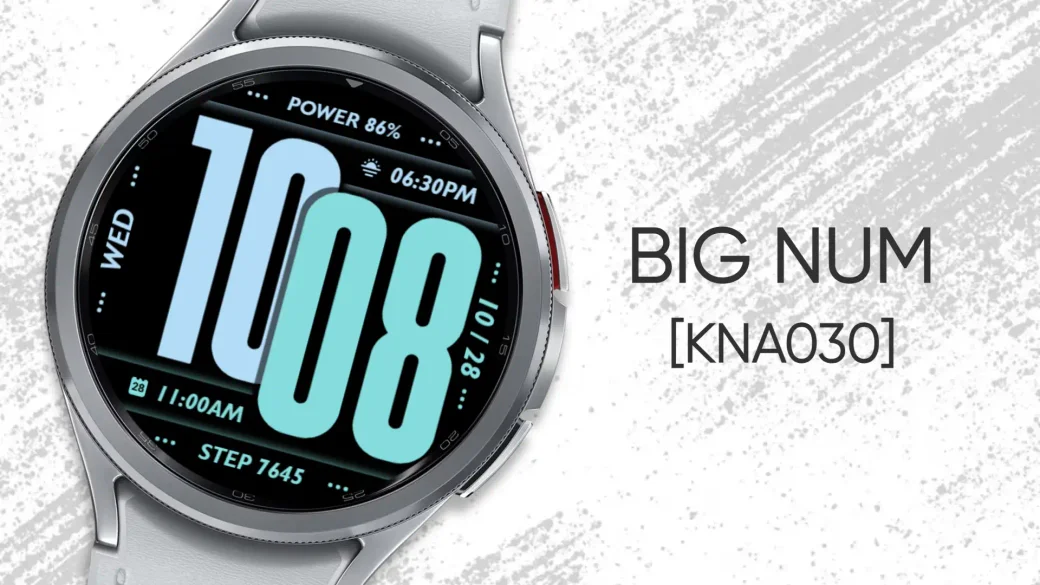
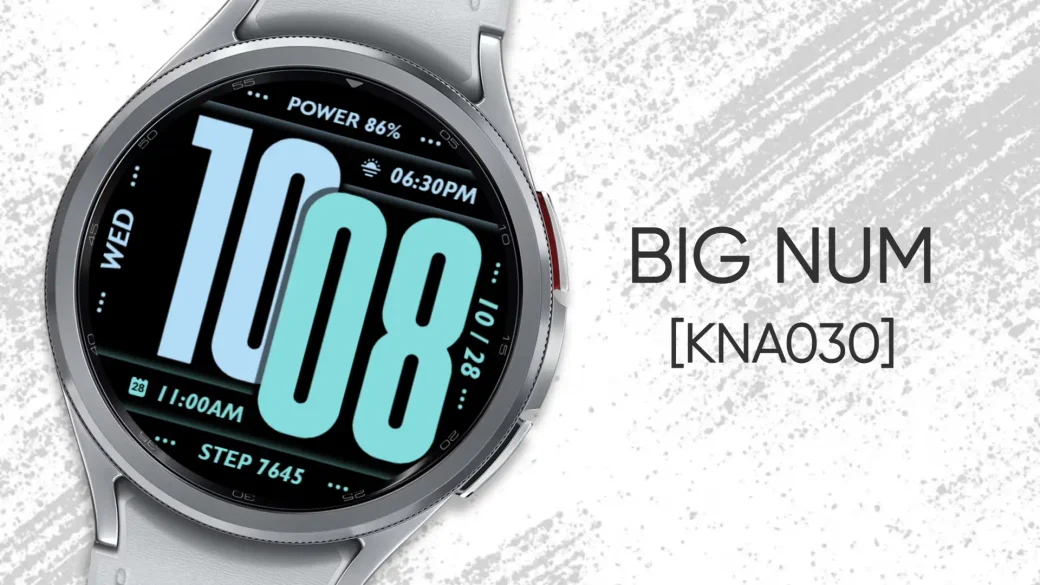
[KNA030] BIG NUM
KNA TH Watch Faces- USK ab 0 JahrenAltersfreigabe
- PersonalisierungKategorie
- 31.08.2026Aktualisiert
- 0,89 €Preis
Verlinkt auf den offiziellen Google Play-Eintrag von com.watchfacestudio.kna030. Zuletzt geprüft am 14.11.2026.
Über diese App
Automatische Übersetzung von Google. Originalsprache: Englisch (Vereinigte Staaten).
Die Kunst der Kombination von Zifferblättern
Wear OS-Zifferblatt mit anpassbaren Komplikationen
HINWEISE ZUR ZIFFERBLATTINSTALLATION:
(Bitte aktualisieren Sie Ihr Android-Gerät auf die neueste Version.)
Prüfen Sie vor der Installation die Kompatibilität Ihrer Smartwatch mit Wear OS. (Hinweis: Galaxy Watch 3 und Galaxy Active sind keine Wear OS-Geräte.)
✅ Kompatible Geräte: Google Pixel (API-Level 30+), Galaxy Watch 4, 5, 6 und andere Wear OS-Modelle.
🚨 Zifferblätter werden nach der Installation nicht automatisch auf Ihrer Smartwatch angezeigt. Sie müssen sie daher manuell auswählen.
Funktionen:
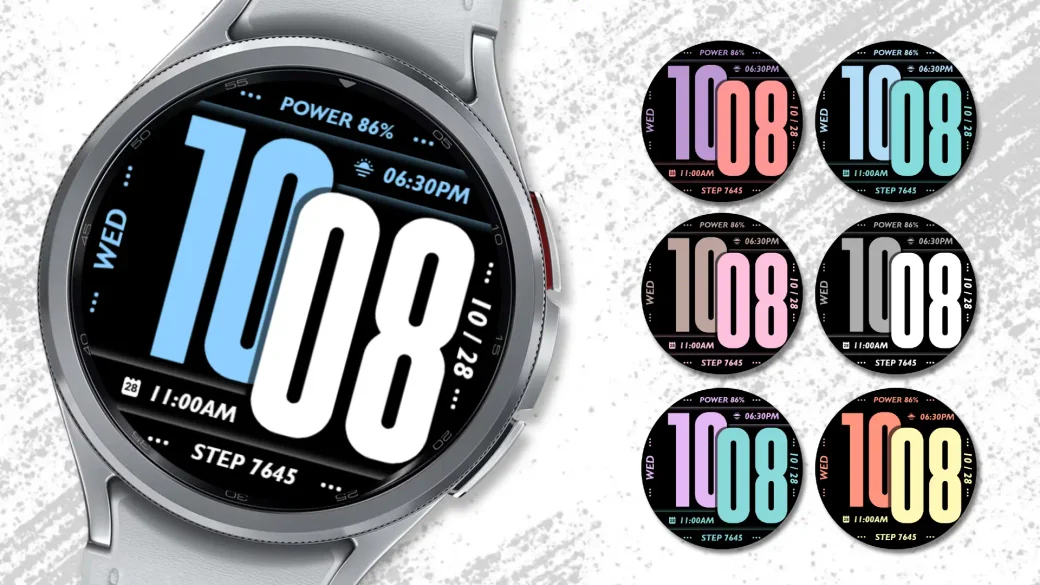
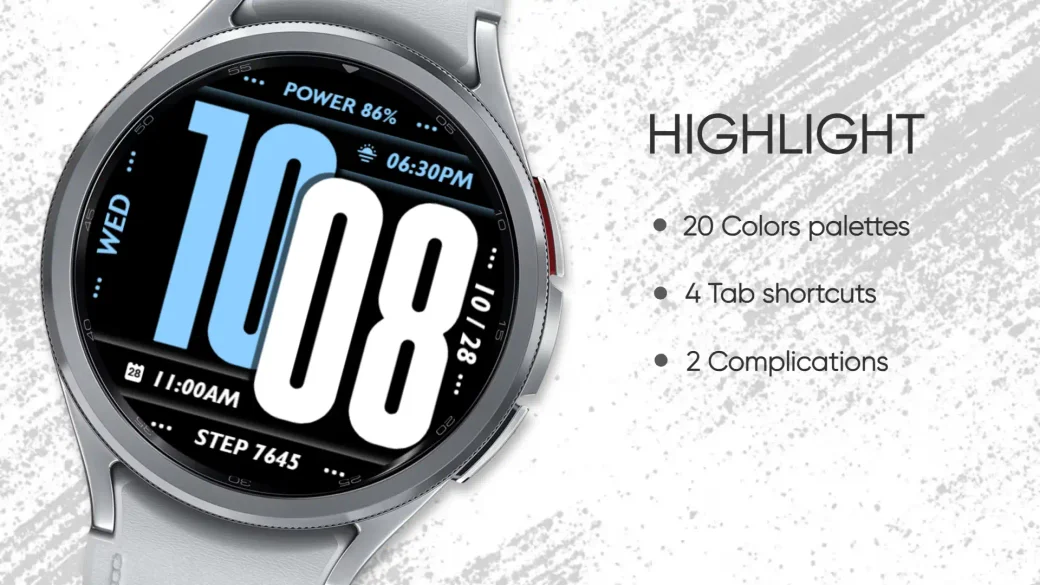
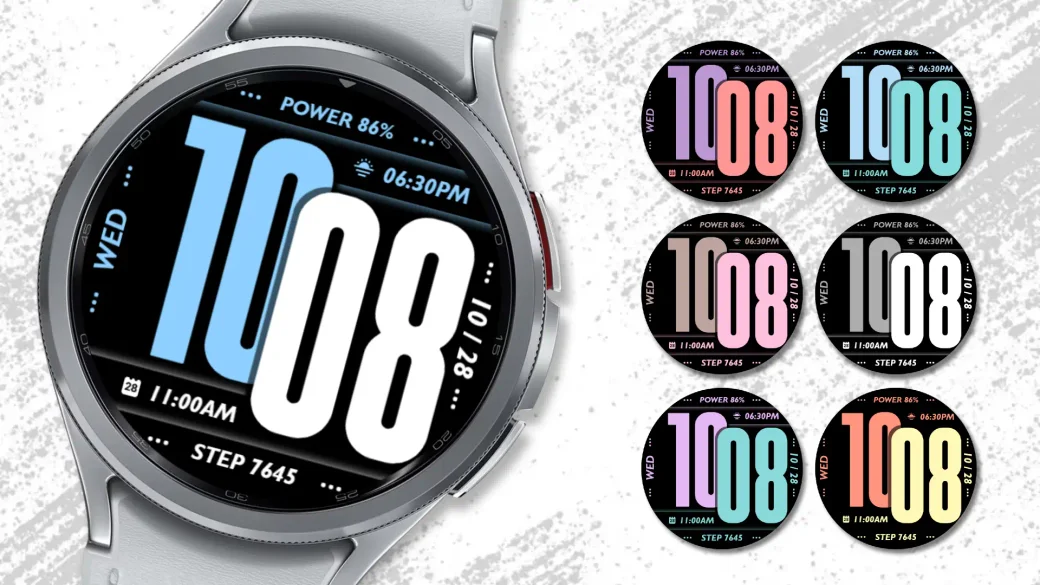
- Große digitale Anzeige (12-/24-Stunden-Format)
- Datum, Wochentag, Monat
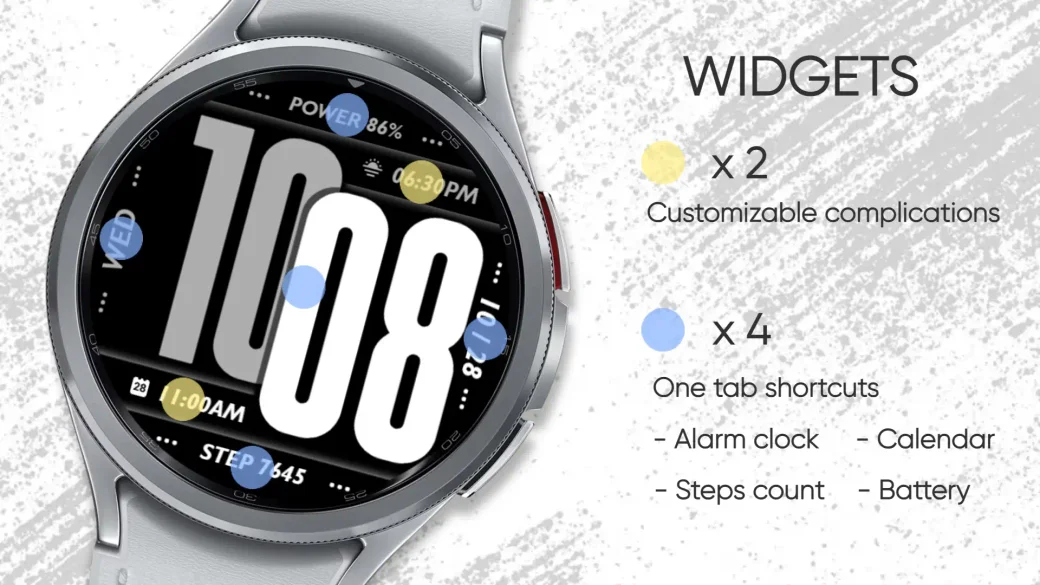
- 2 anpassbare Komplikationen
- 4 Schnellzugriffe
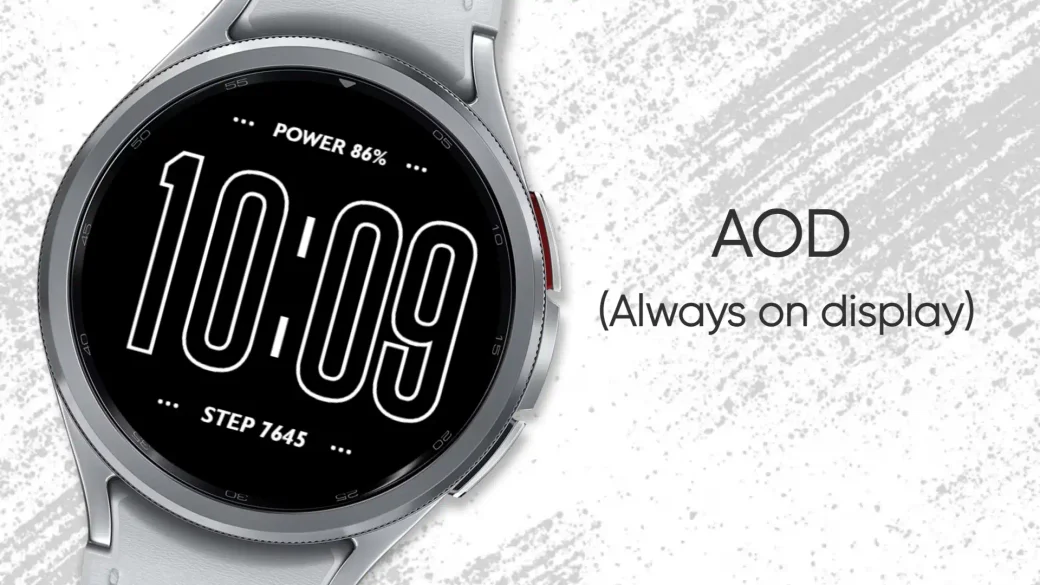
- Always-on-Display
Anpassung:
1. Display berühren und gedrückt halten
2. Auf „Anpassen“ tippen
Komplikationen:
Sie können beliebige Daten hinzufügen.
Sie können beispielsweise Wetter, Weltzeituhr, Sonnenaufgang/Sonnenuntergang, Barometer usw. auswählen.
**Einige Funktionen sind möglicherweise nicht auf allen Uhren verfügbar.** Für weitere Unterstützung kontaktieren Sie uns bitte unter: sombatcsus@gmail.com
Vielen Dank für Ihre Unterstützung.
Originaltext anzeigen
Wear Os Watch Face With Customizable Complications
WATCH FACE INSTALLATION NOTES:
(Please update your android to lastest version)
Check your watch's compatibility with WEAR OS before proceeding with the installation. (Note: Galaxy Watch 3 and Galaxy Active are not WEAR OS devices.)
✅ Compatible devices include API level 30+ Google Pixel, Galaxy Watch 4, 5, 6, and other Wear OS models.
🚨 Watch faces don't automatically apply on your watch screen after the installation. That's why you MUST set it on your watch's screen.
Features:
- Big Digital Styles (12/24 Hour Time format)
- Date , Day of week , Month
- 2 Customizable complications
- 4 tab shortcuts
- Always on display
Customization:
1. Touch and Hold Display
2. Tap on Customize Option
Complications:
You can customize with the any data you want.
For example , you can select weather , world clock , sunset/sunrise , barometer etc.
**Some features may not be available on some watches.
For further support, please contact: sombatcsus@gmail.com
Thank you for Your support.
Datensicherheit
Was KNA TH Watch Faces bei Google Play zu den Daten angibt, die diese App erfasst und weitergibt.
- Keine Daten werden mit Drittunternehmen oder -organisationen geteiltWeitere Informationen dazu, wie Entwickler Angaben zur Weitergabe von Daten machen
- Keine Daten erhobenWeitere Informationen dazu, wie Entwickler Angaben zur Datenerhebung machen
Neue Funktionen
31.08.2026
Art of combination wear os watch faces
Kontakt zum Entwickler
- E-Mailsombatcsus@gmail.com
- Datenschutzerklärungtermsfeed.com
- Adresseจันทะคร 115 หมู่ 7 ตำบลห้วยใหญ่ บางละมุง ชลบุรี 20150 Thailand
Informationen
- Angeboten von
- KNA TH Watch Faces
- Kategorie
- Personalisierung
- Aktualisiert
- 31.08.2026
- Veröffentlicht
- 29.06.2026
- Altersfreigabe
- USK ab 0 Jahren
- Preis
- 0,89 €
- Paketname
- com.watchfacestudio.kna030
![Screenshot von [KNA030] BIG NUM 1](https://imgresize.dlostc.com/rPMiOH4wlRXDmN1RXfDANWHRnufRT7IcDPZN2gKyawo/rs:fit:1040:780/fn:kna030-big-num-android-screenshot-1/czM6Ly9pbWFnZXMvcGxheWltZy83OS9iZC83OWJkZTQxMTUyM2Q0NjdhMDk5MjhjYzM1YTdmYzg1OGNlMGZiOThkNjM5NTM2ODMxYjdiNDQ0YjExNWMxZDBhLndlYnA.webp)
![Screenshot von [KNA030] BIG NUM 2](https://imgresize.dlostc.com/BhSifaHLKsZcgypu35GpNsO01qmkGLNGSfy0lPOSA-E/rs:fit:1040:780/fn:kna030-big-num-android-screenshot-2/czM6Ly9pbWFnZXMvcGxheWltZy9mNC84Yy9mNDhjNGJmMmEzMjgxN2YzNzAxODgxYjZiOTQzZjQxYzNjMzQzMjM1M2Y0ZmVjZTM0NGM3NTJmN2QwOTU5NjU3LndlYnA.webp)
![Screenshot von [KNA030] BIG NUM 3](https://imgresize.dlostc.com/Ty2gOvGNFNqPcEjUj_3Ia9K0GsJjuIT9LBUJXzXbLmE/rs:fit:1040:780/fn:kna030-big-num-android-screenshot-3/czM6Ly9pbWFnZXMvcGxheWltZy9jYi84Mi9jYjgyNWExNWJiNTM4MWZhYWEzM2FlYjE1NDdjMjYzMjY2ZTE0ZjEzNTkwMzUwZTk2YmIyZTRmNzZjMTE0NjA3LndlYnA.webp)
![Screenshot von [KNA030] BIG NUM 4](https://imgresize.dlostc.com/jDsS2L9ADCTfncmXoishFap_GPUVjXKRzAuk3pYG0I4/rs:fit:1040:780/fn:kna030-big-num-android-screenshot-4/czM6Ly9pbWFnZXMvcGxheWltZy85OS9iNS85OWI1MTBkODgyZmE1ZGE1ODY3ZDA2MWIzM2QyN2E3OTNlOTJiZWI2MjI4YzNlMTg3Y2Y1MzRiZDE4NGM5Y2ZkLndlYnA.webp)
![Screenshot von [KNA030] BIG NUM 5](https://imgresize.dlostc.com/ZwhOExu8KoOr9u3np3kRfgaQ5MaVrXcm9JmFzM-u3u8/rs:fit:1040:780/fn:kna030-big-num-android-screenshot-5/czM6Ly9pbWFnZXMvcGxheWltZy8yZi82ZC8yZjZkMWRmM2Q0OTc4ZDkyMDMzMmU5NWMyOWFiZjc0MzRkODhiODRkODhlZGQ4OGExNTcxMDhkMmY3NDMwMTg4LndlYnA.webp)
![Screenshot von [KNA030] BIG NUM 6](https://imgresize.dlostc.com/S-fr7vMu3_y6t7hf7FRkCP86L2hUUuQB2kMn4vINdyk/rs:fit:1040:780/fn:kna030-big-num-android-screenshot-6/czM6Ly9pbWFnZXMvcGxheWltZy83OS9iZC83OWJkZTQxMTUyM2Q0NjdhMDk5MjhjYzM1YTdmYzg1OGNlMGZiOThkNjM5NTM2ODMxYjdiNDQ0YjExNWMxZDBhLndlYnA.webp)
![Screenshot von [KNA030] BIG NUM 7](https://imgresize.dlostc.com/rgi-tkUnTDeCDManXCPom-jRQUmGeOKWoY2GlmDeks0/rs:fit:1040:780/fn:kna030-big-num-android-screenshot-7/czM6Ly9pbWFnZXMvcGxheWltZy9mNC84Yy9mNDhjNGJmMmEzMjgxN2YzNzAxODgxYjZiOTQzZjQxYzNjMzQzMjM1M2Y0ZmVjZTM0NGM3NTJmN2QwOTU5NjU3LndlYnA.webp)
![Screenshot von [KNA030] BIG NUM 8](https://imgresize.dlostc.com/NLwZjaJIl00VIAXDI4180k4zZuz0fME_Y_sfj11FauY/rs:fit:1040:780/fn:kna030-big-num-android-screenshot-8/czM6Ly9pbWFnZXMvcGxheWltZy9jYi84Mi9jYjgyNWExNWJiNTM4MWZhYWEzM2FlYjE1NDdjMjYzMjY2ZTE0ZjEzNTkwMzUwZTk2YmIyZTRmNzZjMTE0NjA3LndlYnA.webp)
![Screenshot von [KNA030] BIG NUM 9](https://imgresize.dlostc.com/5hjs4B5QOzYtWm1wdMgK5G9Zu1Ki37cMtuZ0OcSKe98/rs:fit:1040:780/fn:kna030-big-num-android-screenshot-9/czM6Ly9pbWFnZXMvcGxheWltZy85OS9iNS85OWI1MTBkODgyZmE1ZGE1ODY3ZDA2MWIzM2QyN2E3OTNlOTJiZWI2MjI4YzNlMTg3Y2Y1MzRiZDE4NGM5Y2ZkLndlYnA.webp)
![Screenshot von [KNA030] BIG NUM 10](https://imgresize.dlostc.com/Vo7GUE1avP_qux7w5mNY5QDeQCkxApxSgIh6VuWc_tc/rs:fit:1040:780/fn:kna030-big-num-android-screenshot-10/czM6Ly9pbWFnZXMvcGxheWltZy8yZi82ZC8yZjZkMWRmM2Q0OTc4ZDkyMDMzMmU5NWMyOWFiZjc0MzRkODhiODRkODhlZGQ4OGExNTcxMDhkMmY3NDMwMTg4LndlYnA.webp)