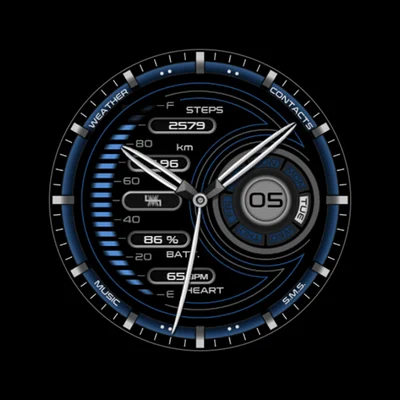
LMwatch crescent
LMWATCH- USK ab 0 JahrenAltersfreigabe
- PersonalisierungKategorie
- 20.10.2026Aktualisiert
- 1,30 €Preis
Verlinkt auf den offiziellen Google Play-Eintrag von com.watchfacestudio.lmwatch_h014_crescent. Zuletzt geprüft am 22.11.2026.
Über diese App
Automatische Übersetzung von Google. Originalsprache: Englisch (Vereinigte Staaten).
Hybrid-Zifferblatt mit 10 Hintergrund- und Dekorationsfarben.
LMwatchs Hybrid-Zifferblatt für Wear OS-Geräte.
(Galaxy Watch 4, 5, 6, 7, 8 Serie)
1. 8 voreingestellte App-Verknüpfungen und 4 anpassbare App-Verknüpfungen.
– Die Position der Verknüpfungen entnehmen Sie bitte den beigefügten Bildern.
2. 10 Hintergrundfarben x 10 Dekorationsfarben.
Installationshinweise
1. Wenn Sie die App von Ihrem Smartphone installieren, stellen Sie sicher, dass die Uhr ausgewählt ist, bevor Sie auf die Schaltfläche „Bezahlen“ klicken. Klicken Sie auf das kleine weiße Dreieck rechts neben der Schaltfläche „Bezahlen“, um die Uhr auszuwählen.
2. Sollte die App im Playstore inkompatibel sein, installieren Sie sie
über einen Webbrowser auf Ihrem Smartphone oder PC.
Klicken Sie im Store auf „Auf einem anderen Gerät installieren“ und wählen Sie „Uhr“ aus, um das Zifferblatt auf Ihrer Uhr zu installieren.
3. Sie können LMwatch auch in der Playstore-App der Uhr suchen und direkt auf Ihrer Uhr installieren.
Weitere Watchfaces gibt es auf Instagram:
www.instagram.com/lmwatch_watchface/
Bei Problemen mit dem Watchface oder für Vorschläge kontaktieren Sie uns bitte: bitterwine1996@gmail.com
Originaltext anzeigen
LMwatch's hybrid watchface for wear OS devices.
(Galaxy watch 4, 5, 6, 7, 8 series)
1. 8 preset app shortcuts and 4 customizable app shortcuts.
- Please refer to attached pictures for the shortcut location.
2. 10 background colors X 10 decoration colors.
Installation notes
1. If you install it from your phone, make sure the watch is selected before pressing the payment button. Click on the small white triangle symbol next to the right of the payment button to select the watch.
2. If the app appears to be incompatible in the Playstore, install it
using a web browser on your phone or PC.
After entering the store, click the Install to another device button, and select watch to install watchface on your watch.
3. You can also search for LMwatch in the watch's Playstore app and install it directly on your watch.
There are more watchfaces on instagram
: www.instagram.com/lmwatch_watchface/
If there is a problem with the watch face or have any suggestions,
please contact us.
: bitterwine1996@gmail.com
Datensicherheit
Was LMWATCH bei Google Play zu den Daten angibt, die diese App erfasst und weitergibt.
- Keine Daten werden mit Drittunternehmen oder -organisationen geteiltWeitere Informationen dazu, wie Entwickler Angaben zur Weitergabe von Daten machen
- Keine Daten erhobenWeitere Informationen dazu, wie Entwickler Angaben zur Datenerhebung machen
Neue Funktionen
20.10.2026
LMwatch crescent
Kontakt zum Entwickler
- Websiteinstagram.com
- E-Mailbitterwine1996@gmail.com
- Datenschutzerklärungsites.google.com
- Adresse동수원로145번길 73 301동 802호 (권선동, 수원아이파크시티아파트) 권선구, 수원시, 경기도 16664 South Korea
Informationen
- Angeboten von
- LMWATCH
- Kategorie
- Personalisierung
- Aktualisiert
- 20.10.2026
- Veröffentlicht
- 04.03.2023
- Altersfreigabe
- USK ab 0 Jahren
- Preis
- 1,30 €
- Paketname
- com.watchfacestudio.lmwatch_h014_crescent