MIMIX MX Pointer K1 Watchface
MIMIX- USK ab 0 JahrenAltersfreigabe
- PersonalisierungKategorie
- 31.10.2024Aktualisiert
- 1,09 €Preis
Verlinkt auf den offiziellen Google Play-Eintrag von com.watchfacestudio.mimix_mx_digi_pointer_k1. Zuletzt geprüft am 24.11.2026.
Über diese App
Automatische Übersetzung von Google. Originalsprache: Englisch (Vereinigte Staaten).
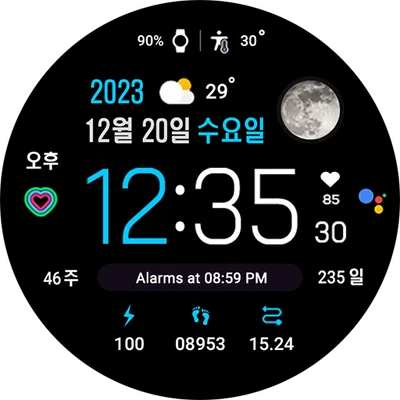
Fortschrittliches Zifferblatt, das Smartwatches mit Wear 2.0 und höher unterstützt.
Schlichtes und sportliches digitales Zifferblatt
Dies ist ein nur koreanisches Zifferblatt.
*Wie installiert man
Bezahlung und Installation der Play Store App auf dem Smartphone (auf den rechten Pfeil tippen und die Smartwatch installieren)
> Die Verbindung zwischen der Uhr und dem Mobiltelefon muss überprüft werden
Finden Sie installierte Watchfaces
1. Halten Sie das Zifferblatt gedrückt > 2. Klicken Sie auf die Schaltfläche „Dekorieren“ > 3. Klicken Sie ganz rechts auf „Zifferblatt hinzufügen“ > Bestätigen Sie das gekaufte Zifferblatt
*Aufgelöst, um die Anzeige zu installieren
Kopieren Sie die Play-Store-Adresse des Zifferblatts (klicken Sie auf die drei Punkte neben der Lupe in der oberen rechten Ecke des Play-Stores > Teilen).
Gehen Sie zu Samsung Internet und klicken Sie auf „Auf einem anderen Gerät installieren“ (wählen Sie Uhr 4).
* Um alle Funktionen nutzen zu können, ist eine Einwilligung zur Nutzung des Sensors erforderlich.
*Wenn die Play Store-App als inkompatibel angezeigt wird, installieren Sie sie bitte zusätzlich zur App auf Ihrem Telefon über einen Webbrowser auf Ihrem PC/Laptop.
*Unterstützt Wear OS-Geräte.
Komplikations-App für den Akku Ihres Mobiltelefons
Nachdem Sie die zusätzliche App über den unten stehenden Link auf Ihrer Uhr und Ihrem Smartphone installiert haben, stellen Sie die Komplikation ein.
Suchen Sie nach der App „Phone Battery Complication“ und installieren Sie sie.
https://play.google.com/store/apps/details?id=com.weartools.phonebattcomp
Alle Credits gehen an den ursprünglichen App-Ersteller.
amoledwatchfaces – https://play.google.com/store/apps/dev?id=5591589606735981545
So richten Sie „Anpassen“ ein
1. Halten Sie das Zifferblatt gedrückt > 2. Klicken Sie auf die Schaltfläche „Dekorieren“ > 3. Tippen Sie auf jeden Komplikationsbereich, um die entsprechenden Informationen festzulegen > 4. Klicken Sie auf „OK“.
Für Neuigkeiten zu neuen Zifferblättern besuchen Sie bitte den untenstehenden Link
https://play.google.com/store/apps/dev?id=5105465284863988309
Bei Fragen zur App kontaktieren Sie uns bitte unter der untenstehenden E-Mail.
mimixjh@gmail.com
Originaltext anzeigen
Simple & Sporty Digital Watchface
This is a Korean-only watch face.
*How to install
Payment and installation of the Play Store app on the smartphone (touch the right arrow and install the smart watch)
> Need to check the connection between watch device and mobile phone
Find installed watchfaces
1. Press and hold the watch face > 2. Click the Decorate button > 3. Click ‘Add watch face’ on the last right > Confirm the purchased watch face
*Resolved to be installed display
Copy the play store address of the watch face (click the three dots next to the magnifying glass in the upper right corner of the play store > share)
Go to Samsung Internet and click 'Install on another device' (select watch 4)
* In order to use all functions, consent to use the sensor is required.
*If the Play Store app is shown as incompatible, please install it using a web web browser on your PC/laptop in addition to the app on your phone.
*Supports Wear OS devices.
Mobile phone battery complication app
After installing the additional app from the link below to your watch and smartphone, set the complication.
Search for the 'Phone Battery Complication' app and install it.
https://play.google.com/store/apps/details?id=com.weartools.phonebattcomp
All credits go to original app creator.
amoledwatchfaces - https://play.google.com/store/apps/dev?id=5591589606735981545
How to set up Customize
1. Press and hold the watch face > 2. Click the Decorate button > 3. Tap each complication area to set the corresponding information > 4. Click OK
For new watch face news, please visit the link below
https://play.google.com/store/apps/dev?id=5105465284863988309
For inquiries about the app, please contact us at the email below.
mimixjh@gmail.com
Datensicherheit
Was MIMIX bei Google Play zu den Daten angibt, die diese App erfasst und weitergibt.
- Keine Daten werden mit Drittunternehmen oder -organisationen geteiltWeitere Informationen dazu, wie Entwickler Angaben zur Weitergabe von Daten machen
- Keine Daten erhobenWeitere Informationen dazu, wie Entwickler Angaben zur Datenerhebung machen
Kontakt zum Entwickler
- E-Mailmimixjh@gmail.com
- Datenschutzerklärungblog.naver.com
- Adresse팔거천동로34길 11-14 101호 북구, 대구광역시 41427 South Korea
Informationen
- Angeboten von
- MIMIX
- Kategorie
- Personalisierung
- Aktualisiert
- 31.10.2024
- Veröffentlicht
- 01.06.2023
- Altersfreigabe
- USK ab 0 Jahren
- Preis
- 1,09 €
- Paketname
- com.watchfacestudio.mimix_mx_digi_pointer_k1
Ähnliche Apps
-
 NTV555 - Black Digital Mod
Personalisierung
-
 JW348 jwstudio
Personalisierung
-
 NW124한글: Digital watch face
Personalisierung
-
 Grid Watch Face
Personalisierung
-
 [KNA009] DARK VIEW
Kunst & Design
-
 Watch face CNW0031
Personalisierung
-
 MIMIX Digital WP05 Watchface
Personalisierung
-
 VOT Watch 027
Personalisierung
-
 MIMIX MX Pointer G2 Watchface
Personalisierung
-
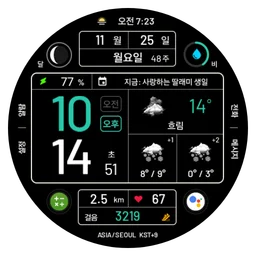 NW076 한글: Digital watch face
Personalisierung
-
 SHL Charting Time Watch Face
Effizienz
-
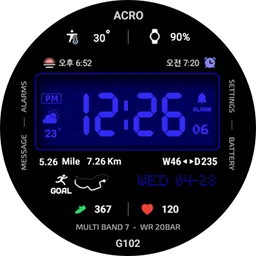 ACRO Genix G102 Digital watch
Personalisierung