Moon Master PRO
WatchBase- USK ab 0 JahrenAltersfreigabe
- PersonalisierungKategorie
- 28.10.2026Aktualisiert
- 1,99 €Preis
Verlinkt auf den offiziellen Google Play-Eintrag von wb.moon.master. Zuletzt geprüft am 13.11.2026.
Über diese App
Automatische Übersetzung von Google. Originalsprache: Englisch (Vereinigte Staaten).
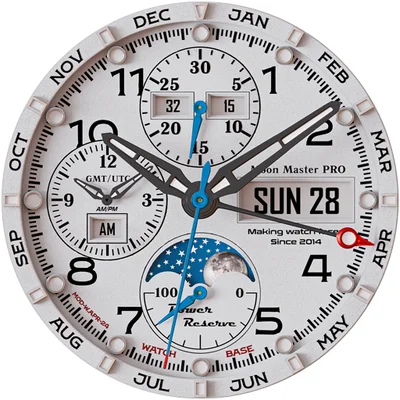
Ein klassischer Look mit wunderschönen Mondphasen und GMT-Uhr!
Erstaunlicher klassischer Look, GROSSE Mondphasen + FOTO-Mondphasen, GMT-Uhr und superrealistisches und detailliertes Design!
Ein unverzichtbares analoges Zifferblatt für Wear OS-Enthusiasten.
HINWEIS: Bitte lesen Sie den Abschnitt „Anleitung“ und „Installation“ und schauen Sie sich die Bilder an!!!
ⓘ Eigenschaften:
- Klassisches Design.
- Mondphasen.
- GROSSE Mondphasen.
- Foto-Mondphasen.
- Tag, Datum, Monat.
- Batterieanzeige.
- GMT-Uhr.
- 30 Sekunden. Indikator.
- 6 verschiedene Farbthemen.
- SUPER realistisch!
- Mondphasenanzeige.
- Immer sichtbar.
ⓘ So geht's:
- Um den GROSSEN Mondphasenbildschirm zu öffnen, tippen Sie einmal auf den Bildschirm, tippen Sie noch einmal, um ein Foto der Mondphase anzuzeigen, und tippen Sie noch einmal, um den GROSSEN Mondphasenbildschirm zu schließen.
- Um Ihr Zifferblatt anzupassen, berühren und halten Sie den Bildschirm und tippen Sie dann auf Anpassen.
Verpassen Sie nicht unsere realistischsten Zifferblätter:
Militärisches ZULU Tactical – https://play.google.com/store/apps/details?id=wb.military.zulu
Tourbillon Aquamarin – https://play.google.com/store/apps/details?id=wb.tourbillon.aquamarine
LUNA BENEDICTA – https://play.google.com/store/apps/details?id=wb.luna.benedicta
Harmony GT Premium – https://play.google.com/store/apps/details?id=wb.harmony.gt
Classic GMT-Präsident – https://play.google.com/store/apps/details?id=wb.classic.gmt
VOYAGER WorldTimer – https://play.google.com/store/apps/details?id=wb.voyager.automatic
Analoger Master – https://play.google.com/store/apps/details?id=wb.analog.master
ⓘ Installation
So installieren Sie: https://watchbase.store/static/ai/
Nach der Installation: https://watchbase.store/static/ai/ai.html
* Das Luna Benedicta-Zifferblatt wird unter „Installation“ und „Nach der Installation“ angezeigt. Der gleiche Installationsprozess gilt für alle unsere Zifferblätter.
Sollten bei der Installation des Zifferblatts Probleme auftreten, beachten Sie bitte, dass wir keinen Einfluss auf den Installationsprozess oder andere Google Play/Watch-Prozesse haben. Das häufigste Problem, mit dem Menschen konfrontiert sind, besteht darin, dass sie das Zifferblatt nach dem Kauf und der Installation nicht sehen/finden können.
Um das Zifferblatt nach der Installation anzuwenden, berühren und halten Sie auf dem Hauptbildschirm (Ihrem aktuellen Zifferblatt) die Wischtaste nach links, um danach zu suchen. Wenn Sie es nicht sehen können, tippen Sie am Ende auf das „+“-Zeichen (fügen Sie ein Zifferblatt hinzu) und finden Sie dort unser Zifferblatt.
Wir verwenden eine Begleit-App für das Telefon, um den Installationsprozess zu vereinfachen. Wenn Sie unser Zifferblatt kaufen, tippen Sie auf die Schaltfläche „Installieren“ (in der Telefon-App). Sie müssen Ihre Uhr überprüfen. Es erscheint ein Bildschirm mit dem Zifferblatt. Tippen Sie erneut auf „Installieren“ und warten Sie, bis die Installation abgeschlossen ist. Wenn Sie das Zifferblatt bereits gekauft haben und Sie dennoch aufgefordert werden, es auf der Uhr noch einmal zu kaufen, müssen Sie sich keine Sorgen machen, dass Ihnen nicht eine doppelte Gebühr berechnet wird. Dies ist ein häufiges Synchronisierungsproblem. Warten Sie einfach ein wenig oder versuchen Sie, Ihre Uhr neu zu starten.
Eine andere Lösung zur Installation des Zifferblatts besteht darin, zu versuchen, es über einen Browser zu installieren, der mit Ihrem Konto angemeldet ist (Google Play-Konto, das Sie auf der Uhr verwenden).
ⓘ Hinweis: Sollten während der Installation Probleme auftreten, lesen Sie bitte unsere umfassende Anleitung oder wenden Sie sich an unser Support-Team. Wir sind hier, um sicherzustellen, dass Ihr Erlebnis mit unseren Zifferblättern reibungslos und angenehm ist.
ⓘ 30-Sekunden-Anzeige (oberes Hilfszifferblatt):
- Die 30-Sekunden-Hilfszifferblattanzeige zählt 30-Sekunden-Intervalle (dreht sich zweimal pro Minute) mit zusätzlicher digitaler Links-/Rechtszählung für 0-30/30-60 Sekunden.
ⓘ Mondphasen:
* Die Mondphasenanzeige bietet eine ungefähre visuelle Darstellung der aktuellen Mondphase und passt sich nicht an die Position der Hemisphäre an.
Treten Sie WatchBase bei.
Facebook-Gruppe (Gruppe „Allgemeine Zifferblätter“):
https://www.facebook.com/groups/1170256566402887/
Facebook Seite:
https://www.facebook.com/WatchBase
Instagram:
https://www.instagram.com/watch.base/
ABONNIEREN Sie unseren YouTube-Kanal:
https://www.youtube.com/c/WATCHBASE?sub_confirmation=1
https://www.youtube.com/c/WATCHBASE
Originaltext anzeigen
Amazing classic look, BIG Moon phases + PHOTO moon phases, GMT clock and super realistic and detailed design!
A must-have analog watch face for Wear OS enthusiasts.
NOTE: Please read the how to section and installation section and check out the images !!!
ⓘ Features:
- Classic design.
- Moon phases.
- BIG Moon phases.
- Photo moon phases.
- Day, Date, Month.
- Battery Indicator.
- GMT Clock.
- 30 Sec. indicator.
- 6 different color themes.
- SUPER Realistic!
- Moon-phase indicator.
- Always On Display.
ⓘ How to:
- To open the BIG Moon phase screen, tap once on the screen, tap once again to reveal photo of the Moon phase, tap once more to close the BIG Moon phases screen.
- To customize your watch face, touch and hold on the screen, then tap on customize.
Don't miss out our top REALISTIC watch faces:
Milirary ZULU Tactical - https://play.google.com/store/apps/details?id=wb.military.zulu
Tourbillon Aquamarine - https://play.google.com/store/apps/details?id=wb.tourbillon.aquamarine
LUNA BENEDICTA - https://play.google.com/store/apps/details?id=wb.luna.benedicta
Harmony GT Premium - https://play.google.com/store/apps/details?id=wb.harmony.gt
Classic GMT President - https://play.google.com/store/apps/details?id=wb.classic.gmt
VOYAGER WorldTimer - https://play.google.com/store/apps/details?id=wb.voyager.automatic
Analog Master - https://play.google.com/store/apps/details?id=wb.analog.master
ⓘ Installation
How to install: https://watchbase.store/static/ai/
After installation: https://watchbase.store/static/ai/ai.html
* Luna Benedicta watch face shown in "How to install" and "After installation". The same installation process is valid for all of our watch faces.
If you have any issues installing the watch face, please note that we have no control over the installation process or any other Google Play / Watch processes. The most common issue that people face is after they buy the watch face and install it, they can't see/find it.
In order to apply the watch face after you install it, touch and hold on the main screen (your current watch face) the swipe left to look for it. If you can't see it, tap on the " + " sign at the end (add a watch face) and find our watch face there.
We use a companion app for the phone to make the installation process easier. If you buy our watch face, tap on the install button (on the phone app) you must check your watch.. a screen will appear with the watch face.. tap install again and wait for the installation to finish. If you already bought the watch face and it still asks you to buy it again on the watch, don't worry you will not be charged twice. This is a common synchronization issue, just wait a little or try to restart your watch.
Another solution for installing the watch face is to try to install it from a browser, logged with your account (google play account that you use on the watch).
ⓘ Note: If you encounter any issues during installation, please refer to our comprehensive guide or contact our support team for assistance. We're here to ensure your experience with our watch faces is seamless and enjoyable.
ⓘ 30 seconds indicator (top subdial):
- The 30-second subdial indicator counts 30-second intervals (rotates twice per minute) with additional left/right digital counting for 0-30/30-60 seconds.
ⓘ Moon phases:
* The moon phase indicator provides an approximate visual representation of the current lunar phase, and does not adjust for hemisphere location.
JOIN WatchBase.
Facebook group (General watch faces group):
https://www.facebook.com/groups/1170256566402887/
Facebook page:
https://www.facebook.com/WatchBase
Instagram:
https://www.instagram.com/watch.base/
SUBSCRIBE to our YouTube channel:
https://www.youtube.com/c/WATCHBASE?sub_confirmation=1
https://www.youtube.com/c/WATCHBASE
Datensicherheit
Was WatchBase bei Google Play zu den Daten angibt, die diese App erfasst und weitergibt.
- Keine Daten werden mit Drittunternehmen oder -organisationen geteiltWeitere Informationen dazu, wie Entwickler Angaben zur Weitergabe von Daten machen
- Keine Daten erhobenWeitere Informationen dazu, wie Entwickler Angaben zur Datenerhebung machen
Kontakt zum Entwickler
- E-Mailsupport@belvek.com
- Datenschutzerklärungwatchbase.store
- Adresse6 Prof. Georgi Bradistilov str./blvd. 1700 Sofia Bulgaria
Informationen
- Angeboten von
- WatchBase
- Kategorie
- Personalisierung
- Aktualisiert
- 28.10.2026
- Veröffentlicht
- 17.04.2024
- Altersfreigabe
- USK ab 0 Jahren
- Preis
- 1,99 €
- Paketname
- wb.moon.master