Neon Shield Watch Face
Watcholate- USK ab 0 JahrenAltersfreigabe
- PersonalisierungKategorie
- 08.10.2026Aktualisiert
- KostenlosPreis
Verlinkt auf den offiziellen Google Play-Eintrag von com.watcholate.neonshield. Zuletzt geprüft am 13.11.2026.
Über diese App
Automatische Übersetzung von Google. Originalsprache: Englisch (Vereinigte Staaten).
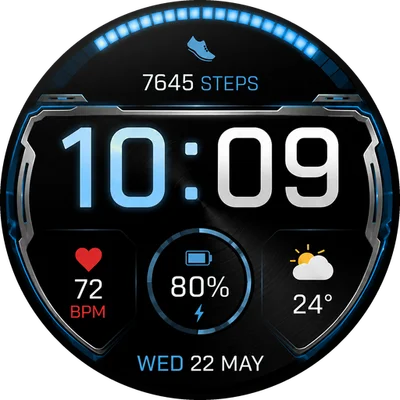
Neun LED-Farben, zwei davon gratis. Schritte, Herzfrequenz, Akkustand und Wetter auf einen Blick.
Neon Shield ist ein digitales Zifferblatt für Wear OS im Watch Face Format. Alles Wichtige auf einen Blick: Uhrzeit, zurückgelegte Strecke, Herzfrequenz, Akkustand und Wetter.
FUNKTIONEN UND ANZEIGE
- Stunde und Minute in breiten LED-Ziffern, Stunden in Akzentfarbe
- Schrittzähler mit beleuchtetem Fortschrittsbalken, der Ihr tägliches Schrittziel anzeigt
- Herzfrequenz in Schlägen pro Minute, Akkustand in Prozent mit Ladeanzeige, aktuelle Temperatur und Umgebungsbedingungen sowie Wochentag und Datum
- Fünf interaktive Felder: Tippen Sie auf eines, um die entsprechende App zu öffnen – Schritte, Herzfrequenz, Akku, Wetter oder Kalender
Always-on-Display: Das Zifferblatt zeigt weiterhin Uhrzeit, Wochentag und Datum an, blendet den Fortschrittsbalken aus und dimmt den Bildschirm, um den Akkuverbrauch zu minimieren.
NEUN FARBEN, ZWEI DAVON IHREN
Dieses Zifferblatt enthält die Farben Blau und Türkis. Es handelt sich um vollständige, dauerhafte Farben – keine Testversion – die nicht ablaufen.
Grün, Orange, Lila, Rot, Weiß, Gelb und Regenbogen bilden das Premium-Set. Mit einer einmaligen Zahlung von 1,49 US-Dollar schalten Sie alle sieben Farben sofort frei. Es gibt kein Abonnement und keine wiederkehrenden Kosten.
Eine noch nicht freigeschaltete Premium-Farbe wird beim Tragen mit einem Vorhängeschloss angezeigt. So sehen Sie immer genau, was Sie kaufen, bevor Sie sich entscheiden.
SO schalten Sie die Premium-Farben frei
1. Installieren Sie die kostenlose Watcholate Watch Faces App von Google Play auf Ihrem Smartphone.
2. Installieren Sie die Watcholate Watch Faces App auch auf Ihrer Smartwatch. Die Smartphone-App öffnet automatisch die richtige Seite auf Ihrer Smartwatch.
3. Tätigen Sie den einmaligen Kauf in der Smartphone-App. Die Zahlung erfolgt über Google Play.
4. Die Premium-Farben werden in der Regel innerhalb von ein bis zwei Sekunden auf Ihrer Smartwatch freigeschaltet. Sie müssen das Zifferblatt nicht neu laden.
Der Kauf ist mit Ihrem Google-Konto verknüpft und gilt daher für jede Smartwatch, mit der Sie sich anmelden. Er wird auch nach dem Zurücksetzen Ihrer Smartwatch oder dem Kauf einer neuen Smartwatch wiederhergestellt.
VORAUSSETZUNGEN
- Eine Wear OS Smartwatch mit Wear OS 5 oder höher (Android 14 oder höher)
- Die Watcholate Watch Faces App auf Ihrem Smartphone und Ihrer Smartwatch für die Premium-Farben. Für die Farben Blau und Türkis benötigen Sie lediglich dieses Zifferblatt.
DATENSCHUTZ
Dieses Zifferblatt enthält keinen Code und sammelt keine Daten. Schrittzahl, Herzfrequenz, Akkustand und Wetter werden von Wear OS selbst erfasst und angezeigt und verlassen Ihre Smartwatch nicht. Auch die Watcholate Watch Faces App sammelt keine Daten. Beide enthalten keinen Tracking-Code. Die vollständigen Datenschutzbestimmungen finden Sie unter: https://watcholate.com/privacy
Von Watcholate
Originaltext anzeigen
Neon Shield is a digital watch face for Wear OS, built in Watch Face Format. Everything a glance should answer is on one screen: the time, how far you have walked, your heart rate, how much battery is left, and what the weather is doing.
FEATURES AND DISPLAY
- Hour and minute in a wide LED-style numeral, hours in the accent colour
- Step count with a lit progress arc that follows your own daily step goal
- Heart rate in beats per minute, battery percentage with a charging indicator, current temperature and conditions, and the day and date
- Five tappable panels: touch one and the matching app opens - steps, heart rate, battery, weather, or your calendar
- Always-on display: the face keeps the time and the day and date, drops the arc, and dims to a small fraction of the screen, so it costs your battery very little
NINE COLOURS, TWO OF THEM YOURS
Blue and Teal are included with this watch face. They are complete, permanent colours - not a trial, and they do not expire.
Green, Orange, Purple, Red, White, Yellow and Rainbow are the premium set. One single payment of US$1.49 unlocks all seven at once. There is no subscription and nothing recurring.
A premium colour you have not unlocked shows a padlock when you wear it, so you always see exactly what you would be buying before you decide.
HOW TO UNLOCK THE PREMIUM COLOURS
1. Install the free Watcholate Watch Faces app on your phone from Google Play.
2. Install the Watcholate Watch Faces app on your watch as well - the phone app will offer to open the right page on your watch for you.
3. Make the one-time purchase in the phone app. Payment is handled by Google Play.
4. The premium colours unlock on your watch, usually within a second or two. You do not need to reload the face.
The purchase is tied to your Google account, so it applies to every watch you sign in to, and it comes back if you reset your watch or buy a new one.
REQUIREMENTS
- A Wear OS watch running Wear OS 5 or later (Android 14 or later)
- The Watcholate Watch Faces app, on both your phone and your watch, for the premium colours. Blue and Teal need nothing but this watch face.
PRIVACY
This watch face contains no code and collects nothing. Step count, heart rate, battery and weather are read and drawn by Wear OS itself and never leave your watch. The Watcholate Watch Faces app collects nothing either. There is no tracking code in either one. Full policy: https://watcholate.com/privacy
From Watcholate.
Datensicherheit
Was Watcholate bei Google Play zu den Daten angibt, die diese App erfasst und weitergibt.
- Keine Daten werden mit Drittunternehmen oder -organisationen geteiltWeitere Informationen dazu, wie Entwickler Angaben zur Weitergabe von Daten machen
- Keine Daten erhobenWeitere Informationen dazu, wie Entwickler Angaben zur Datenerhebung machen
Neue Funktionen
Version 1.0.7 · 08.10.2026
Fixed: a four- or five-digit step count no longer loses its last digit.
Kontakt zum Entwickler
- Websitewatcholate.com
- E-Mailsupport@watcholate.com
- Datenschutzerklärungwatcholate.com
- Adresse14727 Cypress Creek Landing Houston, TX 77068-2527 United States
Informationen
- Angeboten von
- Watcholate
- Kategorie
- Personalisierung
- Version
- 1.0.7
- Aktualisiert
- 08.10.2026
- Veröffentlicht
- 05.09.2026
- Altersfreigabe
- USK ab 0 Jahren
- Preis
- Kostenlos
- Paketname
- com.watcholate.neonshield